

GEO Solution: Automate Perplexity with Scrapeless Browser to Build a Content Analytics Engine

Expert Network Defense Engineer
Turn AI answers into business advantage – Scrapeless GEO solutions help you capture, analyze, and act.
Generative Engine Optimization (GEO) is rapidly becoming one of the most disruptive trends in the search industry. As large language models (LLMs) reshape the way users discover information, evaluate brands, and make decisions, businesses must not only be visible in traditional search results but also ensure their content appears in AI-generated answers.
However, this is just one facet of a larger paradigm shift—we are entering an era of “ubiquitous search”: users no longer rely solely on Google, but obtain answers across various AI engines, assistant applications, and vertical models. In this competitive landscape, Perplexity is rising at an astonishing pace, providing not only instant answers but also real-time source citations, data pipelines, and in-depth analysis, making it an essential tool for content research, market insights, and competitor monitoring.
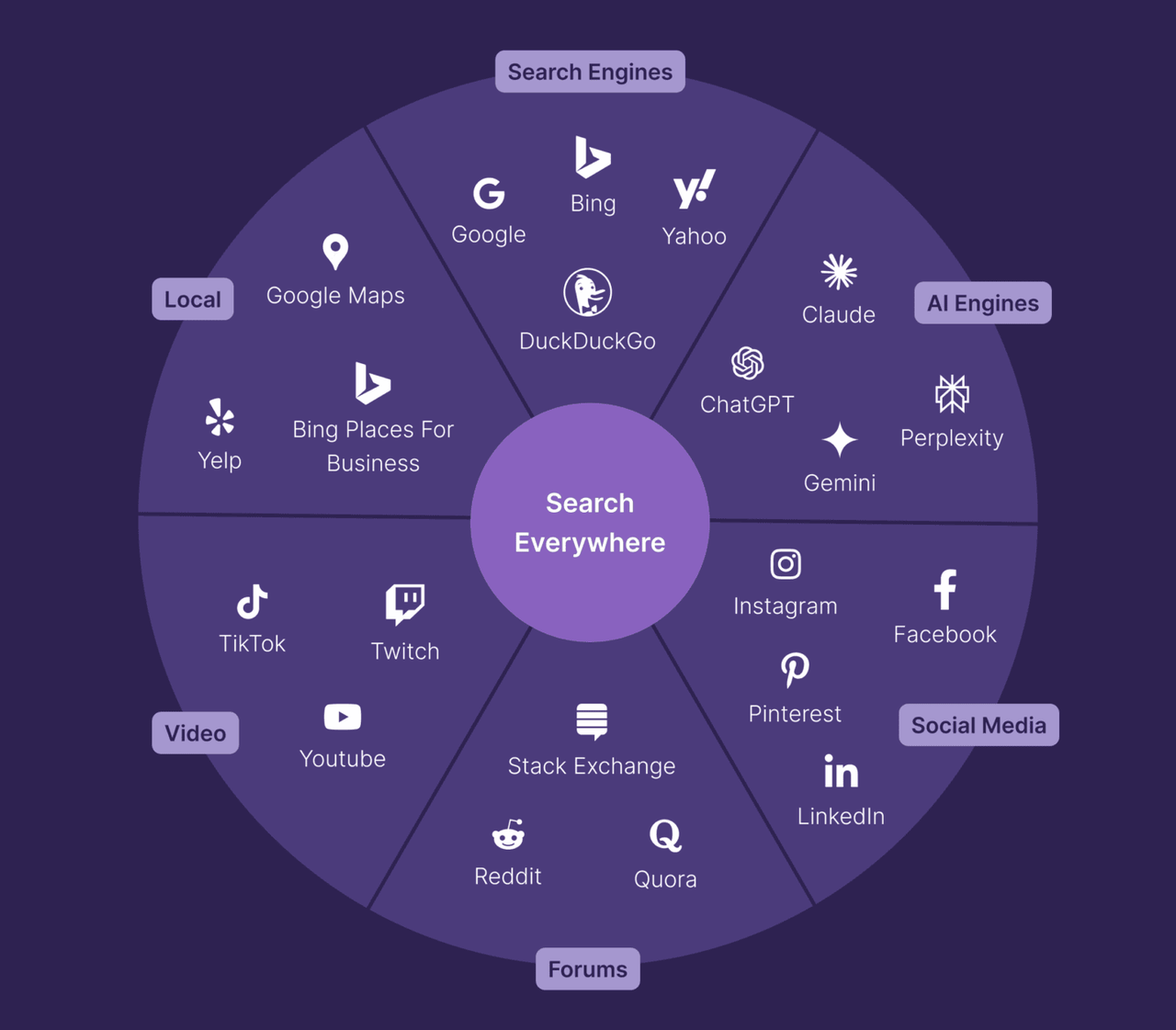
Source: Backlinko
But the real challenge is this: if you’re still manually asking Perplexity one question at a time, your efficiency simply can’t keep up with the pace of the industry. Therefore, this article will reveal how to use Scrapeless Browser to automate Perplexity, transforming it into a continuously operating, scalable content analysis engine that gives you an edge in the era of generative search.
1. What is GEO and Why Does It Matter?
Generative Engine Optimization (GEO) is the practice of creating and optimizing content so that it appears in AI-generated answers on platforms like Google AI Overviews, AI Mode, ChatGPT, and Perplexity.
In the past, success meant ranking high on search engine result pages (SERPs). Looking forward, the concept of being "at the top" may no longer exist. Instead, you need to become the preferred recommendation—the solution AI tools choose to present in their answers.
Data speaks for itself:
- Perplexity’s user base has been growing exponentially, surpassing 100 million monthly active users this year, already reaching 1/20th the scale of Google.
- Google AI Overviews now appear in billions of searches per month—covering at least 13% of all search results.
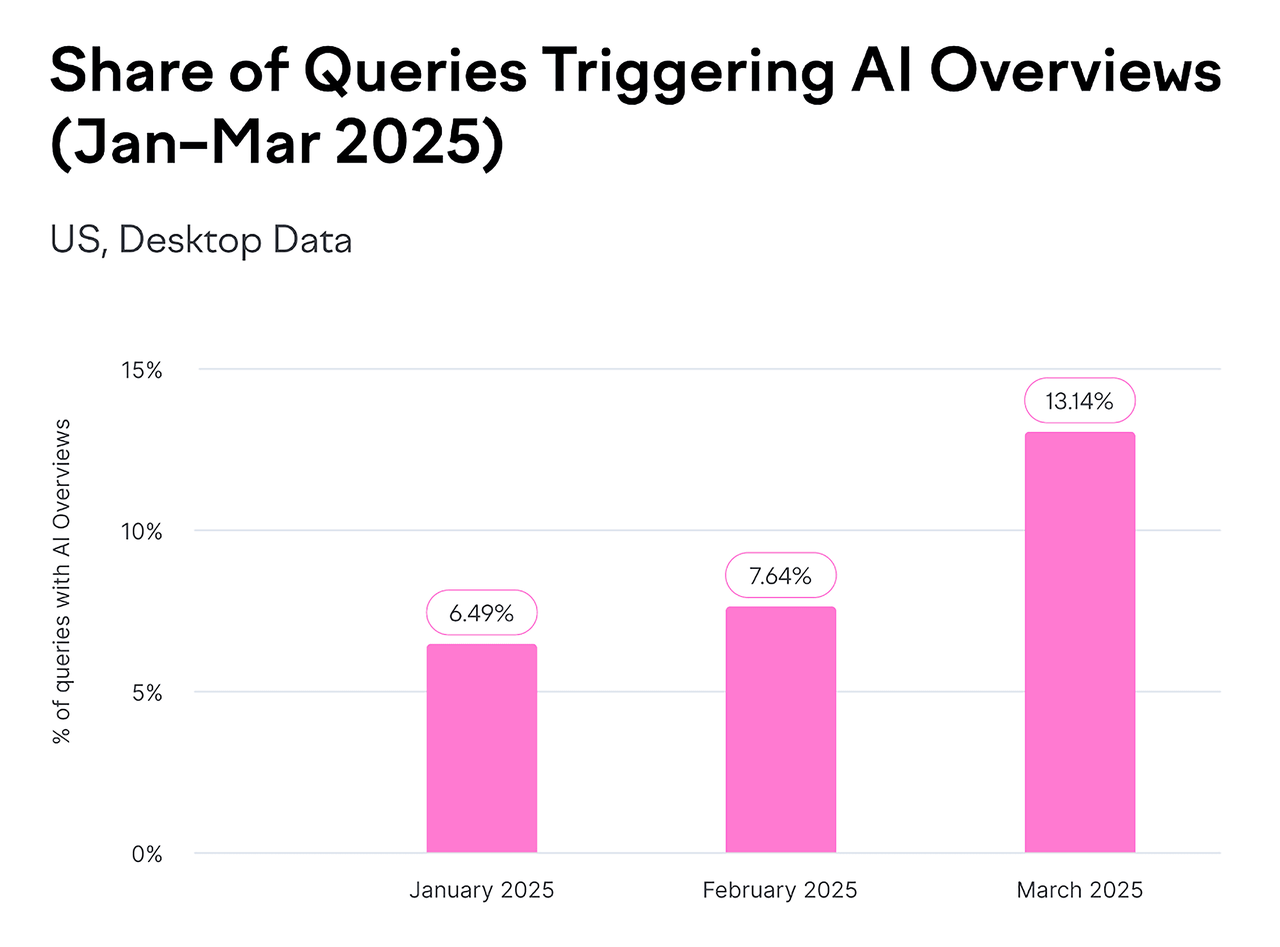
Source: Backlinko
The core goals of GEO optimization are no longer limited to driving clicks but focus on three key metrics:
- Brand Visibility: Increase the likelihood of your brand appearing in AI-generated answers.
- Source Authority: Ensure your domain, content, or data is selected by models as a trusted reference.
- Narrative Consistency & Positive Positioning: Make AI describe your brand professionally, accurately, and positively.
This means the traditional SEO logic of "keyword ranking" is gradually giving way to AI’s source citation mechanism.
Brands must evolve from being "discoverable" to being "trusted, cited, and actively recommended."
2. Why Pay Attention to Perplexity?
Perplexity AI has approximately 15 million monthly active users, with growth rates continuing to rise. Especially in North America and Europe, it has almost become synonymous with “AI search.”
For content strategy, SEO, and market analysis teams, Perplexity is no longer just an “AI search engine”—it has become a new “intelligent research terminal.”
You can use it to:
- Compare content differences across generative engine optimizations
- See which websites are commonly cited for the same keywords in different markets
- Quickly summarize competitors’ topic strategies
However, there are challenges:
👉 Perplexity currently only supports overseas registrations, making it inaccessible to most users in China.
👉 The free version does not provide full API access.
This creates a natural barrier for businesses or content teams: they cannot systematically collect and analyze data at scale.
3. Why Choose Scrapeless Automation?
Scrapeless Browser offers a smarter approach. It’s not just a simple crawler—it’s a real browser instance running in the cloud. You don’t need to open Chrome locally or worry about being detected as a bot. With just one line of Puppeteer code, you can interact with websites exactly like a human would.
For example, you can:
- Open
perplexity.ai - Automatically input questions
- Wait for results to generate
- Extract answer text and citation links
- Save the full page HTML, screenshots, WebSocket messages, and network requests
Unique Advantages of Scrapeless Browser
1. Enterprise-Level Anti-Detection Technology
Modern AI sites like Perplexity have strong anti-scraping protections:
- Cloudflare Turnstile verification
- Browser fingerprinting
- Behavior pattern analysis
- IP reputation checks
How Scrapeless handles it:
ts
const CONNECTION_OPTIONS = {
  proxyCountry: "US",           // Use a US IP
  sessionRecording: "true",     // Record session for debugging
  sessionTTL: "900",            // Keep session for 15 minutes
  sessionName: "perplexity-scraper"  // Persistent session
};- Automatically simulates real user behavior
- Randomized browser fingerprints
- Built-in CAPTCHA solver
- Proxy network covering 195 countries
2. Global Proxy Network
Perplexity answers vary by user location:
- 🇺🇸 US users see US local content
- 🇬🇧 UK users see UK perspective
- 🇯🇵 Japanese users see content in Japanese
Scrapeless solution:
ts
proxyCountry: "US"   // For US perspective
proxyCountry: "GB" // For European market insights- Run multiple queries from different countries for global comparison
- Supports 195 country proxy nodes and custom browser proxies
3. Session Persistence + Recording Playback
When developing and debugging automation scripts, common pain points are:
- ❌ Not knowing where errors occur
- ❌ Unable to reproduce issues
- ❌ Repeatedly running scripts to debug
Scrapeless Live Session:
ts
sessionRecording: "true" // Enable session recording- Real-time viewing: Watch the automation process in the browser live
- Playback: Replay the entire process if it fails
4. Zero Maintenance Cost
Traditional solutions require:
- Local Puppeteer: Maintain servers, update Chrome, handle crashes
- Self-hosted cloud browser: DevOps team, monitoring, scaling
- Monthly cost: 2 engineers × 20 hours ≈ $2,000
Scrapeless Browser:
- ✅ Cloud-hosted, auto-updated
- ✅ 99.9% uptime guarantee
- ✅ Automatic scaling, no concurrency worries
- 💰 Cost: pay-as-you-go, approx. $50–200/month
ROI comparison:
- Traditional: $2,000 (labor) + $200 (server) = $2,200/month
- Scrapeless: $100/month
- Savings: 95%!
5. Ready-to-Use Integration
Scrapeless Browser is fully compatible with mainstream automation libraries:
- ✅ Puppeteer (Node.js)
- ✅ Playwright (Node.js / Python)
- ✅ CDP (Chrome DevTools Protocol)
Migration cost is near zero:
ts
import puppeteer from "puppeteer-core"

// Original: Local browser
// const browser = await puppeteer.launch();

// Migrate to Scrapeless Browser, just change one line:
const browser = await puppeteer.connect({
  browserWSEndpoint: "wss://browser.scrapeless.com/api/v2/browser?token=YOUR_API_TOKEN"
})

const page = await browser.newPage()
await page.goto("https://google.com")
4. Scrapeless Browser + Puppeteer: Detailed Guide to Automatically Fetching Perplexity.ai Answers
Next, we’ll use Scrapeless Browser + Puppeteer to automatically visit Perplexity.ai, submit questions, and capture answers, page links, HTML snippets, and network data.
No local Chrome installation is needed—ready to use out of the box, with support for proxies, session recording, and WebSocket monitoring.
Step 1: Configure Scrapeless Connection
ts
const sleep = (ms) => new Promise(r => setTimeout(r, ms));

const tokenValue = process.env.SCRAPELESS_TOKEN || "YOUR_API_TOKEN";

const CONNECTION_OPTIONS = {
  proxyCountry: "ANY",                // Automatically select the fastest node
  sessionRecording: "true",           // Enable session recording
  sessionTTL: "900",                  // Keep session for 15 minutes
  sessionName: "perplexity-scraper",  // Session name
};

function buildConnectionURL(token) {
  const q = new URLSearchParams({ token, ...CONNECTION_OPTIONS });
  return `wss://browser.scrapeless.com/api/v2/browser?${q.toString()}`;
}- Log in to Scrapeless to obtain your API Token.

💡 Key Points:
proxyCountry: "ANY"automatically selects the fastest node to reduce latency.- If you need content from a specific region, e.g., US news, change to
"US". sessionRecordingallows playback in the console for easier debugging.
Step 2: Connect to the Cloud Browser
ts
const connectionURL = buildConnectionURL(tokenValue);
const browser = await puppeteer.connect({
  browserWSEndpoint: connectionURL,
  defaultViewport: { width: 1280, height: 900 }
});

const page = await browser.newPage();
page.setDefaultNavigationTimeout(120000);
page.setDefaultTimeout(120000);

try {
  await page.setUserAgent(
    "Mozilla/5.0 (Macintosh; Intel Mac OS X 10_15_7) AppleWebKit/537.36 (KHTML, like Gecko) Chrome/140.0.0.0 Safari/537.36"
  );
} catch (e) {}
💡 Notes:
puppeteer-coreis lightweight; it connects to a remote browser without downloading local Chromium.- Setting a desktop User-Agent helps avoid basic anti-scraping detection.
- Using
try-catchis defensive programming to improve script robustness.
Step 3: Monitor All Network Activity (Core!)
This is a critical part of the script! It captures two types of data simultaneously:
3.1 Listen to HTTP Responses
ts
const rawResponses = [];

page.on("response", async (res) => {
  try {
    const url = res.url();
    const status = res.status();
    const resourceType = res.request ? res.request().resourceType() : "unknown";
    const headers = res.headers ? res.headers() : {};
    let snippet = "";
    try {
      const t = await res.text();
      snippet = typeof t === "string" ? t.slice(0, 20000) : String(t).slice(0, 20000);
    } catch (e) {
      snippet = "<read-failed>";
    }
    rawResponses.push({ url, status, resourceType, headers, snippet });
  } catch (e) {}
});
Captured Content:
- API calls, images, CSS, JS, etc.
- Response status codes and HTTP headers
- First 20KB of response content (avoids memory overflow while sufficient for JSON analysis)
3.2 Listen to WebSocket Frames (Key!)
ts
const wsFrames = [];

try {
  const cdp = await page.target().createCDPSession();
  await cdp.send("Network.enable");

  cdp.on("Network.webSocketFrameReceived", (evt) => {
    try {
      const { response } = evt;
      wsFrames.push({
        timestamp: evt.timestamp,
        opcode: response.opcode,
        payload: response.payloadData ?
          response.payloadData.slice(0, 20000) :
          response.payloadData,
      });
    } catch (e) {}
  });
} catch (e) {
  // If CDP is unavailable, skip silently
}
Why WebSocket is Important:
Perplexity answers are not returned in one shot—they are streamed via WebSocket:
User inputs question
   ↓
Perplexity backend generates answer
   ↓
Answer pushed character-by-character via WebSocket
   ↓
Displayed in frontend in real time (like ChatGPT typing effect)
Benefits of Capturing WebSocket:
- Observe the full answer generation process
- Analyze Perplexity’s AI reasoning chain
- Debug incomplete or partial answers
Step 4: Visit Perplexity Website
ts
await page.goto("https://www.perplexity.ai/", {
  waitUntil: "domcontentloaded",
  timeout: 90000
});
Step 5: Smartly Input Your Question
ts
const prompt = "Hi ChatGPT, Do you know what Scrapeless is?";
await findAndType(page, prompt);
Step 6: Wait for Rendering and Capture Results
ts
await page.waitForTimeout(1500);

const results = await page.evaluate(() => {
  const pick = el => el ? (el.innerText || "").trim() : "";
  const out = { answers: [], links: [], rawHtmlSnippet: "" };
  const selectors = ['[data-testid*="answer"]','[data-testid*="result"]','.Answer','article','main'];

  selectors.forEach(s => {
    const el = document.querySelector(s);
    if(el){ const t = pick(el); if(t.length>30) out.answers.push({ selector:s,text:t.slice(0,20000) }); }
  });

  const main = document.querySelector("main") || document.body;
  out.links = Array.from(main.querySelectorAll("a")).slice(0,200).map(a=>({ href:a.href, text:(a.innerText||"").trim() }));
  out.rawHtmlSnippet = main.innerHTML.slice(0,200000);
  return out;
});
💡 Notes:
- Capture answers, links, and HTML snippets
- Keep important data and truncate overly long content for performance
Step 7: Save Outputs
ts
await fs.writeFile("./perplexity_results.json", JSON.stringify(results, null, 2));
await fs.writeFile("./perplexity_page.html", await page.content());
await fs.writeFile("./perplexity_raw_responses.json", JSON.stringify(rawResponses, null, 2));
await fs.writeFile("./perplexity_ws_frames.json", JSON.stringify(wsFrames, null, 2));
await page.screenshot({ path: "./perplexity_screenshot.png", fullPage: true });- JSON, HTML, WebSocket frames, and screenshots are all saved
- Facilitates later analysis, debugging, or reproduction
Step 8: Close the Browser
ts
await browser.close();
console.log("done — outputs saved");
5.Complete Code Example
// perplexity_clean.mjs
import puppeteer from "puppeteer-core";
import fs from "fs/promises";

const sleep = (ms) => new Promise((r) => setTimeout(r, ms));

// 把 token 放在环境变量 SCRAPELESS_TOKEN,或在下面直接填入硬编码值
const tokenValue = process.env.SCRAPELESS_TOKEN || "sk_0YEQhMuYK0izhydNSFlPZ59NMgFYk300X15oW69QY6yJxMtmo5Ewq8YwOvXT0JaW";

const CONNECTION_OPTIONS = {
  proxyCountry: "ANY",
  sessionRecording: "true",
  sessionTTL: "900",
  sessionName: "perplexity-scraper",
};

function buildConnectionURL(token) {
  const q = new URLSearchParams({ token, ...CONNECTION_OPTIONS });
  return `wss://browser.scrapeless.com/api/v2/browser?${q.toString()}`;
}

async function findAndType(page, prompt) {
  // A set of common input selectors (silently attempted, without printing "Not Found")
  const selectors = [
    'textarea[placeholder*="Ask"]',
    'textarea[placeholder*="Ask anything"]',
    'input[placeholder*="Ask"]',
    '[contenteditable="true"]',
    'div[role="textbox"]',
    'div[role="combobox"]',
    'textarea',
    'input[type="search"]',
    '[aria-label*="Ask"]',
  ];

  for (const sel of selectors) {
    try {
      const el = await page.$(sel);
      if (!el) continue;
      // ensure visible
      const visible = await el.boundingBox();
      if (!visible) continue;

      // decide contenteditable vs normal input
      const isContentEditable = await page.evaluate((s) => {
        const e = document.querySelector(s);
        if (!e) return false;
        if (e.isContentEditable) return true;
        const role = e.getAttribute && e.getAttribute("role");
        if (role && (role.includes("textbox") || role.includes("combobox"))) return true;
        return false;
      }, sel);

      if (isContentEditable) {
        await page.focus(sel);
        // Use JavaScript to write and trigger input elements whenever possible to ensure compatibility with React/rich text editors
        await page.evaluate((s, t) => {
          const el = document.querySelector(s);
          if (!el) return;
          // If the element is editable, write and dispatch the input
          try {
            el.focus();
            if (document.execCommand) {
              // insertText Supported in some browsers
              document.execCommand("selectAll", false);
              document.execCommand("insertText", false, t);
            } else {
              // fallback
              el.innerText = t;
            }
          } catch (e) {
            el.innerText = t;
          }
          el.dispatchEvent(new Event("input", { bubbles: true }));
        }, sel, prompt);
        await page.keyboard.press("Enter");
        return true;
      } else {
        // Normal input/textarea
        try {
          await el.click({ clickCount: 1 });
        } catch (e) {}
        await page.focus(sel);
        // Clear and enter
        await page.evaluate((s) => {
          const e = document.querySelector(s);
          if (!e) return;
          if ("value" in e) e.value = "";
        }, sel);
        await page.type(sel, prompt, { delay: 25 });
        await page.keyboard.press("Enter");
        return true;
      }
    } catch (e) {
      // Ignore and move on to the next selector (keep quiet)
    }
  }

  // Back: Ensure the page has focus before using the keyboard to type (quiet, no warning printed)
  try {
    await page.mouse.click(640, 200).catch(() => {});
    await sleep(200);
    await page.keyboard.type(prompt, { delay: 25 });
    await page.keyboard.press("Enter");
    return true;
  } catch (e) {
    return false;
  }
}

(async () => {
  const connectionURL = buildConnectionURL(tokenValue);
  const browser = await puppeteer.connect({
    browserWSEndpoint: connectionURL,
    defaultViewport: { width: 1280, height: 900 },
  });

  const page = await browser.newPage();

  page.setDefaultNavigationTimeout(120000);
  page.setDefaultTimeout(120000);

  // Use a common Desktop User Agent (this reduces the chance of being detected by simple protections)
  try {
    await page.setUserAgent(
      "Mozilla/5.0 (Macintosh; Intel Mac OS X 10_15_7) AppleWebKit/537.36 (KHTML, like Gecko) Chrome/140.0.0.0 Safari/537.36"
    );
  } catch (e) {}

  // Preparing to collect data (brief)
  const rawResponses = [];
  const wsFrames = [];

  page.on("response", async (res) => {
    try {
      const url = res.url();
      const status = res.status();
      const resourceType = res.request ? res.request().resourceType() : "unknown";
      const headers = res.headers ? res.headers() : {};
      let snippet = "";
      try {
        const t = await res.text();
        snippet = typeof t === "string" ? t.slice(0, 20000) : String(t).slice(0, 20000);
      } catch (e) {
        snippet = "<read-failed>";
      }
      rawResponses.push({ url, status, resourceType, headers, snippet });
    } catch (e) {}
  });

  // Try opening a CDP session to capture websocket frames (skip silently if this is not possible)
  try {
    const cdp = await page.target().createCDPSession();
    await cdp.send("Network.enable");
    cdp.on("Network.webSocketFrameReceived", (evt) => {
      try {
        const { response } = evt;
        wsFrames.push({
          timestamp: evt.timestamp,
          opcode: response.opcode,
          payload: response.payloadData ? response.payloadData.slice(0, 20000) : response.payloadData,
        });
      } catch (e) {}
    });
  } catch (e) {}

  // Navigate to Perplexity (using only domcontentloaded)
  await page.goto("https://www.perplexity.ai/", { waitUntil: "domcontentloaded", timeout: 90000 });

  // Enter and submit your question (silent attempt)
  const prompt = "Hi ChatGPT, Do you know what Scrapeless is?";
  await findAndType(page, prompt);

  // The answer is rendered on the page for a short time
  await sleep(1500);

  // Waiting for longer text to appear on the page (but without generating additional logs)
  const start = Date.now();
  while (Date.now() - start < 20000) {
    const ok = await page.evaluate(() => {
      const main = document.querySelector("main") || document.body;
      if (!main) return false;
      return Array.from(main.querySelectorAll("*")).some((el) => (el.innerText || "").trim().length > 80);
    });
    if (ok) break;
    await sleep(500);
  }

  // Extracting answers / links / HTML fragments
  const results = await page.evaluate(() => {
    const pick = (el) => (el ? (el.innerText || "").trim() : "");
    const out = { answers: [], links: [], rawHtmlSnippet: "" };

    const selectors = [
      '[data-testid*="answer"]',
      '[data-testid*="result"]',
      '.Answer',
      '.answer',
      '.result',
      'article',
      'main',
    ];

    for (const s of selectors) {
      const el = document.querySelector(s);
      if (el) {
        const t = pick(el);
        if (t.length > 30) out.answers.push({ selector: s, text: t.slice(0, 20000) });
      }
    }

    if (out.answers.length === 0) {
      const main = document.querySelector("main") || document.body;
      const blocks = Array.from(main.querySelectorAll("article, section, div, p")).slice(0, 8);
      for (const b of blocks) {
        const t = pick(b);
        if (t.length > 30) out.answers.push({ selector: b.tagName, text: t.slice(0, 20000) });
      }
    }

    const main = document.querySelector("main") || document.body;
    out.links = Array.from(main.querySelectorAll("a")).slice(0, 200).map(a => ({ href: a.href, text: (a.innerText || "").trim() }));
    out.rawHtmlSnippet = (main && main.innerHTML) ? main.innerHTML.slice(0, 200000) : "";

    return out;
  });

  // Save outputs (silently)
  try {
    const pageHtml = await page.content();
    await page.screenshot({ path: "./perplexity_screenshot.png", fullPage: true }).catch(() => {});
    await fs.writeFile("./perplexity_results.json", JSON.stringify({ results, extractedAt: new Date().toISOString() }, null, 2));
    await fs.writeFile("./perplexity_page.html", pageHtml);
    await fs.writeFile("./perplexity_raw_responses.json", JSON.stringify(rawResponses, null, 2));
    await fs.writeFile("./perplexity_ws_frames.json", JSON.stringify(wsFrames, null, 2));
  } catch (e) {}

  await browser.close();
  // Print only the necessary brief information.
  console.log("done — outputs: perplexity_results.json, perplexity_page.html, perplexity_raw_responses.json, perplexity_ws_frames.json, perplexity_screenshot.png");
  process.exit(0);
})().catch(async (err) => {
  try { await fs.writeFile("./perplexity_error.txt", String(err)); } catch (e) {}
  console.error("error — see perplexity_error.txt");
  process.exit(1);
});
6. How to Use These JSON Data for GEO? (Practical Guide)
The answers field returned by Perplexity essentially tells you:
how the AI ultimately generates its answers—who it cited, which pages it trusted, which viewpoints were reinforced, and which content was ignored.
In other words:
Understanding answers = understanding why your brand is cited by AI, why it isn’t, and how to improve citation rates.
The Core Task of GEO: Controlling AI’s “Citation Mechanism”
Traditional SEO aims to rank pages higher on search results.
GEO aims to make models more likely to cite your content when generating answers.
Perplexity’s answers JSON lets you see:
- Which URLs the AI cited (
source_urls) - The influence weight of each URL on the answer
- Summaries of the content used by the AI
- How the AI structures the final answer (paragraphs / bullets)
These correspond directly to areas you can optimize for GEO.
① Identify Citation Sources: Are You on the Model’s “Trusted List”?
Example:
json
"title": "Web Scraper PRO - Scrapeless",
"url": "https://scrapeless.com"
If your website is missing:
- Your content is not in AI’s trusted domain list
- Your structured information is insufficient
- It doesn’t meet AI’s scraping/understanding requirements
GEO Action: Build content structures that AI prefers to crawl
- FAQ blocks (highly cited by AI)
- Data-driven content (more trusted by models)
- Reproducible content (short sentences, clear facts)
② See Which Content/Competitors Are Most Cited → Infer AI Preferences
Example:
json
"title": "Scrapeless AI Browser Review 2024: A Game-Changer or Just Another Tool?",
"url": "https://www.futuretools.io"
Observations:
- AI favors long textual knowledge bases (e.g., Wiki)
- Prefers real discussions (Reddit, Trustpilot)
- Prefers structured reviews (TomsGuide)
GEO Action: Mimic these sites’ content structure and knowledge density
③ Analyze AI-Extracted Content Summaries → Produce Matching Content
Example in answers:
json
"Scrapeless is a web scraping toolkit and API that uses AI to..."The model relies on these reproducible facts to answer questions.
GEO Action: Produce the same type of clear, quantifiable, and reproducible content
- Use short sentences
- Keep clear subject-verb-object
- Make content directly quotable
- Use list structures
④ Examine AI’s Answer Structure → Create “Directly Citable” Content
AI’s final answers usually include:
- Steps
- Summaries
- Comparison tables
- Pros / Cons
- Troubleshooting steps
GEO Action: Pre-build content in the same structure.
Because: AI prefers content that is structurally similar, logically clear, and easy to extract
⑤ Check if AI Misunderstands Your Brand Positioning → Optimize Narrative Consistency
Look at whether answers in answers JSON deviate from your brand positioning.
GEO Action:
- Create authoritative About pages
- Provide verified brand descriptions
- Maintain consistent brand narratives across multiple sites
- Publish credible backlinks
❗ This is the essence of GEO:
It’s not about ranking. It’s about getting AI to include you in its trusted knowledge base.
Perplexity’s answers JSON is your most direct data source:
- See AI’s citation logic
- Check competitors’ content structures
- Understand the format AI prefers
- Verify brand positioning
- Identify ignored content
In the era of generative search, the traditional SEO mindset of “ranking first” is being redefined: the real competition is no longer about who ranks higher in search results, but whose content is actively cited, trusted, and presented by AI in its answers.
Scrapeless enables enterprises to gain a complete insight into AI’s decision-making logic for the first time and turn it into actionable GEO strategies.
Core Advantages of Scrapeless Browser:
- Global Proxy Network: Coverage in 195 countries to access data from multiple market perspectives
- Real Behavior Simulation: Automatically handles anti-scraping measures, browser fingerprints, and CAPTCHAs
- Comprehensive Data Capture: Capture answer text, citation links, HTML, and more
- Cloud-Based & Zero Maintenance: No local browsers or servers required, saving up to 95% of costs
- Complete GEO Toolkit: AI citation monitoring, structured content analysis, and global data scraping
Generative Engine Optimization (GEO) is no longer optional—it is now a core pillar of content competitiveness. If you want to gain a strategic advantage in the AI search era, Scrapeless’ full GEO solution is the best starting point.
Scrapeless not only provides browser automation and GEO data automation but also advanced tools and strategies to fully control the AI citation mechanism. Contact us to unlock the complete GEO data solution!
Looking ahead, Scrapeless will continue to focus on cloud browser technology, providing enterprises with high-performance data extraction, automated workflows, and AI Agent infrastructure support, serving industries including finance, retail, e-commerce, marketing, and more. Scrapeless delivers customized, scenario-based solutions to help businesses stay ahead in the era of intelligent data.
Disclaimer
The web scraping, data extraction, automation scripts, and related technical content published by this account are for technical exchange, learning, and research purposes only, aiming to share industry experience and development techniques.
Legal Use
All examples and methods are intended for readers to use legally and compliantly. Please ensure compliance with website terms of service, privacy policies, and local laws.
Risk Responsibility
This account is not responsible for any direct or indirect losses resulting from readers using the techniques or methods described, including but not limited to account bans, data loss, or legal liabilities.
Content Accuracy
We strive to ensure content accuracy and timeliness but cannot guarantee that all examples will work in every environment.
Copyright & Citations
Content comes from publicly available sources or the author’s original work. Please cite the source when reproducing, and do not use for illegal or commercial purposes. This account is not responsible for the consequences of using third-party data or websites.
At Scrapeless, we only access publicly available data while strictly complying with applicable laws, regulations, and website privacy policies. The content in this blog is for demonstration purposes only and does not involve any illegal or infringing activities. We make no guarantees and disclaim all liability for the use of information from this blog or third-party links. Before engaging in any scraping activities, consult your legal advisor and review the target website's terms of service or obtain the necessary permissions.





