🎯 A customizable, anti-detection cloud browser powered by self-developed Chromium designed for web crawlers and AI Agents.👉Try Now
Back to Blog

How to Perform Bulk Queries on ChatGPT for GEO: An Automated Solution Using Scrapeless Cloud Browser

Michael Lee
Michael Lee

Expert Network Defense Engineer

14-Nov-2025
Get the Edge in Every Region!

Turn AI answers into business advantage – Scrapeless GEO solutions help you capture, analyze, and act.

Introduction

Since the beginning of this year, many companies’ SEO strategies have undergone fundamental changes.
More and more users no longer open Google search when they need information. Instead, they ask about products, services, and brands directly in ChatGPT, Claude, or Gemini.

This means: Your visibility in ChatGPT is becoming the new benchmark for brand competitiveness.

The problem is — ChatGPT has no "ranking" feature and no "keyword analysis tool."

You simply cannot know:

  • Is my brand appearing in ChatGPT’s answers?
  • Does ChatGPT recommend my competitors?
  • Are the answers different across countries or languages?

To address these questions, the first step is:

👉 Perform bulk queries of ChatGPT responses to gather data and extract actionable insights


What is GEO?

Generative Engine Optimization (GEO) is the practice of creating and optimizing content so that it appears in AI-generated answers on platforms like Google AI Overviews, AI Mode, ChatGPT, and Perplexity.

In the past, success meant ranking high on search engine result pages (SERPs). Looking forward, there may no longer even be a concept of “top ranking.” Instead, you need to be the preferred recommendation—the solution AI tools actively choose to present in their answers.

The core objectives of GEO optimization are no longer limited to clicks but focus on three key metrics:

  • Brand visibility: Increase the probability of your brand appearing in AI-generated answers.
  • Source authority: Ensure your domain, content, or data is selected as a trusted reference by the AI.
  • Narrative consistency and positive positioning: Make sure AI describes your brand professionally, accurately, and positively.

This means traditional SEO logic based on "keyword ranking" is gradually giving way to AI source citation mechanisms.

Brands must evolve from being "searchable" to being trusted, cited, and actively recommended.


Why Automate Bulk ChatGPT Queries?

From a marketing and SEO perspective, ChatGPT has become a new channel for content discovery and exposure.

However, there are three main pain points:

  1. No visibility into brand coverage
    Companies cannot know if their products are being indexed, mentioned, or recommended by ChatGPT. Without data, it’s impossible to create targeted content optimization or distribution strategies.

  2. Lack of GEO-level insights
    ChatGPT’s answers vary depending on region, language, and even time zone. A product recommended for a U.S. user might not appear for a Japanese user. For international strategies, companies must understand these differences.

  3. Traditional SEO tools cannot provide this data
    Existing SEO tools (e.g., Ahrefs, Semrush) have limited capabilities and cannot fully track ChatGPT responses. This means a new approach is required to monitor brand exposure within AI search channels.

Therefore, the core goal of bulk querying ChatGPT is to systematically collect, analyze, and optimize your brand’s presence in ChatGPT responses. This helps companies:

  • Identify high-potential questions already mentioned by ChatGPT;
  • Discover content gaps that have not been covered;
  • Develop targeted GEO optimization strategies.

Why Choose Scrapeless Cloud Browser?

Many might consider directly calling the OpenAI API to perform bulk queries.

However, in practice, the API approach has obvious limitations:

  • Results are easily influenced by historical preferences and context, making them less objective.
  • It’s difficult to quickly switch IPs to simulate access from different geographic locations.
  • Bulk querying costs are very high (charged by token, becoming expensive at scale).

This is exactly where Scrapeless Cloud Browser comes in.


What is Scrapeless Browser?

Scrapeless Browser is a cloud browser designed for data extraction and automation tasks. It allows you to access ChatGPT from the cloud in a way that closely mimics real user behavior, delivering more accurate and comprehensive results.

Compared with traditional API calls, Scrapeless Cloud Browser stands out in several ways:

  • No account preference interference
    All queries are executed in isolated, login-free browser environments, ensuring objective and reliable results.

  • Multi-region GEO simulation
    Built-in residential proxies from 195+ countries, static ISPs, and unlimited IPs allow easy simulation of users from different locations.

  • High concurrency and low cost
    Supports 1,000+ concurrent instances per task, billed by time, with costs far lower than traditional APIs.

  • Native compatibility with mainstream frameworks
    Migrate existing Puppeteer or Playwright projects with a single line of code—no extra adaptation required.

  • Smart anti-detection and visual debugging
    Built-in handling for Cloudflare, reCAPTCHA, and other protections, with support for Live View debugging and session recording.

Recommended reading: How to Bypass Cloudflare Protection and Turnstile Using Scrapeless | Complete Guide

In short, Scrapeless Cloud Browser enables you to perform bulk “user-perspective ChatGPT queries” efficiently, cost-effectively, and accurately—without registering hundreds of ChatGPT accounts—and automatically extract structured results.


Example: Batch querying ChatGPT using Scrapeless Browser

Scrapeless Browser is a cloud-based headless browser service compatible with major automation frameworks such as Puppeteer and Playwright. Using it, you don't need to maintain a local browser, proxy, or node; you can start it with just one line of connection code.


1. Install Dependencies

bash Copy
npm install puppeteer-core @scrapeless-ai/sdk node-fetch

2. Configure Scrapeless Browser and Connect

ts Copy
import puppeteer, { Browser, Page } from 'puppeteer-core';
import { Scrapeless, PuppeteerLaunchOptions } from '@scrapeless-ai/sdk';

const scrapeless = new Scrapeless();

async function connectBrowser(): Promise<Browser> {
  const options: PuppeteerLaunchOptions = {
    session_name: 'Batch ChatGPT',
    session_ttl: 600,
    fingerprint: {
      platform: 'macOS',
      localization: { timezone: 'America/New_York' },
      args: { '--window-size': '1920,1080' },
    },
  };

  const { browserWSEndpoint } = await scrapeless.browser.createSession(options);
  const browser = await puppeteer.connect({ browserWSEndpoint, defaultViewport: null });
  return browser;
}

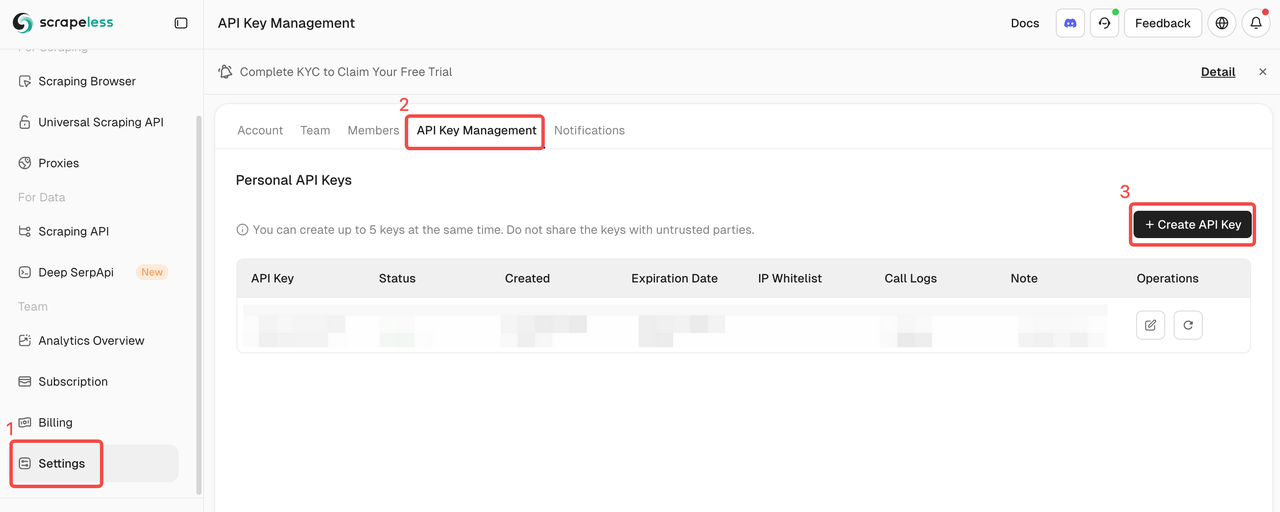
Obtain your Scrapeless Browser API Key by logging into the Scrapeless Dashboard.

Obtain your Scrapeless Browser API Key

💡 Scrapeless Advantage #1: Zero Configuration Environment

  • No need to maintain browser instances locally, minimal resource consumption, and easy scaling.
  • Existing Puppeteer projects can migrate to Scrapeless with minimal changes.
  • Easily simulate real user environments, improving stealth and success rates.
  • Ideal for large-scale automation tasks, such as bulk ChatGPT queries.

3. Automate ChatGPT Access and Input Prompts

ts Copy
async function queryChatGPT(browser: Browser, prompt: string): Promise<string> {
  const page = await browser.newPage();
  await page.goto('https://chatgpt.com/');

  const inputSelector = '[placeholder="Ask anything"]';
  await page.waitForSelector(inputSelector, { visible: true });
  await page.type(inputSelector, prompt);
  await page.keyboard.press('Enter');

  await page.waitForSelector('[data-message-author-role="assistant"]');
  const result = await page.evaluate(() => {
    const messages = document.querySelectorAll('[data-message-author-role="assistant"]');
    return messages[messages.length - 1]?.textContent || '';
  });

  await page.close();
  return result;
}

💡 Scrapeless Advantage #2: Real Web Environment

  • Automates interactions on real web pages (typing, clicking, submitting).
  • Captures dynamically rendered content.
  • Results match what a real user would see when visiting ChatGPT.

4.1 Extract ChatGPT Text Responses

ts Copy
let gptAnswer: string;
gptAnswer = await waitForChatGPTResponse(page);

4.2 Extract Image Cards

ts Copy
let gptImageCards: ChatgptResponse['image_cards'] = [];
// Use selectors to extract images and build { url, position }
ts Copy
const gptRecommendProducts: ChatgptResponse['products'] = [];
// Use selectors to extract product links, titles, and images

4.4 Extract Citations/References

ts Copy
let gptCitations: ChatgptResponse['citations'] = [];
// Use footnote buttons to extract citation links, icons, titles, and descriptions
ts Copy
let gptLinksAttached: ChatgptResponse['links_attached'] = [];
// Use Markdown link selectors to extract links and their text

4.6 Extract Page Body HTML

ts Copy
const body = await page.evaluate(() => document.body.innerHTML);
const cleanBody = body
  .replace(/<script[^>]*>[\s\S]*?<\/script>/gi, '')
  .replace(/<style[^>]*>[\s\S]*?<\/style>/gi, '')
  .replace(/\s+/g, ' ')
  .trim();

Here, HTML cleaning is performed: <script>, <style>, <svg>, <img> tags are removed to obtain a clean body content.

💡 Scrapeless Advantage #3: Multi-Type Result Extraction

  • A single request can fetch multiple types of structured information, without the need for multiple calls or combining different tools.
  • Not only text, but also images, products, citations, attached links, and clean HTML can be extracted.
  • Each type of data is packaged as an array of objects (e.g., ChatgptResponse['products']), making it easy to output directly to JSON, CSV, or Webhooks, and supporting downstream automation workflows.

5. Independent Browser Contexts & Sessions

5.1 Session-Level Isolation

ts Copy
const { session_name, task_id, ... } = input;

browser = await this.connectToBrowser({
  session_name,              // Each task can specify a different session name
  session_ttl: 600,          // Session lifetime
  session_recording,
  proxy_url,
  // ...
});

Using the session_name parameter, different queries can use separate browser sessions, achieving session-level isolation.

5.2 Browser Instance Isolation

ts Copy
async solver(input: QueryChatgptRequest, ...): Promise<BaseOutput> {
  let browser: Browser;
  
  try {
    // Create a new browser connection for each call
    browser = await this.connectToBrowser(...);
    const page = await browser.newPage();
    // Execute tasks
  } finally {
    // Close browser after the task is done
    await page.close();
    await browser.close();
  }
}

Each solver() call will:

  • Create an independent browser instance
  • Automatically clean up after use in the finally block

5.3 Proxy Isolation

ts Copy
const { proxy_url } = input;

browser = await this.connectToBrowser({
  proxy_url,  // Each task can use a different proxy
  // ...
});

const proxy_country = /-country_([A-Z]{2,3})/.exec(proxy_url)?.[1] || 'ANY';

Different tasks can achieve network-level isolation using different proxy_url values.

5.4 Fingerprint Isolation

ts Copy
fingerprint: {
  platform: 'macOS',
  localization: {
    timezone: 'America/New_York',
  },
  args: {
    '--window-size': '1920,1080',
  },
}

💡 Scrapeless Advantage #4: Stability Through Isolation

  • Each ChatGPT query runs in an independent browser session, preventing interference
  • Avoids contamination of Cookies, LocalStorage, or fingerprints, improving request success rates
  • Can run a large number of queries simultaneously on the same machine without Puppeteer instance conflicts
  • Enhances stability and reliability in high-concurrency scenarios

6. Global GEO Switching: Obtain Responses from Different Regions

6.1 Globalized Geolocation

ts Copy
const proxy_country = /-country_([A-Z]{2,3})/.exec(proxy_url)?.[1] || 'ANY';

6.2 Fingerprint Localization

ts Copy
fingerprint: {
  platform: 'macOS',
  localization: {
    timezone: 'America/New_York',
  },
  args: {
    '--window-size': '1920,1080',
  },
}

💡 Scrapeless Advantage #5: 195+ Country Nodes, Automatic Proxy & Localized Simulation

  • Automatic Country IP Selection
    The country code is parsed from proxy_url (e.g., -country_US, -country_JP), and Scrapeless automatically routes requests to residential IPs in the corresponding region.

  • No Proxy Pool Maintenance Required
    Backend automatically manages global nodes, so users don’t need to set up or update proxy lists themselves.

  • Localized Browser Environment
    fingerprint.localization.timezone can set the timezone. Combined with independent sessions, it simulates the target region’s environment, affecting content display and region-specific search results.

  • Obtain Real Localized Results
    Returned ChatgptResponse.country_code indicates the request’s geographic location, making international SEO, brand monitoring, or region-sensitive content analysis more accurate.

7. Extract Results and Support Multiple Output Formats

7.1 Structured Output

In the startChat method, the captured data is encapsulated into a unified ChatgptResponse object:

ts Copy
resolve({
  prompt,
  success: true,
  answer: answerResponse,           // text / html / raw
  country_code: proxy_country,      // geo info
  citations: gptCitations,
  links_attached: gptLinksAttached,
  image_cards: gptImageCards,
  products: gptRecommendProducts,
  url: _url,
});

💡 Scrapeless Advantage #6: Structured Output

  • Each query task generates a structured object.
  • Includes fields such as text answer, attached links, images, recommended products, citations, country code, and URL.
  • Structured objects can be directly used for automation, without additional parsing.

7.2 Multiple Output Methods

In the solver method, results can be pushed or returned:

  1. Webhook Output
ts Copy
this.pushToMessage(payload, webhook);
  1. Function Return
ts Copy
return createResponse(JSON.stringify(payload), payload.url);

💡 Scrapeless Advantage #7: Native Support for Data Pipeline Integration

  • Structured data can be pushed directly to external systems or automation tools (e.g., n8n, Zapier, Airtable).
  • No need to develop extra interfaces or manually process data, enabling real-time automation integration.
  • When connecting to in-house systems or databases, no additional parsing or conversion is required, supporting multiple data pipeline outputs.
  • Each query task result is a structured object, facilitating further analysis, statistics, or export to CSV/JSON.

Complete code

Copy
import puppeteer, { Browser, Page, Target } from 'puppeteer-core';
import fetch from 'node-fetch';
import { PuppeteerLaunchOptions, Scrapeless } from '@scrapeless-ai/sdk';
import { Logger } from '@nestjs/common';

export interface BaseInput {
  task_id: string;
  proxy_url: string;
  timeout: number;
}

export interface BaseOutput {
  url: string;
  data: number[];
  collection?: string;
  dataType?: string;
}

export interface QueryChatgptRequest extends BaseInput {
  prompt: string;
  webhook?: string;
  session_name?: string;
  web_search?: boolean;
  session_recording?: boolean;
  answer_type?: 'text' | 'html' | 'raw';
}

export interface ChatgptResponse {
  prompt: string;
  task_id?: string;
  duration?: number;
  answer?: string;
  url: string;
  success: boolean;
  country_code: string;
  error_reason?: string;
  links_attached?: Partial<{ position: number; text: string; url: string }>[];
  citations?: Partial<{ url: string; icon: string; title: string; description: string }>[];
  products?: Partial<{ url: string; title: string; image_urls: (string | null)[] }>[];
  image_cards?: Partial<{ position: number; url: string }>[];
}

interface StartChatParams extends QueryChatgptRequest {
  page: Page;
  browser: Browser;
}

export class ChatgptService {
  logger = new Logger(this.constructor.name);
  scrapeless = new Scrapeless();

  private timeoutMultiplier = 2;
  private defaultTimeout = 3 * 60 * 1000;
  private internalErrorSymbol = '[InternalError]:';

  async solver(input: QueryChatgptRequest, checkTimeout: () => boolean): Promise<BaseOutput> {
    const { session_name, task_id, webhook, session_recording, proxy_url } = input;

    let browser: Browser;

    const startTime = performance.now();
    const successful = false;

    const getTotalDuration = () => {
      const endTime = performance.now();
      const totalDuration = ((endTime - startTime) / 1000).toFixed(2);
      return totalDuration;
    };

    const handleChatResponse = (data: Partial<ChatgptResponse>) => {
      const payload = { ...data, task_id, duration: getTotalDuration() };
      return payload;
    };

    const createResponse = (data: string, url = 'https://chatgpt.com'): BaseOutput => {
      return {
        url: url,
        data: Array.from(Buffer.from(data)),
        dataType: 'json',
      };
    };

    try {
      browser = await this.connectToBrowser(
        {
          session_name,
          session_ttl: 600,
          session_recording,
          proxy_url,
          fingerprint: {
            platform: 'macOS',
            localization: {
              timezone: 'America/New_York',
            },
            args: {
              '--window-size': '1920,1080',
            },
          },
        },
        checkTimeout,
      );

      const page = await browser.newPage();

      await this.fakePageDate(page);

      const chatParams: StartChatParams = { ...input, page, browser };
      const results = await this.startChat(chatParams);
      const payload = handleChatResponse(results);
      this.pushToMessage(payload, webhook);
      return createResponse(JSON.stringify(payload), payload.url);
    } catch (error) {
      if (error.success) {
        const payload = handleChatResponse(error);
        this.pushToMessage(payload, webhook);
        return createResponse(JSON.stringify(payload), error.url);
      }
      if (error.error_reason) {
        const errorMessage = error.error_reason;
        const payload = handleChatResponse(error);
        this.pushToMessage(payload, webhook);
        this.logger.warn(`Processing failed: ${errorMessage}`);
        throw { message: !errorMessage.includes(this.internalErrorSymbol) ? errorMessage : '' };
      }
      const errorMessage = error.message || 'Unknown error';
      const payload = handleChatResponse({
        success: false,
        error_reason: errorMessage,
      });
      this.pushToMessage(payload, webhook);
      this.logger.warn(`Processing failed: ${errorMessage}`);
      throw error;
    } finally {
      const totalDuration = getTotalDuration();
      this.logger.log(
        `Processing ${successful ? 'successful' : 'completed'} | Total duration: ${totalDuration} seconds`,
      );
    }
  }

  async format(data: Uint8Array): Promise<QueryChatgptRequest> {
    if (!data) {
      throw new Error('No valid input data');
    }
    const input = JSON.parse(data.toString()) as QueryChatgptRequest;

    if (!input.prompt) {
      this.logger.error(`prompt is required`);
      throw new Error('prompt is required');
    }

    return {
      ...input,
      timeout: input.timeout || this.defaultTimeout,
      web_search: input.web_search ?? true,
      session_name: input.session_name || 'Chatgpt Answer',
      session_recording: input.session_recording || false,
      answer_type: input.answer_type || 'text',
    };
  }

  private startChat(params: StartChatParams): Promise<ChatgptResponse> {
    return new Promise(async (resolve, reject: (reason: ChatgptResponse) => void) => {
      const { prompt, answer_type, web_search, timeout, page, browser, proxy_url } = params;
      let action: string;
      let isAborted = false;
      let rawResponse: string;

      this.logger.debug((action = 'Connecting to Browser'));

      const proxy_country = /-country_([A-Z]{2,3})/.exec(proxy_url)?.[1] || 'ANY';
      const query = new URLSearchParams({ q: prompt });
      if (web_search) {
        query.set('hints', 'search');
      }
      const baseUrl = 'https://chatgpt.com';
      const _url = `${baseUrl}/?${query.toString()}`;

      function waitForChatGPTResponse(page: Page): Promise<string> {
        return new Promise((resolve, reject) => {
          let retryCount = 0;
          const CHECK_INTERVAL = 500; // Check once every 500ms

          const checkResponse = async () => {
            try {
              if (isAborted) {
                resolve('timeout');
                return;
              }
              const currentContent = await page.evaluate(() => {
                const assistantMessage = '[data-message-author-role="assistant"]';
                const $assistantMessages = document.querySelectorAll(assistantMessage);
                const lastMessage = $assistantMessages[$assistantMessages.length - 1];
                if (!lastMessage) return null;

                // When a copy button greater than one appears, it means that gpt's answer has been completed
                const $answerCopyButtons = document.querySelectorAll('button[data-testid="copy-turn-action-button"]');
                if ($answerCopyButtons.length > 1) {
                  return lastMessage.textContent || 'No content';
                } else {
                  return null;
                }
              });

              // If the content has not changed and is not empty
              if (currentContent) {
                retryCount++;
                // If the content is stable and not empty, the response is considered complete
                if (retryCount >= 3) {
                  // Content stable for 1.5 seconds
                  resolve(currentContent);
                  return;
                }
              }

              // Continue to check
              setTimeout(checkResponse, CHECK_INTERVAL);
            } catch (error) {
              reject(error);
            }
          };

          // Start checking
          checkResponse();
        });
      }

      async function receiveChatGPTStream() {
        const client = await page.createCDPSession();
        await client.send('Fetch.enable', {
          patterns: [
            {
              urlPattern: '*conversation',
              requestStage: 'Response',
            },
          ],
        });

        client.on('Fetch.requestPaused', async (event) => {
          const { requestId, request, responseHeaders } = event;
          const isSSE = responseHeaders?.some(
            (h) => h.name?.toLowerCase() === 'content-type' && h.value?.includes('text/event-stream'),
          );
          if (request.url.includes('/conversation') && isSSE) {
            try {
              const { body, base64Encoded } = await client.send('Fetch.getResponseBody', { requestId });
              rawResponse = base64Encoded ? Buffer.from(body, 'base64').toString('utf-8') : body;
            } catch (err) {
              console.warn('Failed to get see stream response', err.message);
            }
          }
          await client.send('Fetch.continueRequest', { requestId });
        });
      }

      function throwError(errorReason: string) {
        const error: ChatgptResponse = {
          prompt,
          success: false,
          country_code: proxy_country,
          error_reason: errorReason,
          url: _url,
        };
        reject(error);
      }

      const timeoutId = setTimeout(() => {
        isAborted = true;
        throwError(`Chat timeout after ${timeout}ms`);
      }, timeout);

      try {
        this.logger.debug((action = 'Register CDP to capture GPT stream data (raw_response)'));
        await receiveChatGPTStream();
        this.logger.debug((action = 'Navigating to chatgpt.com'));
        const navigateTimeout = 25_000 * this.timeoutMultiplier;
        try {
          await page.goto(_url, { timeout: navigateTimeout });
        } catch {
          throwError(`Navigate to chatgpt.com Timeout (${navigateTimeout}ms)`);
          return;
        }

        // Add URL change listener
        page.on('framenavigated', async (frame) => {
          if (frame !== page.mainFrame()) return;
          const url = frame.url();
          if (!url.startsWith('https://auth.openai.com')) return;
          isAborted = true;
          throwError(`Redirected to OpenAI login page when <<${_url}>> - ${action}`);
          return;
        });

        if (isAborted) return;
        await this.wait(50, 150);
        this.logger.debug((action = 'Make sure input exists'));
        const inputs = ['#prompt-textarea', '[placeholder="Ask anything"]'];
        try {
          await Promise.race(
            inputs.map(async (input) => {
              await page.waitForSelector(input, {
                timeout: 20_000 * this.timeoutMultiplier,
                visible: true,
              });
              return input;
            }),
          );
        } catch {
          throwError('The current region is unavailable or redirected to the login page');
          return;
        }

        if (isAborted) return;
        await this.wait(150, 250);
        this.logger.debug((action = 'Waiting for GPT Response'));
        let gptAnswer: string;
        try {
          gptAnswer = await waitForChatGPTResponse(page);
          this.logger.debug((action = 'GPT Response received'));
        } catch (error: any) {
          this.logger.error(`Failed to get response: ${error.message}`);
          throwError(`Get chatgpt response failed`);
          return;
        }

        if (isAborted) return;
        await this.wait(150, 250);
        this.logger.debug((action = 'Obtain chatgpt image cards'));
        const imageCardsSelector = 'div.no-scrollbar:has(button img) img';
        const imageCardsLightBoxSelector = 'div[data-testid="modal-image-gen-lightbox"] ol li img';
        const imageCardsLightBoxCloseSelector = 'div[data-testid="modal-image-gen-lightbox"] button';
        let gptImageCards: ChatgptResponse['image_cards'] = [];
        try {
          const firstImageCard = await page.$(imageCardsSelector);
          if (firstImageCard) {
            firstImageCard.click();
            await page.waitForSelector(imageCardsLightBoxSelector);
            gptImageCards = await page.$$eval(imageCardsLightBoxSelector, (elements) => {
              return elements.map((element, index) => {
                const url = element.getAttribute('src') || '';
                return { url, position: index + 1 };
              });
            });
            await page.waitForSelector(imageCardsLightBoxCloseSelector);
            await page.click(imageCardsLightBoxCloseSelector);
          } else {
            this.logger.debug((action = 'No Image Cards found'));
          }
        } catch (error: any) {
          this.logger.debug((action = `Obtain chatgpt image cards: ${error.toString()}`));
        }

        if (isAborted) return;
        await this.wait(300, 450);
        this.logger.debug((action = 'Obtain chatgpt recommend products'));
        const closeButtonSelector = `button[data-testid="close-button"]`;
        const recommendProductsSelector = 'div.markdown div.relative > div.flex.flex-row:has(img):not(a) > div img';
        const recommendProductDetailsSelector = `section[screen-anchor="top"] div[slot="content"]`;
        const detailLinkSelector = `${recommendProductDetailsSelector} span a`;
        const gptRecommendProducts: ChatgptResponse['products'] = [];
        try {
          const recommendProducts = await page.$$(recommendProductsSelector);
          if (recommendProducts.length) {
            let lastUrl = '';
            for (const [index] of recommendProducts.entries()) {
              // External link jump may be triggered
              let newPage: Page = null as unknown as Page;
              const targetCreatedHandler = async (target: Target) => {
                this.logger.debug((action = `Obtain chatgpt recommend products: ${target.type()}`));
                try {
                  if (target.type() === 'page') {
                    const pageTarget = await target.page();
                    const opener = await target.opener();
                    if (opener && (opener as any)?._targetId === (page.target() as any)?._targetId) {
                      newPage = pageTarget as Page;
                    }
                  }
                } catch (e) {}
              };
              browser.once('targetcreated', targetCreatedHandler);

              // Click on the recommended item
              await page.evaluate(
                (selector, index) => {
                  const currentProduct = document.querySelectorAll(selector)?.[index];
                  (currentProduct as HTMLElement)?.click();
                },
                recommendProductsSelector,
                index,
              );

              await this.wait(750, 950);
              browser.off('targetcreated', targetCreatedHandler);

              if (newPage) {
                const url = newPage.url();
                const title = await newPage.title();
                gptRecommendProducts.push({ url, title, image_urls: [] });
                await newPage.close();
                continue;
              }

              await page.waitForSelector(detailLinkSelector, { timeout: 20_000 * this.timeoutMultiplier });

              // Wait for details to change
              let maxRetry = 30;
              while (maxRetry-- > 0) {
                const currentUrl = await page.$eval(detailLinkSelector, (el) => el.getAttribute('href') || '');
                if (currentUrl && currentUrl !== lastUrl) {
                  lastUrl = currentUrl;
                  break;
                }
                await this.wait(200, 300);
              }

              const info = await page.$eval(
                recommendProductDetailsSelector,
                (element, currentUrl) => {
                  const title = element.querySelector('div.text-xl')?.textContent || '';
                  const image_urls = Array.from(element.querySelectorAll('.no-scrollbar img')).map((img) =>
                    img.getAttribute('src'),
                  );
                  return { url: currentUrl, title, image_urls };
                },
                lastUrl,
              );

              gptRecommendProducts.push(info);
            }
            await page.click(closeButtonSelector);
          } else {
            this.logger.debug((action = 'No recommend products found'));
          }
        } catch (error: any) {
          this.logger.debug((action = `Obtain chatgpt recommend products: ${error.toString()}`));
        }

        if (isAborted) return;
        await this.wait(500, 1000);
        this.logger.debug((action = 'Obtain chatgpt citations'));
        const citationsEntranceSelector = `button.group\\/footnote`;
        const citationsContentLinkSelector = `section[screen-anchor="top"] div[slot="content"] a`;
        let gptCitations: ChatgptResponse['citations'] = [];
        await page.bringToFront();

        try {
          const citationsButton = await page.waitForSelector(citationsEntranceSelector, {
            timeout: 3_000,
          });
          if (citationsButton) {
            await citationsButton.click();
            const citationsContent = await page.waitForSelector(citationsContentLinkSelector, {
              timeout: 20_000 * this.timeoutMultiplier,
            });
            if (citationsContent) {
              gptCitations = await page.$$eval(citationsContentLinkSelector, (elements) => {
                return elements.map((element) => {
                  const url = element.href || '';
                  const icon = element.querySelector('img')?.getAttribute?.('src');
                  const title = element.querySelector('div:nth-child(2)')?.textContent || '';
                  const description = element.querySelector('div:nth-child(3)')?.textContent || '';
                  return { url, icon, title, description };
                });
              });
              await page.click(closeButtonSelector);
            }
          } else {
            this.logger.debug((action = 'No citations found'));
          }
        } catch (error: any) {
          this.logger.debug((action = `Obtain chatgpt citations: ${error.toString()}`));
        }

        // In some cases it is necessary to add a fixed positioned element to the page
        // to prevent puppeteer to click on random elements
        if (isAborted) return;
        this.logger.debug((action = 'Add fixed elements to avoid unexpected clicks'));
        await page.evaluate(() => {
          const element = document.createElement('div');
          element.style.position = 'fixed';
          element.style.top = '0';
          element.style.left = '0';
          element.style.width = '100%';
          element.style.height = '100%';
          element.style.zIndex = '1000';
          document.body.appendChild(element);
        });

        if (isAborted) return;
        await this.wait(150, 250);
        this.logger.debug((action = 'Obtain chatgpt attached links'));
        const markdownLinksSelector = 'div.markdown a';
        let gptLinksAttached: ChatgptResponse['links_attached'] = [];
        try {
          gptLinksAttached = await page.$$eval(markdownLinksSelector, (elements) => {
            return elements.map((element, index) => {
              const url = element.href || '';
              const title = element.textContent || '';
              return { url, title, position: index + 1 };
            });
          });
        } catch (error: any) {
          this.logger.debug((action = 'No Attached Links found'));
        }

        this.logger.debug((action = 'Getting body'));
        const body = await page.evaluate(() => document.body.innerHTML);
        const cleanBody = body
          .replace(/<script[^>]*>[\s\S]*?<\/script>/gi, '') // Remove script tags
          .replace(/<style[^>]*>[\s\S]*?<\/style>/gi, '') // Remove style tags
          .replace(/<svg[^>]*>[\s\S]*?<\/svg>/gi, '') // Remove svg tags
          .replace(/<img[^>]*\/?>/gi, '') // Remove img tags
          .replace(/style="[^"]*"/gi, '') // Remove all style attributes
          .replace(/class="[^"]*"/gi, '') // Remove all class attributes
          .replace(/<!--[\s\S]*?-->/g, '') // Remove comments
          // Map related replacements
          .replace(/<span>·<\/span>/g, '') // Remove span tags with ·
          .replace(/<a href="https:\/\/www\.google\.com\/maps\/[^"]*"[^>]*>[\s\S]*?<\/a>/g, '') // Remove all google maps links
          .replace(/<a href="tel:+[^"]*"[^>]*>[\s\S]*?<\/a>/g, '') // Remove all tel links
          .replace(/\s+/g, ' ') // Normalize spaces
          .trim();

        this.logger.debug((action = 'Checking error response'));
        const hasError = [
          'Something went wrong while generating the response.',
          'Unusual activity has been detected from your device.',
          'An error occurred. Either the engine you requested does not exist or there was another issue processing your request.',
        ].some((message) => cleanBody.includes(message));
        if (hasError) {
          throwError(`ChatGPT is currently unavailable`);
          return;
        }

        this.logger.log((action = 'Chat successfully'));

        const answerMap: Record<QueryChatgptRequest['answer_type'], string> = {
          html: cleanBody,
          raw: rawResponse,
          text: gptAnswer,
        };
        const answerResponse = answerMap[answer_type] ?? answerMap.text;

        resolve({
          prompt,
          success: true,
          answer: answerResponse,
          country_code: proxy_country,
          citations: gptCitations,
          links_attached: gptLinksAttached,
          image_cards: gptImageCards,
          products: gptRecommendProducts,
          url: _url,
        });
      } catch (error: any) {
        if (!isAborted) {
          throwError(this.internalErrorSymbol + (error.message || String(error)));
        }
      } finally {
        clearTimeout(timeoutId);
        try {
          await page.close();
          await browser.close();
        } catch {}
      }
    });
  }

  private async connectToBrowser(opt: PuppeteerLaunchOptions, checkTimeout: () => boolean) {
    let browser;
    try {
      const { browserWSEndpoint } = await this.scrapeless.browser.createSession(opt);
      browser = await Promise.race([
        puppeteer.connect({ browserWSEndpoint, defaultViewport: null }),
        new Promise((_, reject) => {
          const interval = setInterval(() => {
            if (checkTimeout()) {
              clearInterval(interval);
              browser?.close();
              reject(new Error('Browser connection timeout'));
            }
          }, 1000);
        }),
      ]);
      return browser;
    } catch (error) {
      this.logger.error(`Browser connection failed: ${error.message}`);
      throw error;
    }
  }

  private async pushToMessage(data: any, webhook?: string) {
    if (!webhook) {
      return;
    }
    try {
      const res = await fetch(webhook, {
        method: 'POST',
        headers: { 'Content-Type': 'application/json' },
        // body: JSON.stringify({ content: JSON.stringify(data).slice(0, 1800) }),
        // body: JSON.stringify(data),
        body: JSON.stringify({
          data: data,
          content: data.answer_text,
        }),
      });
      if (res.ok) {
        this.logger.log('Webhook Push successfully');
      } else {
        this.logger.error('Webhook push failed', await res.text());
      }
    } catch (err) {
      this.logger.error('Webhook push exception', err);
    }
  }

  private async fakePageDate(page: Page) {
    await page.evaluateOnNewDocument(() => {
      // Hook new Date
      const fixedDate = new Date();
      // randomly set the date to 1-3 years ago
      const days = 100 + Math.floor(Math.random() * 365 * 3 - 100);
      fixedDate.setDate(fixedDate.getDay() - days);
      // const fixedDate = new Date('2022-01-01T00:00:00Z');
      const OriginalDate = Date;

      class FakeDate extends OriginalDate {
        constructor(...args: Parameters<typeof Date>) {
          super();
          if (args.length === 0) {
            return new OriginalDate(fixedDate);
          }
          return new OriginalDate(...args);
        }

        static now() {
          return fixedDate.getTime();
        }

        static parse(str: string) {
          return OriginalDate.parse(str);
        }

        static UTC(...args: Parameters<typeof Date.UTC>) {
          return OriginalDate.UTC(...args);
        }
      }

      Object.getOwnPropertyNames(OriginalDate).forEach((prop) => {
        FakeDate[prop as keyof typeof FakeDate] = OriginalDate[prop as keyof typeof OriginalDate] as any;
      });
      (window.Date as typeof FakeDate) = FakeDate;
    });
  }

  private async wait(fromMs: number, toMs: number) {
    const ms = fromMs + Math.random() * (toMs - fromMs);
    await new Promise((resolve) => setTimeout(resolve, ms));
  }
}

After Querying: Turn Raw Responses into Actionable GEO Operation Strategies in 30 Minutes

Quickly understand search results and identify content themes:

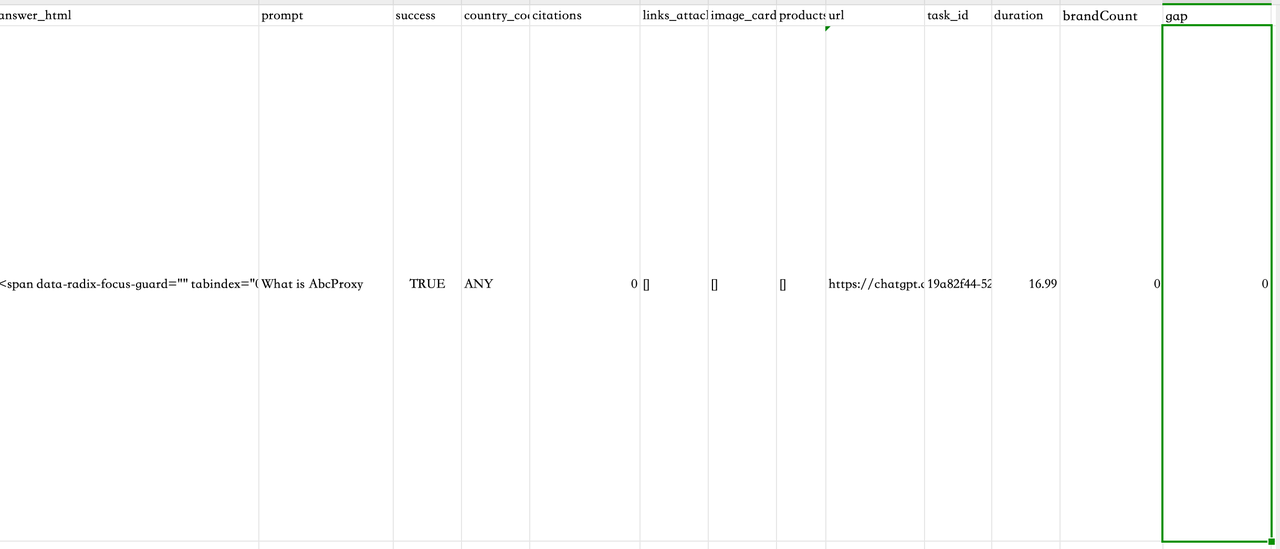
  1. Copy the resulting JSON → Open https://csvjson.com/json2csv → get CSV → paste into Excel.
  2. Add two new columns:
    • brandCount = =IF(ISNUMBER(SEARCH("YourBrand",D2)),1,0)
    • gap = F2-E2 (F column is competitor occurrence count, E column is brandCount)
After Querying: Turn Raw Responses into Actionable GEO Operation Strategies in 30 Minutes

👉 Conclusion: Currently, no one has “claimed this topic,” so you can immediately write an article like “What is ABCProxy?” to capture the answer space.

Tips: After running 100 queries in batch next time, sort by gap descending → top 20 results become priority content ideas.

Field Business Meaning
prompt Original user query
answer_text Full response from ChatGPT
brandCount Number of times your brand appears in the answer
rivalCount Number of times competitors appear
gap rivalCount - brandCount0 = unclaimed, priority content; >0 = select topic immediately, write comparison/ranking article; <0 = maintain updates, continue optimization

Conclusion

With Scrapeless Cloud Browser, you can automate ChatGPT queries to achieve cross-country, cross-timezone GEO optimization and easily obtain localized, precise search results. Whether for international SEO, brand monitoring, or market insight analysis, Scrapeless helps you quickly build an efficient, stable, and scalable automated query system.

Scrapeless not only provides browser automation for GEO data, but also offers advanced tools and data strategies to fully control AI citation mechanisms. Contact us to unlock a complete GEO data solution!

Looking ahead, Scrapeless will continue to focus on cloud browser technology, providing enterprises with high-performance data extraction, automation workflows, and AI agent infrastructure support. Serving industries such as finance, retail, e-commerce, SEO, and marketing, Scrapeless delivers customized, scenario-driven solutions to help businesses stay ahead in the era of intelligent data.

Scrapeless Browser is more than just an automation tool — it is:

A scalable “AI search ecosystem data collection infrastructure”

Enabling you to truly quantify ChatGPT brand visibility, keyword coverage, and content trends.


At Scrapeless, we only access publicly available data while strictly complying with applicable laws, regulations, and website privacy policies. The content in this blog is for demonstration purposes only and does not involve any illegal or infringing activities. We make no guarantees and disclaim all liability for the use of information from this blog or third-party links. Before engaging in any scraping activities, consult your legal advisor and review the target website's terms of service or obtain the necessary permissions.


Most Popular Articles

Catalogue