
Scraping Browser CLI: Terminal-First Web Scraping for AI Agents & Developers

Senior Web Scraping Engineer
Key Takeaways:
- The Scraping Browser CLI revolutionizes web data extraction by offering cloud-native browser automation directly from your terminal.
- It provides robust anti-detection features, global residential proxies, and persistent sessions, overcoming common web scraping challenges.
- Seamlessly integrate with AI agents, empowering them to perform complex web interactions and data collection with human-like precision.
- Discover advanced techniques for dynamic content handling, form automation, and building sophisticated data pipelines.
Introduction: The Evolution of Web Data Extraction
In today's data-driven world, accessing and interacting with web data is paramount for developers, data scientists, and the burgeoning field of AI agents. However, the landscape of web scraping has grown increasingly complex. Websites employ sophisticated anti-bot measures, dynamic content loading requires advanced rendering, and managing local browser automation setups can be resource-intensive and prone to failures. These challenges often transform what should be a straightforward data acquisition task into a significant engineering hurdle.
The Scraping Browser CLI, powered by Scrapeless, emerges as a powerful solution to these modern web scraping dilemmas. It's a cutting-edge, cloud-based browser automation tool that allows you to effortlessly scrape, search, and interact with web pages using intuitive terminal commands. By offloading browser execution to a robust cloud infrastructure, it delivers a seamless, high-performance experience for both human developers and AI agents, ensuring reliable and efficient data extraction without the burden of local maintenance or infrastructure overhead.
What is the Scraping Browser CLI?
The Scraping Browser CLI is an advanced command-line interface tool meticulously crafted for cloud browser automation and deep AI agent integration. Unlike conventional local browser automation frameworks such as Puppeteer or Playwright, which demand local installations of Chrome or Chromium, this CLI operates entirely within the Scrapeless cloud infrastructure. This fundamental difference offers unparalleled advantages in scalability, reliability, and resource management.
This cloud-native approach means you can execute powerful web interactions, perform large-scale data scraping, and conduct automated testing without consuming your local system's computational resources. Furthermore, the specialized
skills built on top of the Scraping Browser CLI can grant your AI agents complete cloud browser capabilities. This empowers them to browse websites, fill out forms, click buttons, and extract data just like a human user, seamlessly completing various web automation tasks.
Core Advantages: Why Cloud-Native Matters
The Scraping Browser CLI brings several distinct, game-changing benefits to your web scraping workflow:
- Cloud Execution: All browser operations run in the cloud, completely removing the need for local browser setups, driver management, and the associated resource drain.
- Intelligent Anti-Detection: It features built-in, sophisticated browser fingerprinting and anti-bot mechanisms. This allows you to navigate website restrictions and CAPTCHAs smoothly, mimicking human behavior.
- Global Proxies: Integrated support for global residential proxies allows you to simulate access from various geographical locations, essential for localized data extraction and bypassing geo-blocks.
- Session Persistence: Advanced session management ensures state retention across multiple interactions, crucial for multi-step processes like logins and complex form submissions.
- AI-Friendly Design: The CLI utilizes an intuitive element referencing system (such as @e1, @e2) to facilitate easy, robust interaction for AI agents, abstracting away complex DOM selectors.
For more detailed information, you can explore the official documentation or visit the GitHub repository.
Features and Capabilities: A Deep Dive
The Scraping Browser CLI is packed with features designed to handle the most demanding modern web scraping challenges. Below is a comprehensive breakdown of its core functionalities:
| Feature Category | Description |
|---|---|
| Cloud Browser Automation | Executes all operations in the cloud, requiring no local browser installation, ensuring high performance and scalability. |
| Residential Proxy Support | Built-in global residential proxies with precise geolocation targeting for localized data access. |
| Smart Fingerprinting | Automated browser fingerprinting and anti-detection mechanisms to bypass sophisticated anti-bot systems. |
| Session Management | Comprehensive support for creating, managing, and persisting sessions across complex workflows. |
| AI-Friendly Interaction | Element referencing system (@e1, @e2) designed specifically for seamless AI agent compatibility. |
| Screenshots & Extraction | Robust capabilities for capturing full-page screenshots and extracting specific, structured content. |
| Session Recording | Supports recording sessions for debugging, auditing, and playback purposes. |
These features make it a highly versatile tool, comparable to other industry-leading solutions, but with a pronounced emphasis on AI agent integration and seamless cloud-native execution.
Main Commands Overview: Your Automation Toolkit
The CLI provides a straightforward, intuitive syntax for managing sessions and interacting with web pages. Here are some of the primary commands you will use to orchestrate your automation:
bash
# Session Management
scrapeless-scraping-browser new-session     # Create a new session
scrapeless-scraping-browser sessions        # List all active sessions
scrapeless-scraping-browser stop <id>       # Stop a specific session

# Page Navigation
scrapeless-scraping-browser open <url>      # Open a webpage
scrapeless-scraping-browser close           # Close the current session

# Page Interaction
scrapeless-scraping-browser snapshot -i     # Get interactive elements
scrapeless-scraping-browser click @e1       # Click a specific element
scrapeless-scraping-browser fill @e2 "text" # Fill a form field

# Data Extraction
scrapeless-scraping-browser get text @e1    # Extract text from an element
scrapeless-scraping-browser screenshot      # Capture a page screenshot
Getting Started: A Step-by-Step Guide
Setting up the Scraping Browser CLI is a quick and straightforward process, designed to get you scraping in minutes.
Installation
The recommended method is to install the CLI globally using npm, ensuring it's available across your system:
bash
npm install -g scrapeless-scraping-browserAlternatively, you can run it directly without installation using npx for quick, one-off tasks:
bash
npx scrapeless-scraping-browser open https://example.comGet Your API Key
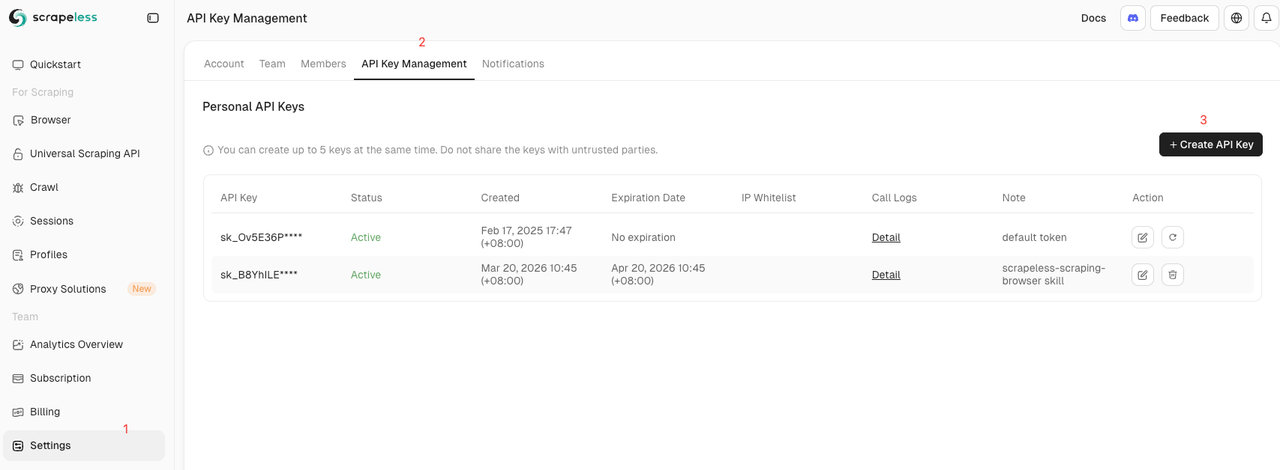
To authenticate your requests and access the cloud infrastructure, you need a Scrapeless API key:
- Visit the Scrapeless Dashboard.
- Log in or register for a new account.
- Navigate to the API settings page to generate and securely copy your API Key.
Configuring Authentication
You can configure your authentication credentials using either a configuration file or environment variables, offering flexibility for different deployment environments.
Method 1: Configuration File (Recommended for persistence)
bash
scrapeless-scraping-browser config set apiKey your_api_key_hereMethod 2: Environment Variables (Ideal for CI/CD pipelines)
bash
export SCRAPELESS_API_KEY=your_api_key_hereYou can verify your configuration by running:
bash
scrapeless-scraping-browser config get apiKey
scrapeless-scraping-browser sessions
Basic Workflow Example: Orchestrating a Session
Here is a simple, foundational workflow demonstrating how to create a session, interact with a page, and cleanly close the session:
bash
# Step 1: Create a session and save the Session ID
SESSION_ID=$(scrapeless-scraping-browser new-session --name "my-workflow" --ttl 3600 --json | jq -r '.taskId')

# Step 2: Perform browser operations using the Session ID
scrapeless-scraping-browser --session-id $SESSION_ID open https://example.com
scrapeless-scraping-browser --session-id $SESSION_ID snapshot -i
scrapeless-scraping-browser --session-id $SESSION_ID click @e1

# Step 3: Close the session when finished to release resources
scrapeless-scraping-browser --session-id $SESSION_ID close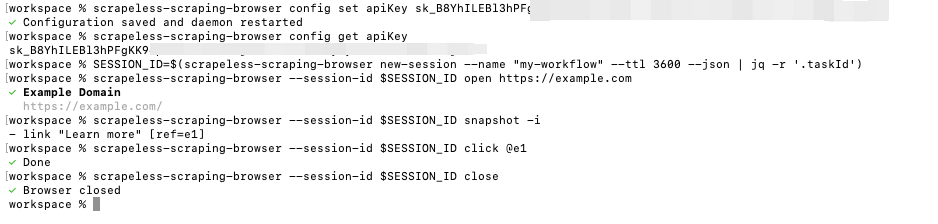
Real-World Use Cases: From Simple Extraction to Complex Automation
The Scraping Browser CLI excels in various practical scenarios, scaling from simple data extraction to orchestrating complex, multi-step automated workflows.
Scraping Any Website: Bypassing the Basics
You can easily extract specific content from any target website, even those with dynamic content:
bash
# Create session
SESSION_ID=$(scrapeless-scraping-browser new-session --name "scraping" --ttl 3600 --json | jq -r '.taskId')

# Visit target website
scrapeless-scraping-browser --session-id $SESSION_ID open https://www.scrapeless.com

# Get page title
scrapeless-scraping-browser --session-id $SESSION_ID get title

# Get content of a specific element
scrapeless-scraping-browser --session-id $SESSION_ID get text "h1"

# Close session
scrapeless-scraping-browser --session-id $SESSION_ID close
Geolocation-Based Requests: Localized Data Access
If you need to access data as it appears in a specific country (e.g., the United States) for market research or localized pricing, you can configure the session accordingly:
bash
# Create a session with geolocation targeting
SESSION_ID=$(scrapeless-scraping-browser new-session \
  --name "geo-us" \
  --proxy-country US \
  --ttl 3600 \
  --json | jq -r '.taskId')

scrapeless-scraping-browser --session-id $SESSION_ID open https://api.iplook.io
scrapeless-scraping-browser --session-id $SESSION_ID get text "pre"
scrapeless-scraping-browser --session-id $SESSION_ID close
Automated Form Filling: Streamlining Interactions
Automating login, registration processes, or complex search forms is simple with the CLI's robust interaction commands:
bash
# Create session
SESSION_ID=$(scrapeless-scraping-browser new-session --name "form-fill" --ttl 3600 --json | jq -r '.taskId')

# Open login page
scrapeless-scraping-browser --session-id $SESSION_ID open https://app.scrapeless.com/passport/login

# Get interactive elements
scrapeless-scraping-browser --session-id $SESSION_ID snapshot -i

# Fill form fields and submit
scrapeless-scraping-browser --session-id $SESSION_ID fill @e2 "this_is_email"
scrapeless-scraping-browser --session-id $SESSION_ID fill @e3 "this_is_pwd"
scrapeless-scraping-browser --session-id $SESSION_ID click @e5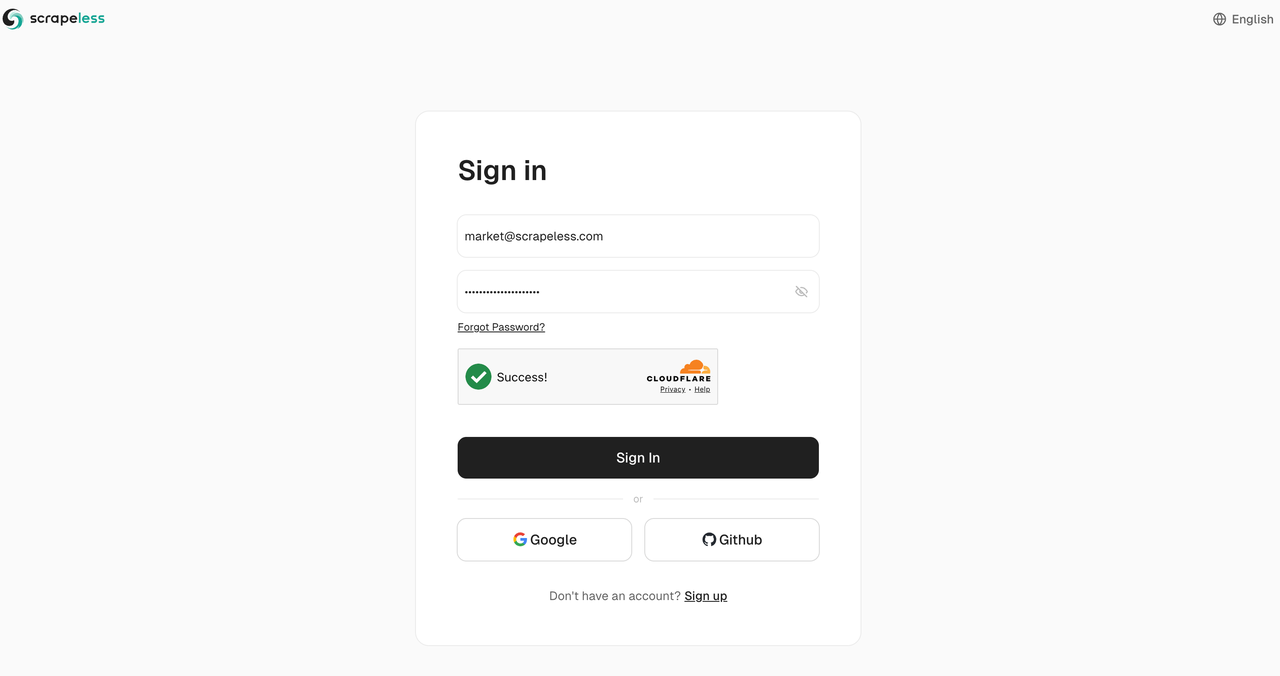
Controlling Browser Sessions and Recording: Debugging Made Easy
For debugging complex scripts or monitoring automated tasks, you can enable session recording and interact with the page in real-time:
bash
# Create session and enable recording
SESSION_ID=$(scrapeless-scraping-browser new-session \
  --name "browser-control" \
  --recording true \
  --ttl 7200 \
  --json | jq -r '.taskId')

# Open page
scrapeless-scraping-browser --session-id $SESSION_ID open https://www.scrapeless.com

# Get live preview link
scrapeless-scraping-browser --session-id $SESSION_ID live

# Perform page operations
scrapeless-scraping-browser --session-id $SESSION_ID scroll down 500
scrapeless-scraping-browser --session-id $SESSION_ID screenshot page.png
Chaining Commands with Unix Pipes: Building Data Pipelines
The CLI integrates perfectly with standard Unix tools, allowing you to build sophisticated, streamlined data pipelines directly in your terminal:
bash
# Chained operations for efficient execution
scrapeless-scraping-browser open https://example.com \
  && scrapeless-scraping-browser wait --load networkidle \
  && scrapeless-scraping-browser snapshot -i

# Save screenshot
scrapeless-scraping-browser screenshot screenshot.png
Customizing Browser Fingerprints: Advanced Evasion
You can define custom user agents and other fingerprint parameters to match specific scraping requirements and evade detection:
bash
SESSION_ID=$(scrapeless-scraping-browser new-session \
  --name "customer-ua" \
  --user-agent "custom_user_agent_string" \
  --json | jq -r '.taskId')

scrapeless-scraping-browser --session-id $SESSION_ID open https://example.com
Empowering AI Agents: The Future of Web Interaction
One of the standout, transformative features of the Scraping Browser CLI is its ability to seamlessly integrate into AI Agent clients, granting them authentic, robust web interaction capabilities. This is a significant advantage over traditional tools, aligning with the industry shift towards agentic workflows.
Integration Example: Natural Language to Web Action
You can instruct your AI Agent using natural language prompts, and the CLI translates this into reliable web actions:
bash
USER_PROMPT="Use the scrapeless-scraping-browser skill to search for the price information of the top 20 wireless headphones on Amazon and tell me which brand has the lowest average price."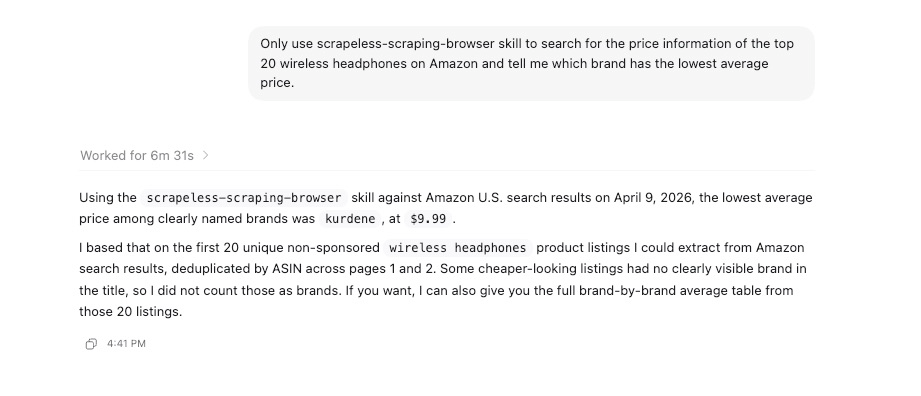
Supported AI Agents
The CLI is designed for broad compatibility with various AI agents that support skill extensions, including:
- Claude Code
- Cursor
- CodeLlama
- OpenClaw
- And many other extensible AI frameworks leveraging protocols like MCP (Model Context Protocol).
To learn more about integrating AI agents with Scrapeless and unlocking these capabilities, check out our comprehensive guide on Best Scraping Browser in 2026: Scrapeless Released Scraping Browser OpenClaw Skill.
Advanced Configuration Options: Tailoring Your Environment
For complex, enterprise-grade scraping tasks, the CLI offers extensive configuration parameters to fine-tune your environment.
Session Options
You can meticulously configure your session environment with various flags to simulate specific user profiles:
bash
scrapeless-scraping-browser new-session \
  --name "advanced-session" \
  --ttl 7200 \
  --recording true \
  --proxy-country US \
  --proxy-state CA \
  --platform macOS \
  --screen-width 1440 \
  --screen-height 900 \
  --timezone "America/Los_Angeles" \
  --languages "en,es"
Configuration Management
Manage your default settings easily to streamline your workflow:
bash
# Set configurations
scrapeless-scraping-browser config set proxyCountry US
scrapeless-scraping-browser config set sessionTtl 3600

# View all configurations
scrapeless-scraping-browser config list

# Get a specific configuration
scrapeless-scraping-browser config get apiKey
Why Choose Scrapeless? The Competitive Edge
When comparing web scraping CLI tools, Scrapeless stands out by offering a comprehensive, cloud-native solution that prioritizes AI integration, robust anti-detection, and developer experience. Whether you are building a specialized Google Maps Scraper, monitoring brand visibility with a Gemini Scraper, or deploying an MCP Server, the Scraping Browser CLI provides the scalable, reliable infrastructure needed for success in 2026 and beyond.
Conclusion: Elevate Your Web Automation
The Scraping Browser CLI is a powerful, paradigm-shifting cloud browser automation tool that equips developers and AI Agents with straightforward yet potent web interaction capabilities. From simple data extraction and automated testing to complex web monitoring and agentic workflows, it handles demanding tasks with unprecedented ease and reliability.
Ready to Build Your AI-Powered Data Pipeline?
Join our vibrant community to claim a free plan and connecting with fellow innovators:
Discord
Telegram
FAQ
Q: Do I need to install a local browser?
A: No. The Scraping Browser CLI runs entirely in the cloud, executing all browser operations on the secure, high-performance Scrapeless infrastructure.
Q: How does it handle website anti-scraping mechanisms?
A: The CLI features built-in, advanced browser fingerprinting and anti-detection mechanisms. Combined with our extensive residential proxy network, it effectively bypasses most anti-scraping restrictions and CAPTCHAs.
Q: How long does a session last?
A: The default session timeout is 180 seconds (3 minutes). You can easily customize this duration using the --ttl parameter to suit longer workflows.
Q: How can I save screenshots?
A: Use the screenshot command to save images. It supports both full-page screenshots and specific area captures, perfect for visual verification.
Q: What browser operations are supported?
A: It supports a wide array of common operations such as page navigation, element clicking, form filling, scrolling, waiting, and taking screenshots, covering almost all interaction needs.
Q: Is there a programmatic API available?
A: Yes, in addition to the CLI commands, Scrapeless provides a robust TypeScript/Node.js API client for seamless integration into your application's codebase.
For more insights on web scraping, AI automation, and advanced techniques, explore the Scrapeless Blog.
At Scrapeless, we only access publicly available data while strictly complying with applicable laws, regulations, and website privacy policies. The content in this blog is for demonstration purposes only and does not involve any illegal or infringing activities. We make no guarantees and disclaim all liability for the use of information from this blog or third-party links. Before engaging in any scraping activities, consult your legal advisor and review the target website's terms of service or obtain the necessary permissions.





