
Optimize Product Rankings Using Playwright MCP and Scrapeless Browser (GEO Solution)

Expert Network Defense Engineer
Overview
In the era of AI, generative search engines—such as Perplexity and Google AI Overview—are reshaping how users access information. Compared with traditional search, AI-generated results follow more transparent ranking logic and place much higher emphasis on structured content.
This article introduces a complete workflow:
using a Playwright MCP Server to automate access to AI search engines, scrape competitor content, analyze ranking patterns, and finally optimize your own product content to achieve higher visibility in generative search.
Part 1: Core Concepts & Technical Foundations
1.1 The Ranking Principles of Generative Search
Compared with traditional search engines, generative search introduces fundamentally different evaluation criteria:
Traditional Search vs. Generative Search
| Traditional Search | Generative Search |
|---|---|
| SEO ranking signals dominate (backlinks, authority, keywords) | Emphasis on structure, readability, factual density, and scenario matching |
| Content optimized for algorithms | Content optimized for AI reasoning |
| Ranking logic more opaque | Ranking logic more transparent |
| SERP driven | Answer-generation driven |
Key Insight:
In the generative search era, structured content, scenario alignment, and clear comparison logic matter far more than backlinks or domain authority.
This gives smaller players a real chance to stand out—if your content is well-structured, deeply comparative, and precisely matched to search intent, you can outrank larger websites in Perplexity and other AI-driven engines.
1.2 What Is Playwright MCP? — Browser Automation Redesigned for AI
The Playwright MCP Server extends Playwright beyond its traditional automation and testing use cases. While developers typically use Playwright to control browsers programmatically, the MCP Server version is specifically designed for AI Agents.
When the server is running, any MCP-compatible host can connect and gain full access to Playwright’s automation capabilities. In other words, an AI agent can operate a real browser just like a human—browsing pages, scraping content, submitting forms, making purchases, responding to emails, and more.
Like all MCP servers, Playwright MCP Server exposes a set of tools to AI agents, mapping directly to Playwright APIs. Here are some of the key tools:
- Browser_click — Click elements like a human using a mouse
- Browser_drag — Perform drag-and-drop actions
- Browser_close — Close browser instances
- Browser_evaluate — Execute JavaScript directly inside the page
- Browser_file_upload — Upload files via the browser
- Browser_fill_form — Automatically fill web forms
- Browser_hover — Move the cursor to a specified element
- Browser_navigate — Navigate to any URL
- Browser_press_key — Simulate keyboard input
With these capabilities, an AI agent can interact with websites almost exactly the way a human would—and can easily perform complex data collection through browser-based scraping.
Part 2: Scrapeless Browser — High-Performance, Scalable, and Cost-Efficient Cloud Browser Infrastructure
“If you access modern websites using a normal crawler, 90% of your requests will be rejected.
But with Scrapeless Browser, the success rate jumps to 99%.”
2.1 Why Do You Need Scrapeless Browser?
If you use native Playwright or Selenium to access modern websites — especially those protected by anti-bot systems — you will inevitably run into issues such as:
| Issue | Symptoms | Consequences |
|---|---|---|
| IP detected as a crawler | Requests return 403/429 | Unable to retrieve data |
| Browser fingerprint is obvious | Detected as an automation tool | Directly blocked by the website |
| Single outbound IP | Frequent requests lead to IP ban | Requires manual unblocking |
| Cloudflare or similar protection | CAPTCHA challenges required | Crawler gets completely stuck |
| Geo-restrictions | Content available only in certain regions | Cannot obtain global insights |
Scrapeless Browser is built specifically to solve these problems.
It operates as a “human-mode” browser service, automatically bypassing 99% of anti-bot detections.
2.2 Core Advantages of Scrapeless Browser
1. Intelligent Anti-Bot Evasion
- Built-in handling for major protection systems such as reCAPTCHA, Cloudflare Turnstile/Challenge, AWS WAF, etc.
- Simulates realistic human browsing behaviors (random delays, mouse moves, scrolling, etc.)
- Supports random fingerprint generation or fully customizable fingerprint parameters.
2. Global Proxy Network
Scrapeless Browser offers residential IPs, static ISP IPs, and unlimited IP pools across 195 countries, with transparent pricing ($0.6–1.8/GB).
It also supports custom browser-level proxy settings.
This is especially valuable for location-dependent use cases:
- Regional pricing differences on e-commerce platforms
- Localized search engine results
3. Session Management & Recording
js
sessionRecording = true     // Enable recording for debugging
sessionTTL = 900            // Keep session alive for 15 minutes
sessionName = my_session    // Custom session name for easy identification
This allows you to:
- Maintain logged-in states for multi-step workflows
- Record the full session for auditing
- Replay failed operations to debug issues
Part 3: Environment Setup & Installation
3.1 Prerequisites
Before you start, ensure the following software is installed.
Step 1: Install Node.js and npm
Playwright MCP Server runs on Node.js.
- Visit the official Node.js website and download the latest LTS version
- Complete installation following system prompts
- Verify installation in your terminal:
node -v
npm -v
Expected output:
v22.x.x
10.x.x
Step 2: Install Cursor Editor
- Download the desktop app from the official Cursor website
- Install and launch the application
3.2 Get Your Scrapeless API Key
Playwright MCP typically integrates with the Scrapeless Browser Service to achieve higher crawling success rates and anti-bot evasion.
- Visit the Scrapeless official website
- Sign up and log into your dashboard
- Navigate to API Key Management
- Generate your API key and store it securely
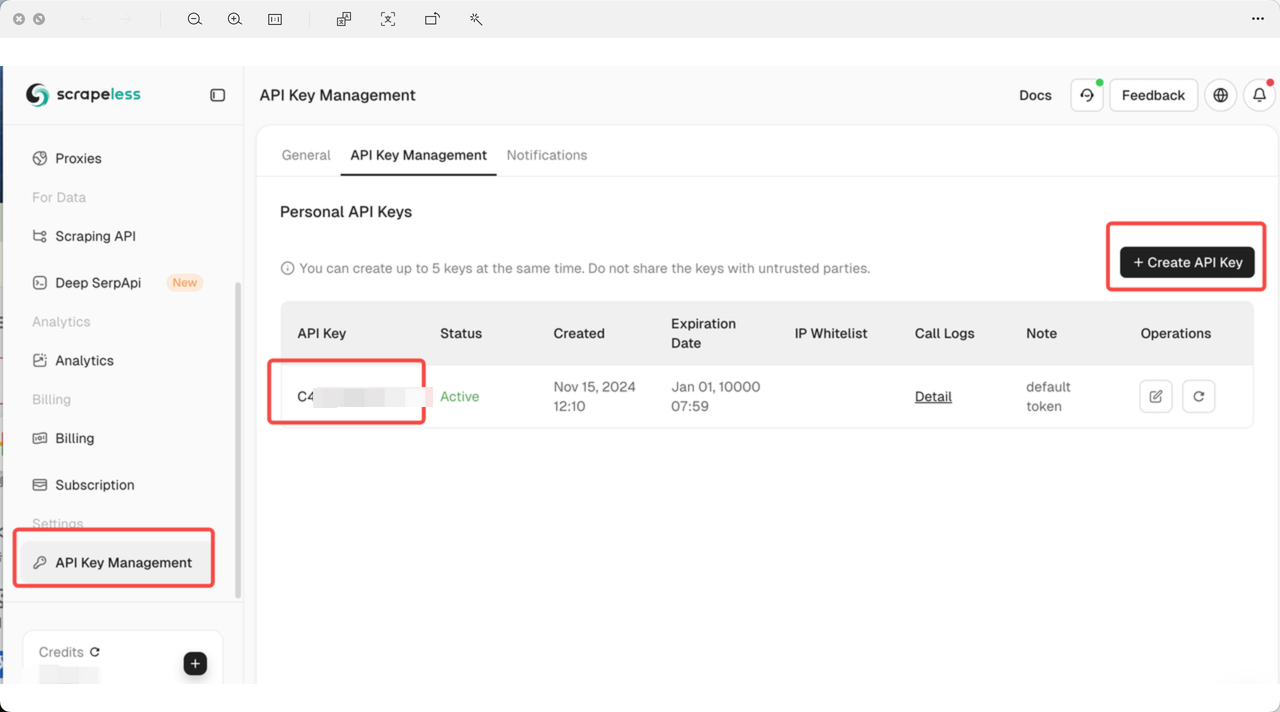
3.3 Configure Playwright MCP Server in Cursor
Step 1: Open Cursor Settings
- Launch Cursor
- Open Settings
- Select MCP from the left menu
Step 2: Add a New Global MCP Server
- Click “Add new global MCP server”
- Enter the following configuration details in the setup panel
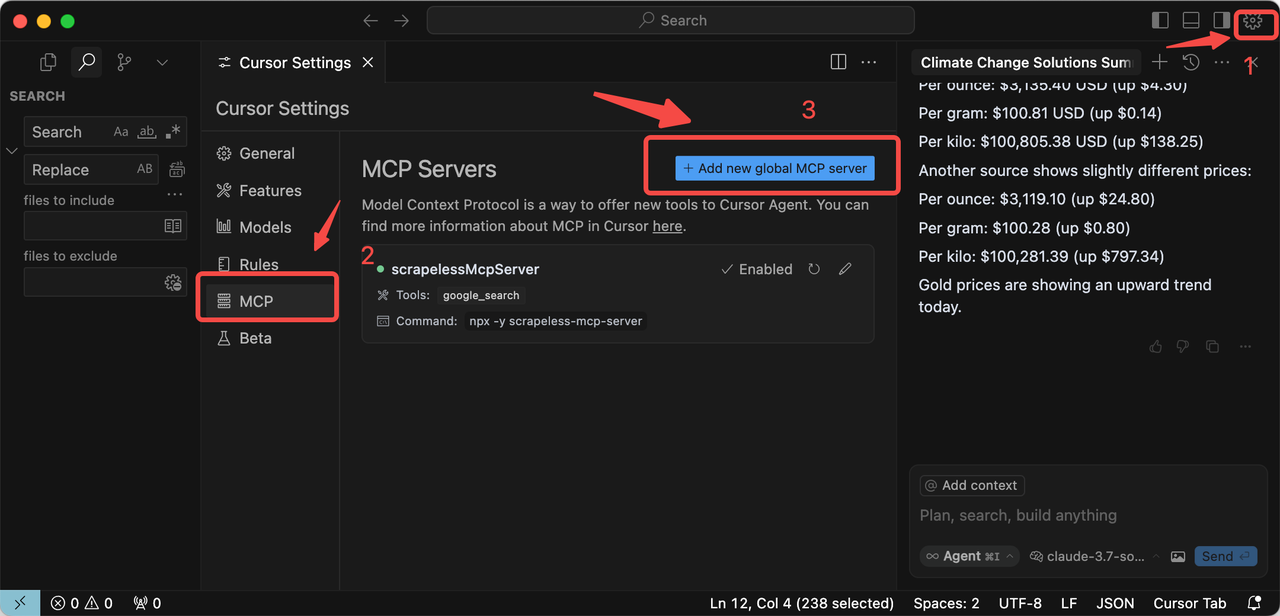
Step 3: Configuration Template
Paste the following JSON configuration into the setup panel, and replace Your_Token with your actual Scrapeless API key:
json
{
  "mcpServers": {
    "playwright": {
      "command": "npx",
      "args": [
        "@playwright/mcp@latest",
        "--headless",
        "--cdp-endpoint=wss://browser.scrapeless.com/api/v2/browser?token=Your_Token&proxyCountry=ANY&sessionRecording=true&sessionTTL=900&sessionName=playwrightDemo"
      ]
    }
  }
}
Configuration Parameter Explanation
-
--headless: Runs the browser in headless mode (no visible GUI)
-
token=Your_Token: Your Scrapeless API key
-
proxyCountry=ANY: Uses a proxy node from any available country
- (You can change this to a specific country code such as
US,FR,SG,CN, etc.)
- (You can change this to a specific country code such as
-
sessionRecording=true: Enables session recording for easier debugging
-
sessionTTL=900: Sets session lifetime to 900 seconds
-
sessionName=playwrightDemo: A custom name for identifying the session
Step 4: Save and Restart
- Click Save to apply the configuration
- Restart the Cursor app to make the new settings take effect
- After restarting, you should now be able to use the Playwright MCP tools directly inside Cursor
How to Use Playwright to Operate a Browser — Practical Example
Step 1: Use MCP to Automate Perplexity
AI Instruction Template
Copy the following instruction into Cursor Chat so the AI agent can control the browser through Playwright MCP + Scrapeless:
markdown
Task: Use playwright-mcp to automate the following Scrapeless browser task.

Instructions for the AI agent:
1. Visit https://www.perplexity.ai/ and perform a search.
2. Navigate to https://www.perplexity.ai/
3. Do not log in; proceed as a guest.
4. In the search bar, enter the query: "Top 5 Sony Bluetooth Headphones of 2025".
5. Press Enter to trigger the search.
6. Wait for the page to fully load and render search results (approx. 3–5 seconds).
7. Extract the top 5 search results, including:
   - Title of the result
   - Summary/description snippet
   - URL link
   - Key content features
     (e.g., product review, ranking list, blog post, technical article)
8. Return the results in the following structured JSON format:

[
  {
    "title": "...",
    "summary": "...",
    "url": "...",
    "content_type": "..."
  }
]
Ensure accuracy and completeness. Do not miss any results.
Expected Output Example
The AI agent should return data in a similar structure:
json
[
  {
    "title": "Best Sony Headphones 2025: WH-1000XM6 Review",
    "summary": "The WH-1000XM6 stands as Sony's flagship model with industry-leading ANC technology, premium sound quality, and exceptional comfort for travelers and office workers.",
    "url": "https://www.rtings.com/headphones/reviews/sony-wh-1000xm6",
    "content_type": "product_review"
  },
  {
    "title": "Sony WH-1000XM5 vs XM6: Complete Comparison Guide",
    "summary": "Compare the flagship models to understand which Sony headphones suit your budget and needs best, with detailed specs and performance metrics.",
    "url": "https://www.businessinsider.com/sony-wh-1000xm5-vs-xm6",
    "content_type": "comparison_article"
  }
]
Step 2: Collect and Organize the Results
Save the returned JSON to your local file system or database.
At this point, you already have the top 5 competitor results for your target query.
⚠️ Important:
If some pages require deep extraction (e.g., long-form review content), you can issue additional AI instructions asking the AI to open each URL and scrape more detailed information.
Step 3: Perform Deep Competitor Content Analysis
AI Analysis Instruction Template
markdown
Act as a content analysis and SEO/Generative Engine Optimization market-insight expert. Analyze the 5 search results below and identify common patterns in content structure, platform types, review angles, recommendation logic, user-intent coverage, and brand storytelling.

Please focus your analysis on the following:

### 1. Platform Source Patterns
- What types of websites are these results from?
  (e.g., professional review sites, ranking lists, media outlets, tech publications)
- Are there authoritative sources dominating the results?

### 2. Content Angle Patterns
- Which angles do these pages use to evaluate the headphones?
  (ANC performance, sound quality, value, comfort, bass, daily use, travel/office use)

### 3. Recommendation Logic Patterns
- Do they follow a consistent recommendation framework?
  Example:
  **flagship → value pick → bass model → TWS earbuds → budget model**

### 4. Writing Style Patterns
- Are they short summary-style guides or long technical deep dives?
- Do they highlight measurable factors like frequency response or ANC levels?

### 5. User Intent Satisfaction
- Which user concerns are addressed?
- Do they map products to user scenarios (travelers, office users, bass lovers, budget users)?

### 6. GEO Optimization Insights for My Product
- Extract recurring angles, structures, and keyword patterns.
- Provide actionable recommendations for optimizing GEO pages for my headphone product.
- Deliver:
  - Recommended content structure
  - Ranking layout template
  - High-value keyword list

Please provide a structured and in-depth analysis so the results can be directly applied to my GEO content strategy.
Example of Analysis Results

The specific analysis of the results is as follows:
1. Overview of Platform Sources
The following are the source platforms of the search results:
| Source | Platform Type | Authority | Content Features |
|---|---|---|---|
| RTINGS.com | Laboratory Review | High | Data-driven, highly technical |
| Business Insider | Mainstream Media | High | Consumer-oriented, buying guides |
| CNET | Technology Media | High | Professional reviews, comparative analysis |
| What Hi-Fi | Audio Specialist Media | High | Enthusiast-focused, in-depth audio analysis |
| AudiophileOn | Enthusiast Forum | Medium | Subjective experience sharing, community insights |
Key Conclusions:
- The content sources include both mainstream and professional audio platforms, providing broad coverage.
- RTINGS focuses on experimental/test data, BI/CNET emphasizes readability, and What Hi-Fi/AudiophileOn highlights professional audio quality.
2. Content Themes and Focus
The following are the key information and focus areas covered in the collected content:
- Active Noise Cancellation (ANC) Performance – Emphasized by all sources.
- Sound Quality – Detailed descriptions for each model.
- Usage Scenarios – Business trips, office, commuting, bass preference.
- Value for Money – Clearly distinguished flagship, value, and budget models.
- Comfort and Design – Lightweight, foldable, comfortable to wear.
- Bass and Special Features – Bass-focused models highlighted.
Content Hierarchy (Frequency of Occurrence):
- ANC (100%)
- Sound Quality (100%)
- Usage Scenarios (100%)
- Value/Price (80%)
- Comfort/Design (80%)
- Bass Characteristics (60%)
- Battery Life (40%)
- Connectivity Features (40%)
3. Recommendation Patterns
| Rank | Model | Positioning |
|---|---|---|
| 1 | WH-1000XM6 | Flagship – Best overall performance |
| 2 | WH-1000XM5 | Value – High performance, lower price |
| 3 | ULT Wear | Bass-focused – Special audio effects |
| 4 | WF-1000XM5 | True Wireless – Portable option |
| 5 | WH-CH720N | Budget – Core features, affordable |
Conclusions:
- Each headphone model corresponds to a clearly defined usage scenario.
- Flagship models are prioritized, budget models listed last, with specialized models interspersed in between.
- Pricing reflects value differentiation.
4. Content Structure and Style
Typical Structure:
- Overview / Target Audience
- Pros and Cons
- Sound Quality
- ANC Performance
- Comfort and Build Quality
- Battery Life and Features
- Price and Conclusion
- Usage Scenarios / Recommended Users
Style Characteristics:
- RTINGS: Long-form, data-driven, charts, experimental ratings.
- Mainstream Media (BI/CNET): Medium-length, readable, conversational.
- Audio Specialists (What Hi-Fi/AudiophileOn): Detailed sound analysis, highly technical.
5. User Intent Coverage
Focus Areas:
- Performance: ANC, sound quality, bass
- Value for Money: Price, model comparison
- Usage Scenarios: Business trips, office, bass enthusiasts, portability
- Features: Battery, connectivity, app control
| Intent | XM6 | XM5 | ULT | WF-1000XM5 | CH720N |
|---|---|---|---|---|---|
| Best Overall | ✅ | ⚠️ | ❌ | ❌ | ❌ |
| Value for Money | ⚠️ | ✅ | ⚠️ | ⚠️ | ⚠️ |
| Best ANC | ✅ | ⚠️ | ⚠️ | ⚠️ | ❌ |
| Best Bass | ⚠️ | ❌ | ✅ | ⚠️ | ❌ |
| Best Portability | ❌ | ❌ | ❌ | ✅ | ❌ |
| Budget Choice | ❌ | ❌ | ❌ | ❌ | ✅ |
| Business Travel | ✅ | ⚠️ | ⚠️ | ⚠️ | ❌ |
| Office Use | ✅ | ✅ | ⚠️ | ⚠️ | ⚠️ |
Step 4: Optimize Your Product Content
Based on the analysis above, optimize your product content following these principles:
Optimize Authority and Citation Sources
Analysis: RTINGS, CNET, BI, What Hi-Fi, AudiophileOn
GEO Strategy:
- Blogs: Cite data, review conclusions, and scores.
- Product pages: Include citation marks or links like “Source: RTINGS/BI.”
- Ensure content is verifiable to improve GEO ranking.
- Compare your product with results from authoritative reviews.
Performance Focus
Analysis: All sources emphasize performance metrics like ANC, sound quality, and bass.
GEO Strategy:
- Blogs: Provide detailed review sections with quantified data (ANC scores, frequency response, bass levels).
- Product pages: Include key performance tables (battery, ANC level, sound quality rating).
Usage Scenarios / User Intent Coverage
Analysis: All sources clearly match products to user scenarios (travel, office, bass enthusiasts), and GEO values user-intent alignment.
GEO Strategy:
- Blogs: Modularized scenario recommendations (business trips, commuting, daily use, sports).
- Product pages: Scenario tags or matrices (e.g., “Travel Friendly: ★★★★★”).
Features Focus
Analysis: Battery, connectivity, app functionality, and call quality are key differentiators.
GEO Strategy:
- Blogs: Feature sections with tables and short descriptions.
- Product pages: Technical specification tables + highlighted features.
- FAQs: Answer specific feature questions to improve long-tail keyword coverage.
Final Summary: Scrapeless × Playwright MCP = Your “AI Growth Engine”
By combining Playwright MCP’s “browser-level automation” with Scrapeless’ “zero-ban, zero-maintenance, highly stable scraping”, you are effectively building a true AI growth machine.
-
Scrapeless solves the issues of missing, unstable, or incomplete data
You don’t need to manage IPs, headers, fingerprints, proxies, or clusters—Scrapeless handles everything. -
Playwright MCP handles “data that requires real browser interaction”
For example: scrolling, logging in, clicking, loading dynamic content—tasks that standard APIs or scraping tools cannot handle.
When combined, you get a complete pipeline from data collection → analysis → content optimization.
Next Steps
- Set up the Playwright MCP environment immediately.
- Choose 1–2 core products for pilot analysis.
- Optimize your content based on the analysis results.
Wish you better rankings in AI search! 🚀
Recommended Resources
At Scrapeless, we only access publicly available data while strictly complying with applicable laws, regulations, and website privacy policies. The content in this blog is for demonstration purposes only and does not involve any illegal or infringing activities. We make no guarantees and disclaim all liability for the use of information from this blog or third-party links. Before engaging in any scraping activities, consult your legal advisor and review the target website's terms of service or obtain the necessary permissions.





