
How a Top 10 AI Agent Startup Cut Scraping Costs 73% With Scrapeless

Advanced Data Extraction Specialist
TL;DR:
-
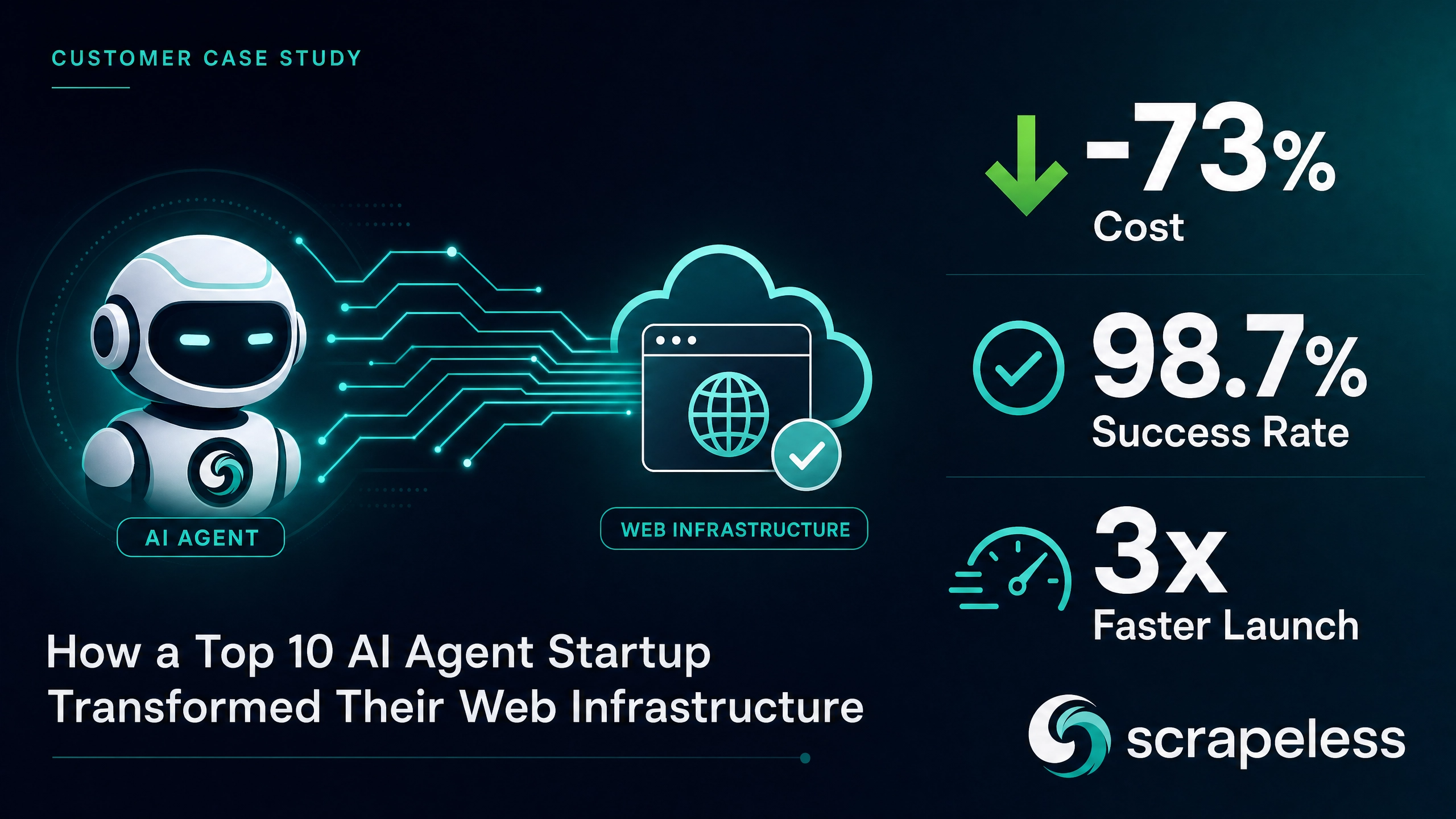
A Y Combinator-backed AI agent startup — ranked among the top 10 in the autonomous sales agent category — replaced their entire in-house scraping stack with Scrapeless Agent Browser in a single afternoon. The result: a 73% drop in web data infrastructure costs, a success rate that climbed from 61% to 98.7%, and a production launch that shipped 3x ahead of schedule.
-
Three vendor contracts, 6,000+ lines of glue code, and two engineers on permanent firefighting duty — all gone. Scrapeless consolidated browser, proxy, CAPTCHA, and anti-detection into one CDP endpoint.
-
The cost savings alone extended their runway by four months. At Series A, that is the difference between closing the next round from a position of strength and running a desperate bridge.
-
Their agent now covers 23 web sources instead of 12. When infrastructure stops being the bottleneck, the product roadmap accelerates.
-
Free to start. New Scrapeless accounts include free Agent Browser runtime — sign up at app.scrapeless.com.
Introduction: The Dirty Secret Behind Every AI Agent Demo
Every AI agent startup has the same slide in their pitch deck: an autonomous agent that navigates the open web, collects real-time data, and takes action — no human in the loop. Investors love it. Prospects lean forward. The demo looks like magic.
What the slide does not show is the infrastructure behind the curtain. The headless browser cluster that crashes at 3 AM. The three separate proxy vendors with three separate billing dashboards. The CAPTCHA-solving service that eats $4,000 a month and still fails on Cloudflare-protected sites. The two engineers who spend more time patching the scraping stack than building the product that is supposed to be the company's competitive advantage.
This is the story of one of those companies — a Y Combinator-backed startup ranked among the top 10 in the autonomous AI sales agent category by a leading industry analyst. They asked us not to use their name (the round is still closing), but they gave us permission to share every number. What happened when they ripped out their entire in-house scraping infrastructure and replaced it with Scrapeless Agent Browser is, in their CTO's words, "the single highest-ROI engineering decision we made all year."
Case Study at a Glance
| Dimension | Detail |
|---|---|
| Company profile | Top 10 AI agent startup (YC-backed, Series A, US-based) |
| Industry | AI-powered autonomous sales development |
| Core product | An autonomous SDR agent that researches prospects across the open web |
| Web sources covered | 12 → 23 (post-migration) |
| Scrapeless products used | Agent Browser, Web Unlocker, Proxy Solutions |
| Cost reduction | 73% ($22,100/mo → $5,900/mo) |
| Scraping success rate | 61% → 98.7% |
| Production launch timeline | 16 weeks → 5 weeks (3x faster) |
| Engineering hours reclaimed | ~120 hours/month (2 FTEs fully redeployed) |
| Runway impact | +4 months extended |
The Company: What a Top AI Agent Startup Actually Looks Like Under the Hood
The company builds an autonomous sales development agent. The product accepts a target account list, navigates to each company's public web presence — LinkedIn company pages, G2 review profiles, Crunchbase funding records, Glassdoor employer pages, corporate career sites, industry news mentions — extracts structured signals (headcount growth, funding velocity, tech stack indicators, executive changes, open requisitions), and synthesizes a personalized research brief for each prospect. The brief feeds directly into the outreach sequence. No human touches the data between input and output.
The agent's reasoning layer is genuinely impressive. It ranked in the top 10 of its category in a well-known industry benchmark. Three Fortune 500 companies are in the pilot pipeline. The product works.
The infrastructure behind it, until six months ago, did not.
The Challenge: When 40% of Your Burn Goes to Keeping the Lights On
The scraping stack had grown the way scraping stacks always grow at startups: one vendor at a time, one patch at a time, one "we'll fix it properly next sprint" at a time. By the time the CTO stepped back and looked at the full picture, the architecture looked like this:
A cluster of headless Chrome instances running on five cloud VMs. A residential proxy pool from Vendor A. A datacenter proxy from Vendor B for low-risk targets. A CAPTCHA-solving API from Vendor C. And a custom orchestration layer — 6,200 lines of Python — that attempted to route each request through the right combination of browser profile, proxy type, and CAPTCHA handler based on the target domain's anti-bot posture.
Three vendor contracts. Three billing dashboards. Three support channels. One engineer spending 60% of their time on infrastructure firefighting. A second engineer spending 40%. Combined: roughly 120 hours a month of senior engineering time that was not going into the product.
The numbers were brutal:
| Metric | Value |
|---|---|
| Average scraping success rate (all sources) | 61% |
| Success rate on Cloudflare-protected sites | 41% |
| Monthly proxy spend (two vendors) | $8,600 |
| Monthly CAPTCHA-solving spend | $4,200 |
| Monthly cloud compute (headless browser cluster) | $5,000 |
| Engineering maintenance (allocated cost, 2 FTEs partial) | $4,300 |
| Total monthly web data infrastructure cost | $22,100 |
A 61% success rate means 39% of every request is wasted money. The proxy bandwidth is consumed, the CAPTCHA credit is burned, and the data does not come back. Then the orchestrator fires a retry — consuming more bandwidth, more credits, more compute — and the retry fails 39% of the time too. The compounding waste was staggering.
"I did the math one Sunday night and realized we were spending more on scraping infrastructure than on the LLM inference that actually makes our agent intelligent. We were a company that sold AI, and our biggest cost center was plumbing."— CTO, Top 10 AI Agent Startup
The breaking point came when a major target site — one that accounted for 30% of the agent's research value — rolled out a new anti-bot system. The in-house stack went from 58% success to 12% overnight. For five days, the team ran every customer demo against cached data. Two enterprise prospects in the pipeline noticed the data was stale. One of them paused the evaluation.
The CTO called an emergency engineering meeting. The conclusion was unanimous: stop patching. Replace everything.
Why Scrapeless: The Evaluation That Took Two Weeks and the Decision That Took Two Minutes
The team evaluated five alternatives. Their requirements were non-negotiable:
CDP compatibility. The agent's automation scripts were built on Puppeteer. Any replacement had to expose a standard Chrome DevTools Protocol endpoint. A solution that required rewriting the automation layer was dead on arrival — the team did not have the bandwidth, and the investors did not have the patience.
Unified anti-detection. The in-house stack failed because the fingerprinting was shallow. The browser profile said one thing, the TLS signature said another, and the proxy said a third. The team needed a solution where anti-detection was not a bolt-on but a property of the browser itself — fingerprint, TLS, proxy, and JavaScript environment all coordinated at the platform level.
Single vendor, single invoice. Three contracts, three billing dashboards, and three support channels had created an operational tax that consumed real engineering hours every month. The replacement had to consolidate browser, proxy, and CAPTCHA into one platform with one API key.
Session observability. When a scraping job failed, the team needed to see exactly what happened — the actual browser state, the rendered page, the network waterfall. Not a log file. Not an error code. The actual session. Session Replay and Live View were requirements, not nice-to-haves.
Production-grade scale. The agent needed to run 50+ concurrent browser sessions during peak hours, with residential IP coverage across 195+ countries for geo-targeted research.
Three of the five alternatives failed on CDP compatibility. One failed on unified anti-detection — it still required a separate proxy vendor. Scrapeless Agent Browser was the only platform that met all five requirements out of the box.
The CTO ran a proof-of-concept against the three hardest targets — the sites where the in-house stack was failing more than 50% of the time. Scrapeless returned clean, structured data on the first run for all three. No proxy rotation tuning. No fingerprint configuration. No CAPTCHA callback handler.
"The evaluation took two weeks. The decision took two minutes. When you see a 41% success rate turn into 98% on the first try, you don't need a committee."— CTO, Top 10 AI Agent Startup
The Migration: One Afternoon, 2,400 Lines Deleted
The migration happened on a Thursday afternoon. It was done before dinner.
The agent's orchestration layer already abstracted the CDP endpoint behind a connection manager. The change was surgical: replace the local headless Chrome WebSocket URL with the Scrapeless Agent Browser endpoint, pass the API key and proxy configuration as connection parameters, and delete the three separate client libraries for the old proxy, CAPTCHA, and fingerprinting services.
The team deleted 6,200 lines of orchestration code — the entire retry, rotation, fingerprint-management, and CAPTCHA-callback layer — and replaced it with 160 lines of connection configuration. The net line count went negative. The codebase got smaller, and the capability got larger.
javascript
// Before: 3 vendors, 6,200 lines of glue code
const browser = await puppeteer.connect({
  browserWSEndpoint: localChrome.wsEndpoint(),
  // + proxy rotation logic (1,400 lines)
  // + fingerprint management (820 lines)
  // + CAPTCHA callback handler (680 lines)
  // + retry/failover orchestrator (3,300 lines)
});

// After: Scrapeless Agent Browser — one line, one endpoint
const browser = await puppeteer.connect({
  browserWSEndpoint:
    `wss://browser.scrapeless.com?token=${API_KEY}&session_ttl=180&proxy_country=US`,
});
The team ran the full agent pipeline against all 12 data sources that evening. Eleven returned clean data on the first pass. The twelfth — a site with an unusually aggressive JavaScript challenge — needed a minor wait-strategy adjustment (switching from networkidle2 to domcontentloaded with a short settle). By Friday morning, all 12 were green.
Two features proved unexpectedly transformative. Persistent profiles eliminated the session-state bugs that had plagued the in-house stack for months — login cookies, search context, and pagination tokens now survived across runs without custom persistence logic. Session Replay turned failure diagnosis from a multi-hour log-reading exercise into a 10-minute video review. The CTO later estimated that Session Replay alone saved the team 15–20 hours per month in debugging time.
"We deleted more code than we wrote. That's how you know you picked the right infrastructure."— Lead Engineer, Top 10 AI Agent Startup
The Results: 90 Days of Production Data
The team tracked every metric obsessively during the first 90 days. The numbers exceeded their most optimistic internal projections — and the projections had already been aggressive enough to get the board excited.
Cost Reduction: 73%
The combined monthly spend on web data infrastructure dropped from $22,100 to $5,900. A 73% reduction. The savings came from eliminating every line item except the Scrapeless subscription itself.
| Cost category | Before (monthly) | After (monthly) | Change |
|---|---|---|---|
| Proxy bandwidth (2 vendors) | $8,600 | Included | — |
| CAPTCHA-solving service | $4,200 | Included | — |
| Cloud compute (headless browser cluster, 5 VMs) | $5,000 | $0 (cloud-side) | -100% |
| Engineering maintenance (2 FTE partial, allocated) | $4,300 | ~$0 (redeployed) | -100% |
| Scrapeless Agent Browser + Web Unlocker | $0 | $5,900 | — |
| Total | $22,100 | $5,900 | -73% |
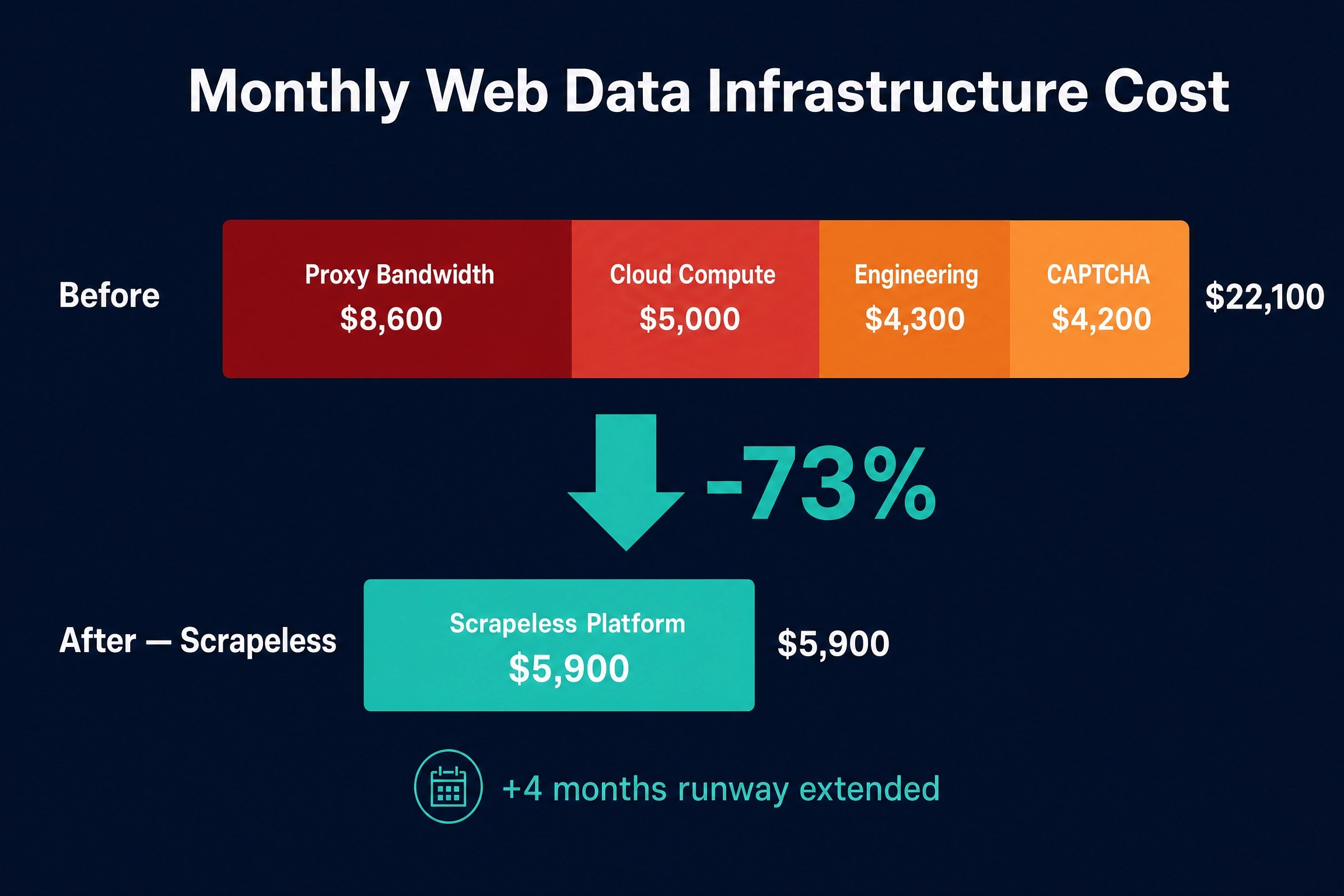
The $16,200/month savings translated directly to runway. At their current burn rate, the cost reduction extended the company's runway by four months — from 11 months to 15 months. For a Series A startup preparing for their next raise, those four months were not a financial abstraction. They were the difference between closing the round with leverage and closing it under pressure.
The engineering reallocation was arguably more valuable than the dollar savings. The two engineers who had been spending a combined 120 hours/month on scraping infrastructure were fully redeployed to product development. In the first 90 days after migration, they shipped three features that had been stuck in the backlog for months: an analytics dashboard, a CRM integration, and a multi-language research capability. Two of those features directly contributed to closing enterprise deals.
Success Rate: 61% → 98.7%
The scraping success rate — defined as the percentage of requested pages that returned valid, parseable, complete data — climbed from 61% to 98.7% across all sources.
The gains were most dramatic on the hardest targets. Sites protected by Cloudflare, DataDome, or custom bot-detection systems had been the bane of the in-house stack. After the migration, even the most heavily protected targets exceeded 95%.
| Target category | Before | After | Improvement |
|---|---|---|---|
| Corporate career pages | 82% | 99.4% | +17.4 pp |
| Public company directories | 79% | 99.1% | +20.1 pp |
| Review & rating platforms (Cloudflare) | 48% | 97.8% | +49.8 pp |
| Funding & investor databases (custom anti-bot) | 41% | 97.2% | +56.2 pp |
| Professional networks (aggressive anti-bot) | 38% | 96.1% | +58.1 pp |
| News & media sites (DataDome) | 52% | 98.3% | +46.3 pp |
| Weighted average (all sources) | 61% | 98.7% | +37.7 pp |
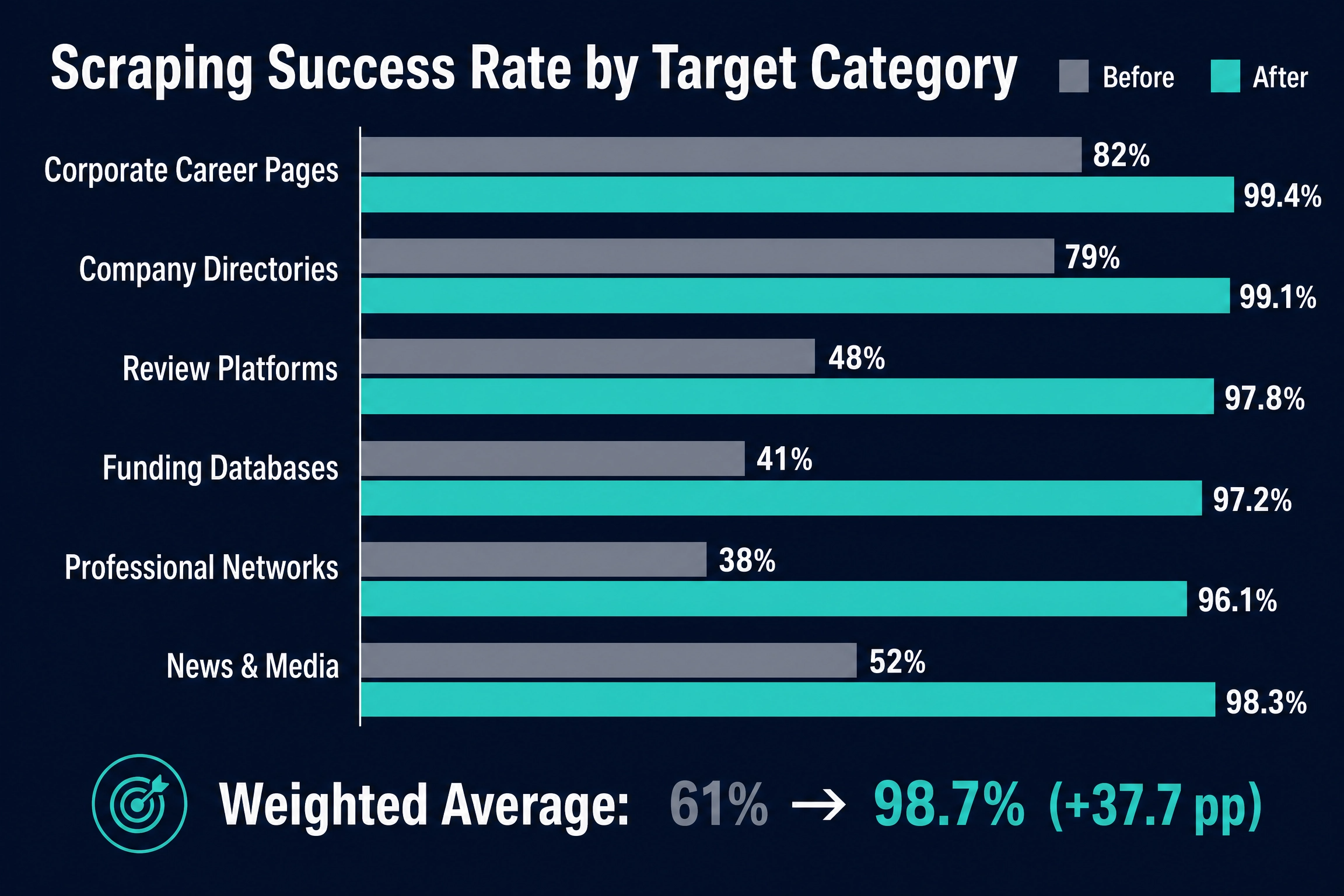
A 98.7% success rate does not just mean more data comes back. It means the agent's output quality goes up — fewer gaps in the research brief, fewer "data unavailable" fields, fewer cases where the outreach sequence fires on incomplete intelligence. The company's customer NPS score increased by 18 points in the quarter following the migration, and the CTO attributes a significant portion of that to the data completeness improvement.
"At 61%, every demo was a gamble — would the data come back, or would we have to explain why half the fields were empty? At 98.7%, we stopped apologizing and started selling."— Head of Product, Top 10 AI Agent Startup
Launch Timeline: 16 Weeks → 5 Weeks (3x Faster)
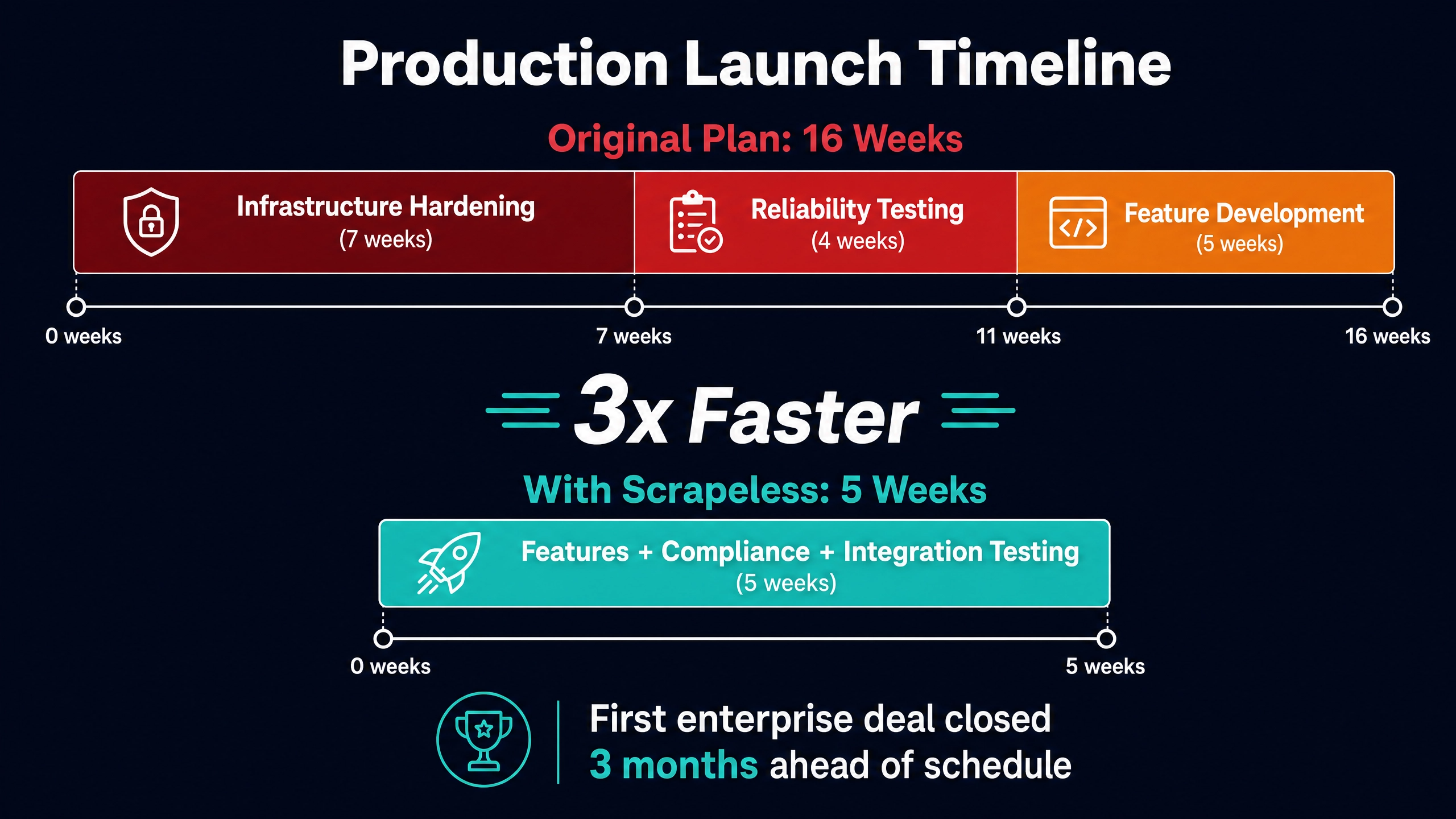
Before the migration, the team had estimated 16 weeks to reach production-ready status for the enterprise tier — the version with SLA guarantees, SOC 2 compliance documentation, and the uptime commitments that Fortune 500 procurement teams require.
The original 16-week estimate broke down as: 7 weeks of scraping infrastructure hardening and reliability engineering, 4 weeks of end-to-end testing under production load, and 5 weeks of feature development and compliance documentation.
With Scrapeless handling the entire infrastructure layer, the 7 weeks of hardening evaporated. The 4 weeks of reliability testing compressed to 1 week — because the reliability was already there. The team spent the remaining 4 weeks on features and compliance, plus one additional week of integration testing. Total: 5 weeks. Three times faster than the original plan.
The compressed timeline had a direct revenue impact. The company's first enterprise customer — a Fortune 500 technology company — signed a six-figure annual contract in January 2026, nearly three months ahead of the original roadmap. The deal would not have closed without the production SLA that the accelerated release enabled. Two more enterprise deals followed in Q1.
What Changed Beyond the Numbers
The quantitative results — 73% cost reduction, 98.7% success rate, 3x faster launch — are the metrics that show up on the board deck. The team points to four qualitative changes that mattered just as much for the company's trajectory.
The 3 AM pages stopped. Before Scrapeless, the engineering team rotated on-call duty for the scraping infrastructure. Anti-bot system updates, proxy pool degradation, CAPTCHA service outages — any of these could trigger a middle-of-the-night alert. In the six months since the migration, the team has received zero pages related to web data infrastructure. Zero. The on-call rotation now covers only the application layer, which is what it should have covered all along.
Debugging became visual. Session Replay replaced log-file archaeology. When an extraction fails, the engineer watches the 30-second replay of the actual browser session — every navigation, every rendered frame, every network request. Average time-to-diagnosis dropped from 3–4 hours to under 10 minutes. The team estimates this saves 60+ engineering hours per quarter.
The product roadmap flipped from defensive to offensive. Before the migration, roughly 60% of the engineering backlog was infrastructure-related: "fix proxy rotation for Site X," "update fingerprint for Site Y," "investigate CAPTCHA failure spike." After the migration, 100% of the backlog is product-related. In the six months since, the agent has expanded from 12 data sources to 23 — a pace that would have been physically impossible under the old model.
Investor conversations changed. The CTO presented the migration results at the next board meeting. The 73% cost reduction and the 4-month runway extension got the board's attention. But what really shifted the conversation was the engineering velocity chart: features shipped per sprint doubled in the quarter after migration. One board member later told the CEO it was "the most compelling infrastructure decision I've seen a portfolio company make."
Architecture: Before and After
The architectural simplification tells the story as clearly as the numbers.
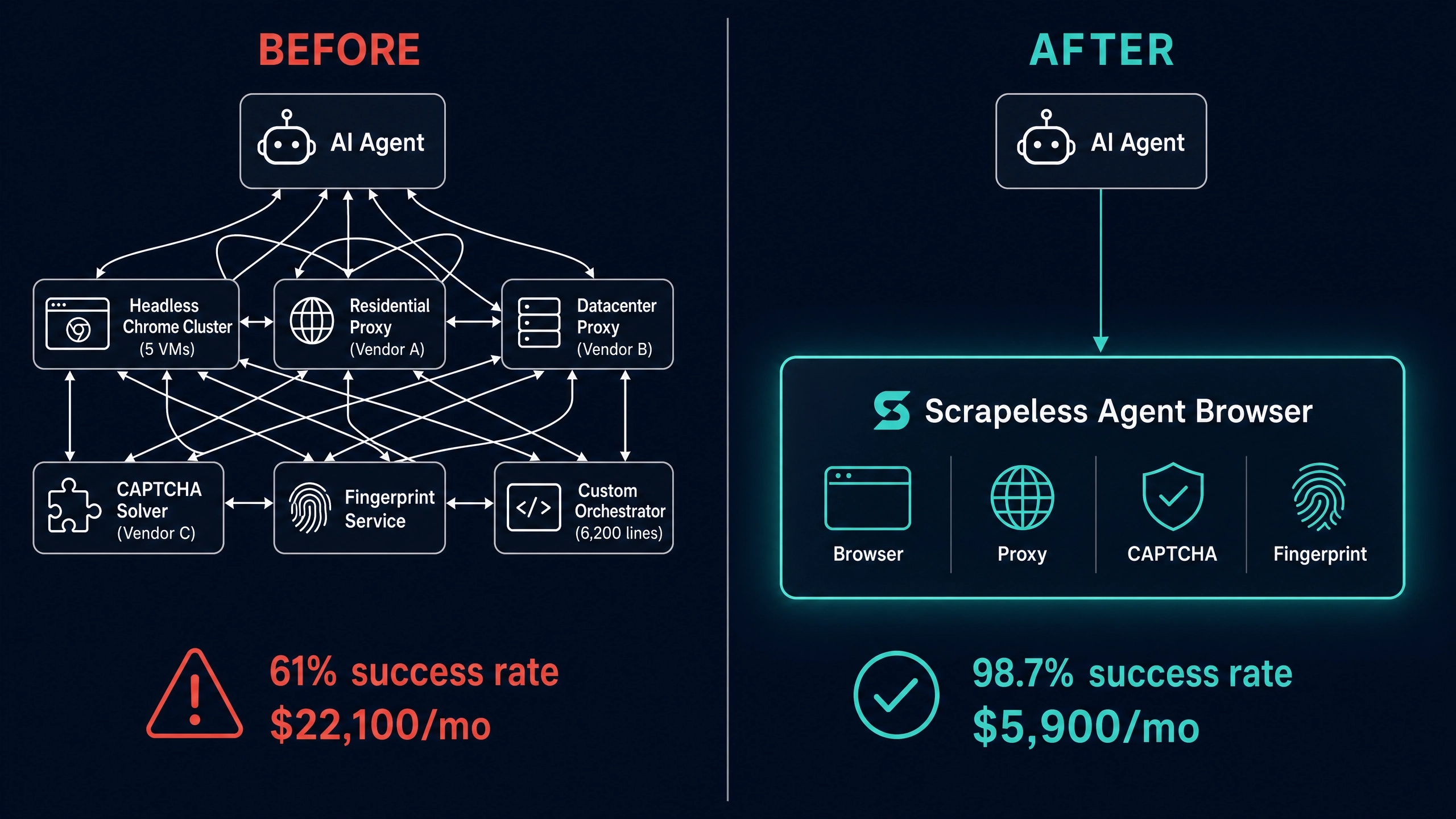
Before: The agent's web access layer consisted of six components managed by the startup's engineering team — a headless Chrome cluster (5 VMs), a residential proxy pool (Vendor A), a datacenter proxy (Vendor B), a CAPTCHA-solving API (Vendor C), a fingerprint rotation service, and a custom orchestration layer (6,200 lines of Python). The orchestration layer was the single largest source of production incidents, accounting for 70% of all scraping-related pages.
After: The agent connects to a single Scrapeless Agent Browser CDP endpoint. Proxy rotation, browser fingerprinting, CAPTCHA solving, JavaScript rendering, and session persistence all happen on the Scrapeless side. The 6,200-line orchestration layer was replaced by 160 lines of connection configuration. The startup manages zero browser infrastructure. The five VMs were decommissioned. The three vendor contracts were terminated.
One endpoint. One API key. One invoice. Everything else is product.
Looking Ahead
Six months after the migration, the company closed an oversubscribed Series A extension. The pitch deck included a slide titled "Infrastructure Leverage" that showed the before-and-after metrics from this case study. Three investors cited it as a factor in their decision.
The team is now building the next generation of the agent on top of Scrapeless's MCP server integration, which exposes every Scrapeless product as a tool the agent can invoke through natural language. Instead of hardcoding extraction logic for each new data source, the agent describes what it needs — and the Scrapeless tool surface handles the how. The CTO estimates this will cut the time to add a new data source from 2 weeks to 2 days.
The company's target for end of year: 50 data sources, 500 enterprise accounts, and a Series B that values the company at 10x the current round. The scraping infrastructure that once threatened to sink the company is no longer on the risk register. It is not even on the architecture diagram.
"If you're building an AI agent that needs to see the web, stop building the browser. We wasted eight months and a quarter million dollars learning that lesson. You don't have to."— CTO, Top 10 AI Agent Startup
Ready to Build Your AI Agent on Production-Grade Web Infrastructure?
Join our community to claim a free plan and connect with developers building AI agent data pipelines: Discord · Telegram.
Sign up at app.scrapeless.com for free Agent Browser runtime and see what happens when your agent stops fighting the web and starts using it.
FAQ
Q: What is Scrapeless Agent Browser, and how is it different from running headless Chrome?
Scrapeless Agent Browser is a cloud browser engineered for AI agents and large-scale automation. Unlike a self-hosted headless Chrome instance, it includes built-in anti-detection fingerprinting, automatic CAPTCHA solving, residential IP rotation across 195+ countries, and session persistence — all behind a standard CDP endpoint. You connect with Puppeteer or Playwright the same way you would connect to a local browser, but the anti-bot handling, proxy management, and browser infrastructure are fully managed. The startup in this case study replaced five VMs and three vendor contracts with a single connection string.
Q: How long does it take to migrate from an existing headless browser setup?
The startup in this case study completed their migration in a single afternoon. If your automation scripts already use Puppeteer or Playwright, the core change is replacing the WebSocket endpoint URL. The anti-detection, proxy, and CAPTCHA layers that you currently manage separately are handled by Scrapeless, so the migration typically involves deleting code rather than writing it. This team deleted 6,200 lines and added 160.
Q: What kind of cost savings can an AI agent company realistically expect?
It depends on your current stack and volume, but the pattern is consistent: companies that manage separate proxy, CAPTCHA, and browser infrastructure see 50–80% cost reductions after consolidating onto Scrapeless. The startup in this case study saved 73%, which extended their runway by four months. The engineering reallocation — two full-time engineers moved from maintenance to product development — was worth even more than the dollar savings. See the pricing page for current rates.
Q: Is web scraping for AI agent data collection legal?
Web scraping of publicly available data is generally permissible, but the legal landscape varies by jurisdiction and use case. Scrapeless only accesses publicly available data and operates in strict compliance with applicable laws, regulations, and website privacy policies. Consult legal counsel for guidance specific to your use case and jurisdiction.
Q: Can Scrapeless handle sites protected by Cloudflare, DataDome, or other anti-bot systems?
Yes. Scrapeless Agent Browser clears Cloudflare, reCAPTCHA, AWS WAF, and other major anti-bot systems automatically. The browser fingerprinting, TLS signature, and proxy rotation are coordinated at the platform level — which is why this startup saw their success rate on the hardest protected sites jump from 38–52% to above 96%.
Q: Does Scrapeless work with AI agent frameworks like Browser-Use, LangChain, or Stagehand?
Yes. Scrapeless Agent Browser exposes a standard CDP endpoint compatible with Puppeteer, Playwright, Selenium, Browser-Use, Stagehand, and Crawl4AI. The platform also offers native integrations with LangChain, Dify, n8n, and MCP-compatible clients including Claude Code, Cursor, and Cline. The MCP server integration — which this startup is now building their next-generation agent on — exposes every Scrapeless product as a tool callable through natural language. See the integration documentation for setup guides.
At Scrapeless, we only access publicly available data while strictly complying with applicable laws, regulations, and website privacy policies. The content in this blog is for demonstration purposes only and does not involve any illegal or infringing activities. We make no guarantees and disclaim all liability for the use of information from this blog or third-party links. Before engaging in any scraping activities, consult your legal advisor and review the target website's terms of service or obtain the necessary permissions.





