Build a Python SERP Monitor With SQLite and CSV Reports

Lead Scraping Automation Engineer
TL;DR:
- A Python SERP monitor records a domain's best position in returned Google organic results. This project checks the first returned desktop page, with explicit location and language settings.
- SQLite preserves the search conditions and observation history. Keep the database between collections so later reports can select a comparable baseline.
- CSV reports separate ranking changes from collection problems. A missing target, an empty result array, and an unsuccessful request have different meanings.
- Saved report versions preserve earlier comparisons. Export reads stored report rows without sending another search request.
- The retained example is one baseline, not a long-term trend. Three keyword observations produced three report rows, with no previous ranks to compare.
- Free to start. Sign up at app.scrapeless.com and use the introductory credit offer to try a small watchlist.
Introduction: A Rank Needs Its Search Context
A Google ranking observation belongs to a query, location, language, device, and returned result set. Recording a position without those conditions makes the next comparison difficult to interpret.
This tutorial builds a Python SERP monitor around Scrapeless Google Search API. You configure a keyword watchlist and target domain, collect organic results, save observations in SQLite, and export a CSV report. The implementation uses Python's standard library and runs on macOS or Linux.
The retained case checks scrapeless.com for scrapeless, web scraping api, and google search api. Its first baseline contains one match at position 3 and two keywords without a match in the returned results. For the underlying actor request model, the Scrapeless Scraper API walkthrough provides additional context.
Pipeline at a Glance
The Python SERP monitor turns each configured query into a validated observation, then stores the evidence and a versioned report.
| Stage | Operation | Output |
|---|---|---|
| Collect | Request the first desktop organic result page | Search response or saved task state |
| Validate | Check structure, positions, and destination links | Usable observation or a data-quality state |
| Match | Compare normalized hostnames | Best returned position for each target |
| Store | Retain request context and observation data | data/rankings.sqlite |
| Report | Select a comparable baseline and save report rows | Versioned report and CSV file |
The example report is output/60c13c8bd553-v1.csv. Your run ID, result counts, and output filename can differ. The default watchlist has one target domain, so each of its three keywords contributes one CSV row.
Why Scrapeless Google Search API
Scrapeless Google Search API supplies structured search results, including organic result positions and links, for the monitor to validate and store.
The Google Search API, within the Scraping API product family, lets the request specify country, language, search domain, and location. The application can focus on domain matching and historical comparisons instead of maintaining a search-page DOM parser.
This project reads organic_results; it does not combine ads, maps, or AI citations into an organic rank. It also does not automatically paginate. Review Scrapeless pricing before choosing the watchlist and collection frequency: collect makes service requests, while history and export operate on local records.
Prerequisites
The monitor needs Python 3.9 or newer on macOS or Linux, built-in SQLite and HTTPS support, and a Scrapeless API key with product access and credits.
- Use a terminal and plain-text editor. A spreadsheet application is useful for reading the CSV.
- Keep the database on local storage. The implementation uses POSIX file locks.
- Allow HTTPS access to the project download, Scrapeless dashboard, and API.
- Supply your own API key for live collection. The historical output below is retained from the source case; a new collection will produce its own results.
No third-party Python packages or separate database service are required. Python exposes SQLite through its standard-library SQLite interface.
Check the runtime before downloading the project:
bash
python3 --version
python3 -c "import sqlite3, ssl, urllib.request, csv, fcntl; print('Required standard-library modules: OK')"
Step 1 — Download and Open the Project
The Python SERP monitor implementation supplies the collector, configuration, and report commands used below.
Open the repository, choose Code → Download ZIP, and extract the archive. If access is restricted in your environment, use an account with repository access.
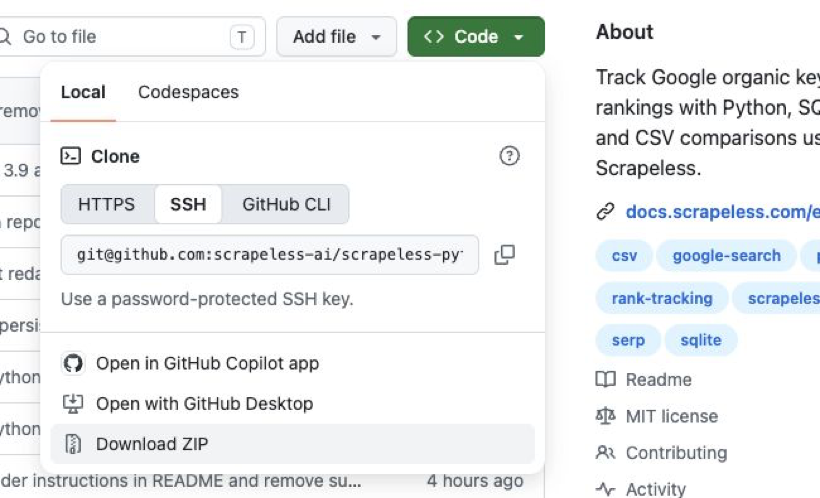
Download the project archive from the repository's Code menu.
Open the extracted directory and confirm that serp_monitor.py, tutorial.py, starter.html, and config.json are present.
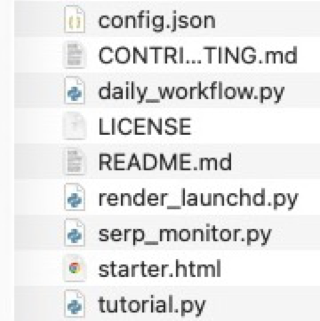
The extracted project directory. Keep the original filenames.
On macOS, type cd followed by a space in Terminal, drag the extracted folder from Finder into the terminal, and press Return. Run the remaining commands from that project directory.
bash
python3 serp_monitor.py --helpThe command lists collect, history, export, and demo. Git and a virtual environment are optional for this download-and-run route.
Step 2 — Save the Key and Fix the Search Scope
The API key authenticates requests, while config.json defines the observations that can later be compared.
In the Scrapeless dashboard, open Settings → API Key Management and use an existing valid key. Create one only if needed. The API key management instructions explain the account setup.
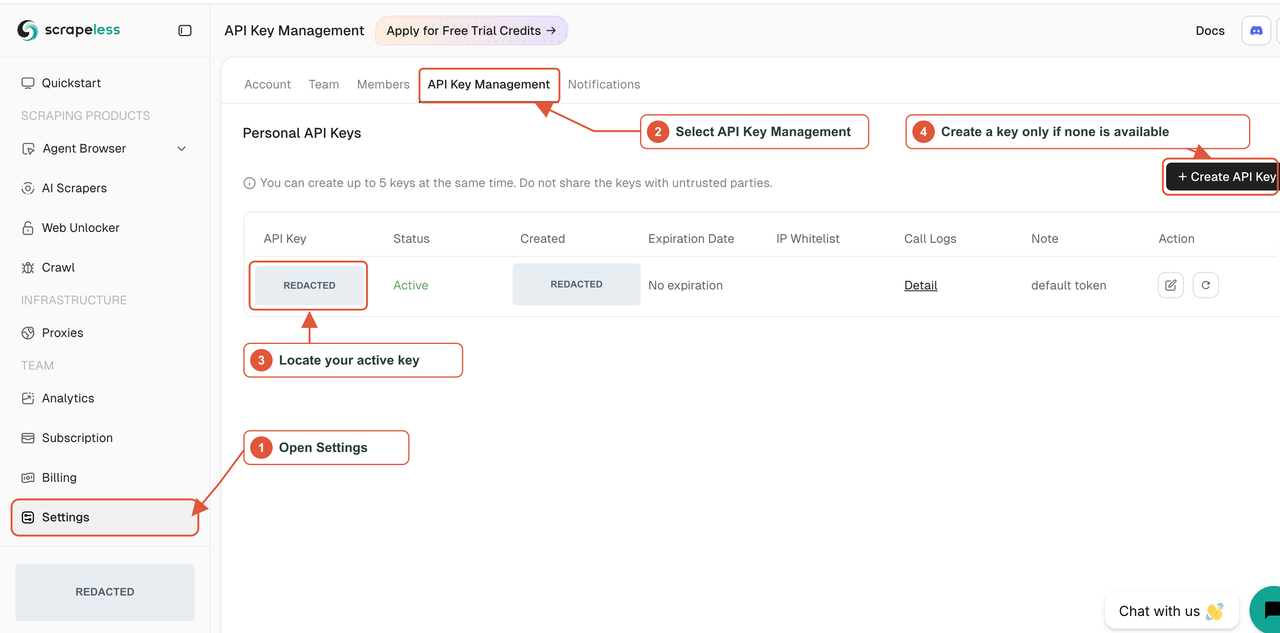
The key-management entry points. Credentials and account-specific values are concealed.
Create the local key file without replacing an existing one, restrict its permissions, and open it in the macOS editor:
bash
cp -n .env.example .env
chmod 600 .env
open -e .env
Note: Replace the placeholder with your own key in the local file. Live collection requires this credential and available account credits.
dotenv
SCRAPELESS_API_KEY=YOUR_SCRAPELESS_API_KEYAn existing SCRAPELESS_API_KEY environment variable takes precedence over .env. Keep the file private and exclude it from screenshots and shared archives.
Open config.json in a plain-text editor and preserve or replace the following watchlist:
json
{
  "keywords": ["scrapeless", "web scraping api", "google search api"],
  "target_domains": ["scrapeless.com"],
  "gl": "us",
  "hl": "en",
  "google_domain": "google.com",
  "location": "Austin, Texas, United States"
}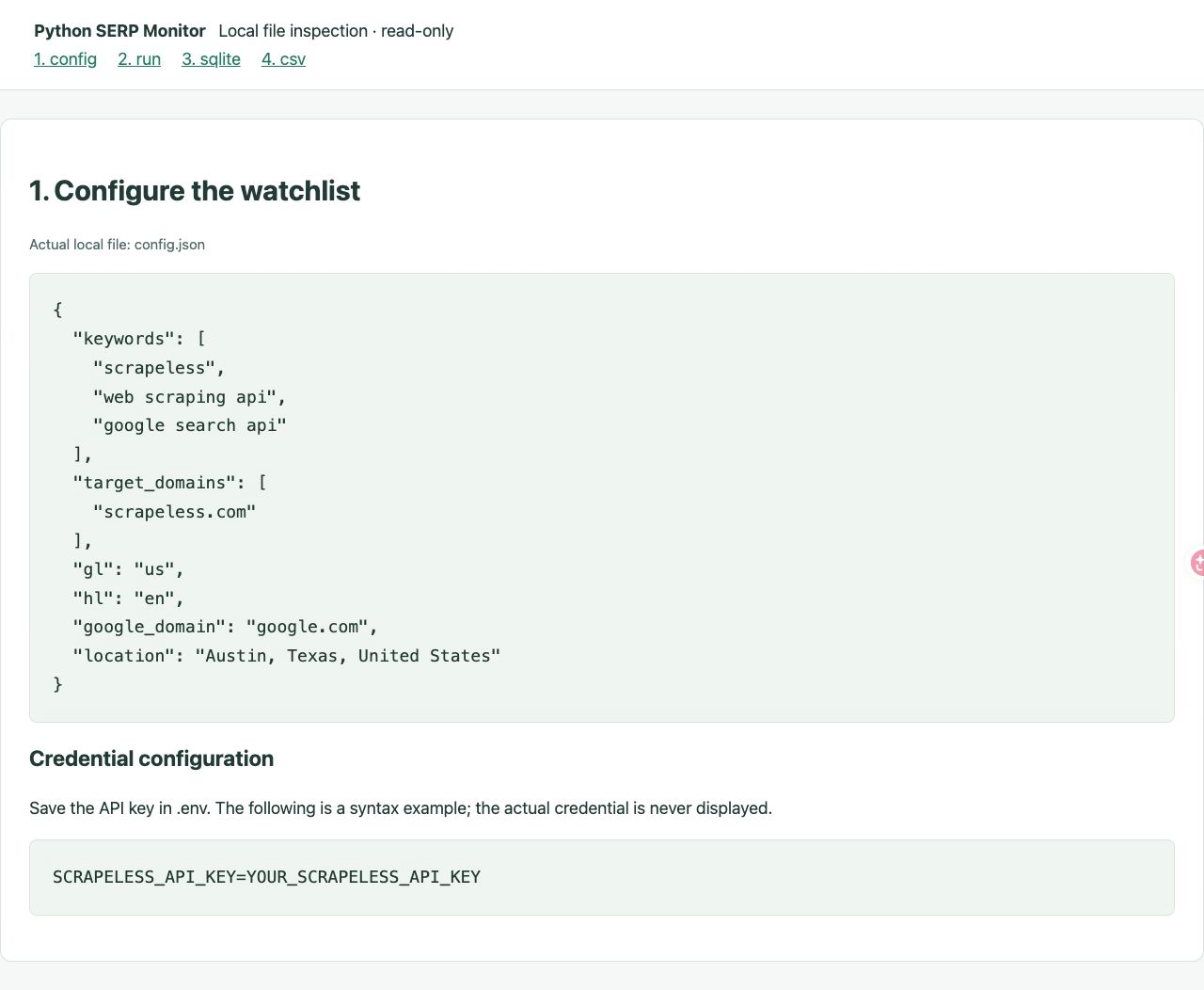
The case configuration. The credential area shows a placeholder, not the real key.
target_domains identifies the hosts to find in the response; it does not limit Google to returning those hosts. gl, hl, google_domain, and location set the search country, language, domain, and location. The project fixes the device to desktop and pagination start to 0.
Keep these inputs consistent for later comparisons. A different location or language starts a different search scope.
Step 3 — Collect the First Observation
The collect command requests the configured searches, stores observations, and writes the report.
Note: This command requires your Scrapeless API key and credits. It sends real searches. The output shown afterward is retained from the original case, not a guaranteed response to a new run.
bash
python3 serp_monitor.py collect --config config.json --env-file .envThe retained run produced this output:
text
Run: 60c13c8bd553
scrapeless: 9 organic results saved
web scraping api: 7 organic results saved
google search api: 9 organic results saved
CSV: output/60c13c8bd553-v1.csv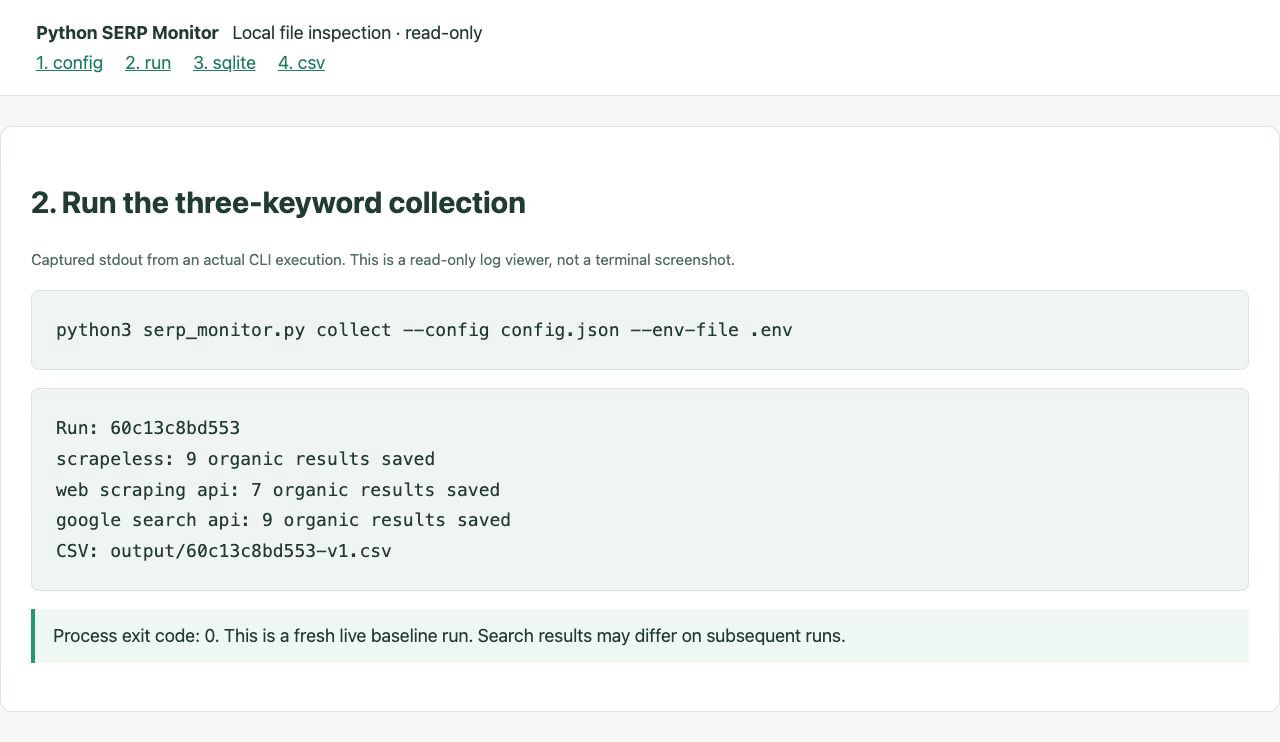
A read-only log view, not a terminal screenshot. The source command completed with exit code 0.
The run saved observations in data/rankings.sqlite and wrote the CSV path shown above. These counts describe saved organic results, not the target domain's rank.
Step 4 — Validate Results and Match the Target Hostname
The collector validates the returned organic array before treating a domain match or absence as a successful observation.
Understand the Request and Task State
For the first keyword, the project constructs this request body. It is a request example, not a second command to execute:
json
{
  "actor": "scraper.google.search",
  "input": {
    "q": "scrapeless",
    "gl": "us",
    "hl": "en",
    "google_domain": "google.com",
    "location": "Austin, Texas, United States",
    "start": 0,
    "device": "desktop"
  }
}
The project sends the body to POST https://api.scrapeless.com/api/v1/scraper/request with the key in x-api-token. The Google Search API request lifecycle distinguishes an HTTP 200 result from an HTTP 201 response containing a taskId.
The collector saves a returned task ID before polling that existing task. A submitted task and a completed observation are different states. If submission has an uncertain outcome and no task ID was saved, the application leaves that uncertainty visible instead of silently creating another search.
An HTTP response code alone does not prove that the application received usable ranking data. The HTTP semantics specification defines protocol status; the collector must still validate the response body.
Check the Organic Result Array
The monitor reads position, link, and title from organic_results. It preserves the returned position rather than replacing it with an array index.
Positions must be distinct positive integers, and links must yield valid HTTP(S) destination addresses. An empty organic array receives empty_unverified and stays out of rank comparisons. That state prevents an unconfirmed empty response from being interpreted as a disappeared target.
Some Google results use /url or /goto wrapper links. The collector extracts an explicit destination when available. For opaque supported wrappers, it checks redirect information within a restricted Google scope using an independent request without the Scrapeless key; it does not visit the final target site. Unresolved links remain an error rather than being silently removed from a supposedly complete observation.
Start Scraping with Scrapeless
Power up your web scraping and automation workflow with Scrapeless!
Sign up today and get $5 in free credit — no credit card required.Claim your free credit now in the Scrapeless Dashboard.
Match Hostnames, Not URL Substrings
A target domain must match the parsed hostname or one of its subdomains. Substring matching would incorrectly accept example.com.other.org for example.com. The distinction follows the separate authority and path components in the URI syntax specification.
Save the following as match_example.py beside serp_monitor.py. It uses hand-written illustrative inputs and makes no API request.
python
from urllib.parse import urlsplit
from serp_monitor import normalized_domain


def best_match(organic, domain):
    domain = normalized_domain(domain)
    for item in sorted(organic, key=lambda row: row["position"]):
        host = normalized_domain(urlsplit(item["link"]).hostname or "")
        if host == domain or host.endswith("." + domain):
            return item
    return None


organic = [
    {"position": 1, "link": "https://example.com.other.org/page"},
    {"position": 3, "link": "https://www.example.com/page"},
]
match = best_match(organic, "example.com")
print(match["position"] if match else None)
Run the local example:
bash
python3 match_example.pyIt prints 3. The first host belongs to other.org; the second belongs to the target domain. If several results match, the lowest returned position wins.
Without a match, the rank stays blank. Blank means the domain was not found in this returned set, not position zero or proof of absence from all Google results.
Step 5 — Inspect the SQLite History
SQLite keeps the request context and saved observations needed for later comparisons, including states that a flat CSV cannot fully describe.
| Table | Stored information | Purpose |
|---|---|---|
runs |
Run identity, mode, configuration, completion state | Group a collection |
snapshots |
Keyword, input, status, task details, result data, request timing | Preserve observations and task state |
report_versions |
Saved comparison rows and selected baseline information | Keep report versions reproducible |
Save this complete script as inspect_history.py in the project directory. It opens the database read-only and prints the organic count for each snapshot in the latest live run.
Note: This script requires an existing database from collection. It does not submit searches or create a missing database.
python
import json
import sqlite3
from pathlib import Path

uri = Path("data/rankings.sqlite").resolve().as_uri() + "?mode=ro"
with sqlite3.connect(uri, uri=True) as db:
    rows = db.execute("""
        SELECT keyword, status, organic_json
        FROM snapshots
        WHERE run_id = (
            SELECT id FROM runs
            WHERE mode = 'live'
            ORDER BY started_at DESC LIMIT 1
        )
        ORDER BY id
    """)
    for keyword, status, organic_json in rows:
        count = len(json.loads(organic_json or "[]"))
        print(keyword, status, count)
Run python3 inspect_history.py after collection. The retained database query returned:
text
scrapeless success 9
web scraping api success 7
google search api success 9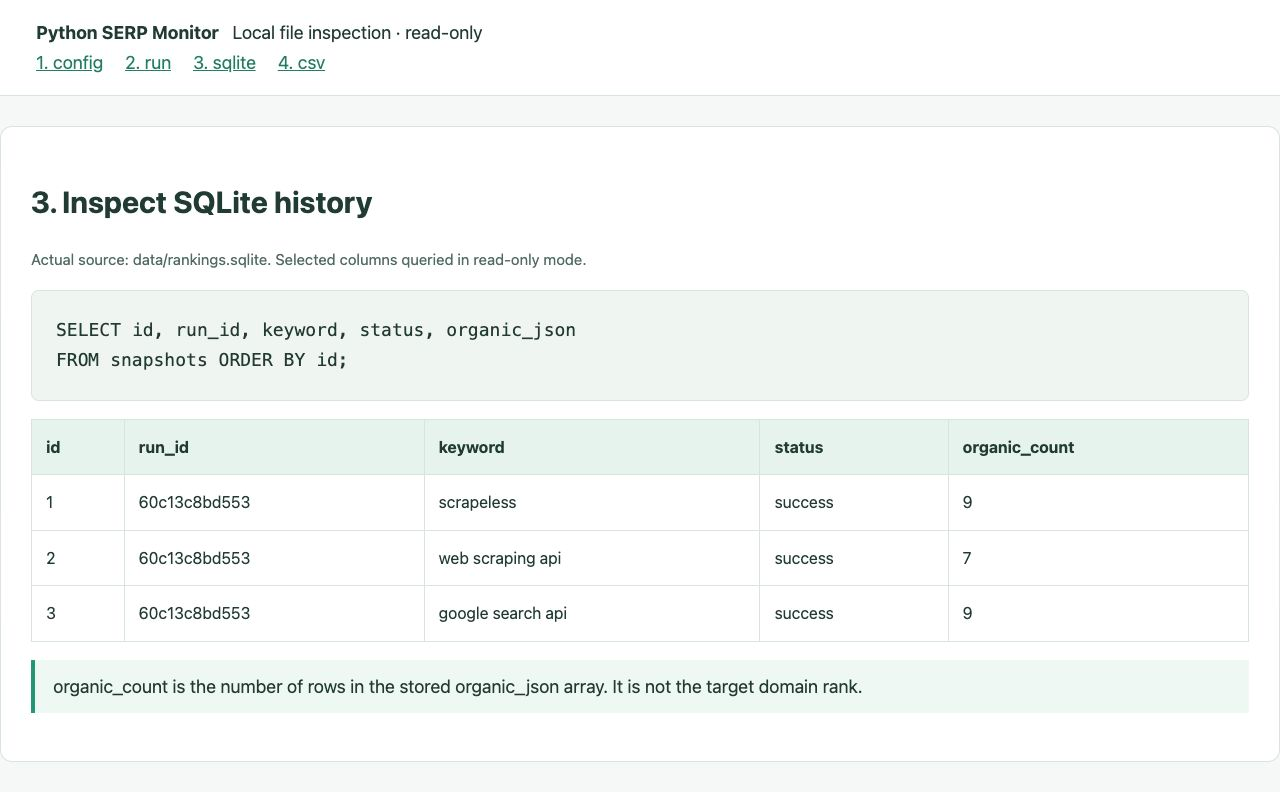
Selected fields from the retained database. The displayed organic count is calculated from the stored array.
success describes collection. It is distinct from the report's baseline or baseline_absent status. Preserve the same database for later observations; a CSV alone cannot restore task history.
Step 6 — Read and Re-Export the CSV
The CSV combines the target match, result coverage, and comparison state in one row for each keyword and target.
Open the run's CSV in a spreadsheet application. You can also list the saved runs:
Note: The local history and export commands require the database retained from collection. They make no API calls.
bash
python3 serp_monitor.py history --db data/rankings.sqlite
python3 serp_monitor.py export --output output/saved-report.csv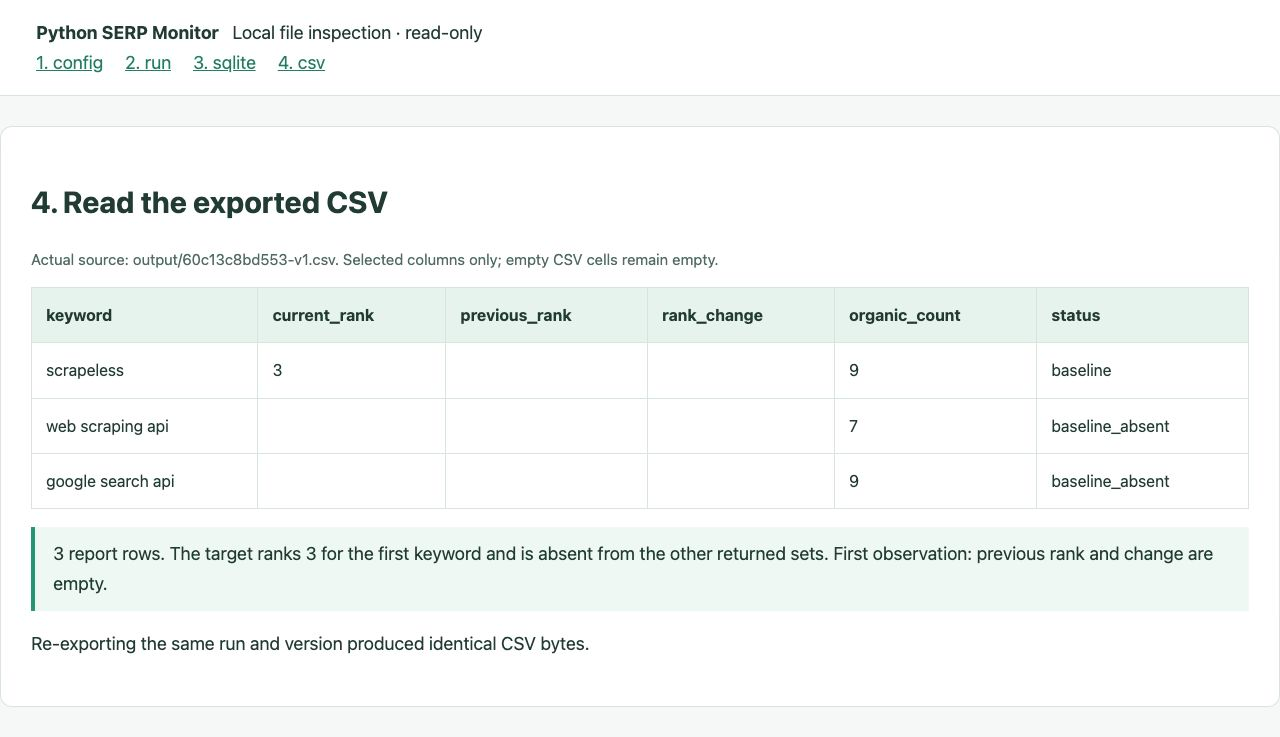
Selected CSV columns in a read-only viewer, not a spreadsheet-application screenshot. Missing ranks remain blank.
The retained first baseline contains these results:
| Keyword | Current rank | Organic results | Report status |
|---|---|---|---|
scrapeless |
3 | 9 | baseline |
web scraping api |
— | 7 | baseline_absent |
google search api |
— | 9 | baseline_absent |
The dashes represent blank CSV cells. All three observations succeeded, but only the first keyword matched the target. There was no previous comparable observation, so previous_rank and rank_change were blank.
The report also retains fields for tracing its snapshots, baseline, search settings, and request timing. CSV export uses UTF-8 with a byte-order mark and escapes formula-like text cells. The distinction matters when importing externally supplied text into spreadsheets, as described in OWASP's CSV injection guidance.
Compare a Later Collection Without Rewriting the Baseline
A later report calculates movement only when the stored observations have matching search scope and a reliable ordering.
At the next observation time, return to the same project directory and keep .env, config.json, and data/rankings.sqlite. Run the collect command from Step 3 again. This starts a new paid collection; it is not necessary just to read the existing report.
Establish Whether the Observations Are Comparable
The earlier result must have been received no later than the current request was submitted. Matching query settings alone are insufficient when request intervals overlap or older records lack trustworthy timing.
In those cases, the report keeps the current rank but marks the comparison not_comparable. These are client submission and receipt times; the project does not claim to know the provider's exact collection time.
When both comparable observations contain a match, the calculation is rank_change = previous_rank - current_rank. An illustrative move from position 5 to position 3 produces +2, meaning an improvement of two positions. This arithmetic example is not a second live observation from the case.
Keep Absence Separate From Collection Quality
| Report state | Meaning |
|---|---|
baseline / baseline_absent |
First usable comparison baseline, with or without a target match |
up / down / unchanged |
Both comparable observations matched; position improved, declined, or stayed equal |
new / lost / still_absent |
Match present only now, only before, or in neither returned set |
pending / error |
No usable completed current observation |
empty_unverified |
Empty organic array, excluded from ranking baselines |
not_comparable |
Valid current result, but ordering does not support a change calculation |
lost is limited to the returned set. Result counts can change between observations, so read coverage alongside position before drawing a conclusion.
Export the Saved Report Version
The application stores report rows and their selected baselines when it generates a version. Later observations do not change the rows already saved in that version.
Note: Replace
YOUR_RUN_IDwith an existing run ID. This command requires its saved version in the local database and makes no API call.
bash
python3 serp_monitor.py export --run-id YOUR_RUN_ID --version 1 --output output/saved-v1.csvThe retained case's version-1 re-export produced identical CSV bytes. Export writes a temporary file before replacing the destination. An explicitly chosen output path can be overwritten, while the saved database version remains available.
Troubleshooting the Local Workflow
Most setup problems can be traced to the current directory, active credential, or selected database.
| Symptom | What to check |
|---|---|
| Script cannot be found | Run commands from the extracted project directory |
| Missing or invalid key | Replace the placeholder and check environment-variable precedence |
| Insufficient account access or balance | Check the selected service and available credits in the dashboard |
| Empty current rank | Inspect the target hostname and returned organic coverage |
| Unexpected new baseline | Confirm search settings and the database path match the intended history |
empty_unverified |
Inspect response quality before interpreting ranking changes |
not_comparable |
Inspect recorded request intervals and historical timing availability |
Keep the key file and raw database private. Before sharing a report or screenshot, remove credentials and any private targets or URLs.
Conclusion: Preserve the Observation Before Interpreting the Change
This Python SERP monitor connects collection, hostname matching, SQLite history, and CSV reporting in one small workflow. The retained example establishes a baseline for three queries; longer-term conclusions require additional real observations with comparable settings and timing.
Keep the database, read the collection state before the ranking state, and use saved report versions when a comparison must remain reproducible. Those choices make the next collection interpretable.
Ready to Build Your Search Monitoring Pipeline?
Join developers building search workflows on Discord or Telegram.
Sign up at app.scrapeless.com, start with a small watchlist, and retain the search context with every observation.
FAQ
Q: What data should this monitor collect?
Use the monitor for public organic search results and targets you are authorized to analyze. Review the relevant service terms and requirements for your use case before collecting or sharing data.
Q: Does the monitor track every Google result page?
No. This implementation requests the first returned desktop organic page with start: 0. A missing target means no match in that returned set.
Q: Do you need a proxy or an AI agent?
No separate proxy client or AI agent is required by this application. Python calls Scrapeless Google Search API with the account key and configured search inputs.
Q: What happens if Google changes its page markup?
This monitor consumes structured API results instead of selecting Google DOM elements. It still validates the response schema and records unusable data rather than inventing a rank.
Q: How does the monitor handle access errors or an unusable response?
It keeps collection problems separate from target absence. Check credentials, product access, balance, and the recorded response state before interpreting the report.
Q: Can multiple collectors write to the same database?
The application uses a shared database lock to prevent overlapping collection against the same local database. Keep collection sequential and use consistent database paths.
Q: Why can a successful result be marked not_comparable?
The current result can be valid while request ordering is uncertain. Overlapping intervals or missing historical submission times prevent a defensible movement calculation.
Q: Does export spend API credits?
No. export reads a saved report version, and history reads local run records. collect makes search requests.
Q: Does a blank rank mean the website was removed from Google?
No. A blank rank indicates no target match in the returned organic set. It is not a complete index-status assessment.
At Scrapeless, we only access publicly available data while strictly complying with applicable laws, regulations, and website privacy policies. The content in this blog is for demonstration purposes only and does not involve any illegal or infringing activities. We make no guarantees and disclaim all liability for the use of information from this blog or third-party links. Before engaging in any scraping activities, consult your legal advisor and review the target website's terms of service or obtain the necessary permissions.