
Proxy SwitchyOmega: Complete Step-by-Step Tutorial (2025 Update + Scrapeless Proxies)

Advanced Data Extraction Specialist
Switching between multiple proxy profiles can be tedious—especially if you juggle SEO tools, scraping tasks, or geo-specific accounts daily. Proxy SwitchyOmega is one of the most powerful browser extensions for managing proxies efficiently. It’s simple, open-source, and flexible enough to work with modern proxy providers such as Scrapeless Proxies, a developer-grade solution for smart IP rotation and automation.
This step-by-step guide explains how to install, configure, and optimize Proxy SwitchyOmega, and how to pair it with Scrapeless for a truly seamless setup.
Table of Contents
- What is Proxy SwitchyOmega?
- How to Install Proxy SwitchyOmega
- Basic Proxy SwitchyOmega Configuration
- How to Optimize Proxy Settings
- Pairing SwitchyOmega with Scrapeless Proxies
- Troubleshooting Common Issues
- Tips and Tricks for Power Users
- How SwitchyOmega Enhances Privacy and Security
- Final Thoughts
1. What is Proxy SwitchyOmega?
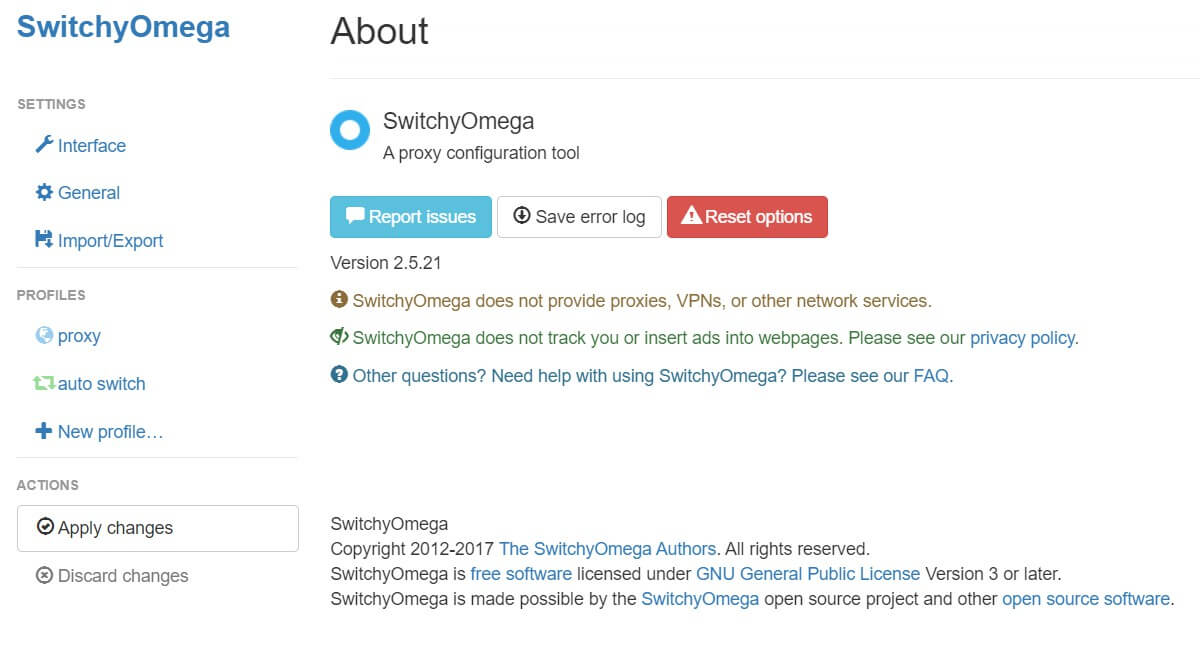
Proxy SwitchyOmega is a free browser extension for Chrome, Firefox, and Edge that simplifies proxy management. It lets you switch between multiple proxy profiles—each with its own IPs, ports, and rules—without diving into browser settings every time.
If you manage social accounts, automate browsing with bots, or test web localization, you already know the pain of frequent proxy changes. SwitchyOmega streamlines that process.
Key Features
- 🌐 Multi-Profile Management: Manage HTTP, HTTPS, and SOCKS5 proxies.
- 🔄 Auto-Switch Mode: Automatically route specific domains through different proxies.
- 🧩 PAC Script Support: Advanced routing logic for complex workflows.
- 💾 Backup & Restore: Save and sync configurations across devices.
- 🔐 Manifest V3-Compatible Forks: Updated versions work with modern Chrome/Edge updates.
💡 Pro Tip: Always use SwitchyOmega with a reputable proxy provider that supports both authentication and rotation—like Scrapeless Proxies, which offers cloud-rotating IPs ideal for SEO, web scraping, and automation.
2. How to Install Proxy SwitchyOmega
Step 1: Visit your browser’s extension store.
Step 2: Click “Add to Browser.” Grant the requested permissions.
Step 3: After installation, look for the 🌍 SwitchyOmega icon beside your address bar. Click it to open the dashboard.
3. Basic Proxy SwitchyOmega Configuration
Once installed, you’ll configure your first proxy profile.
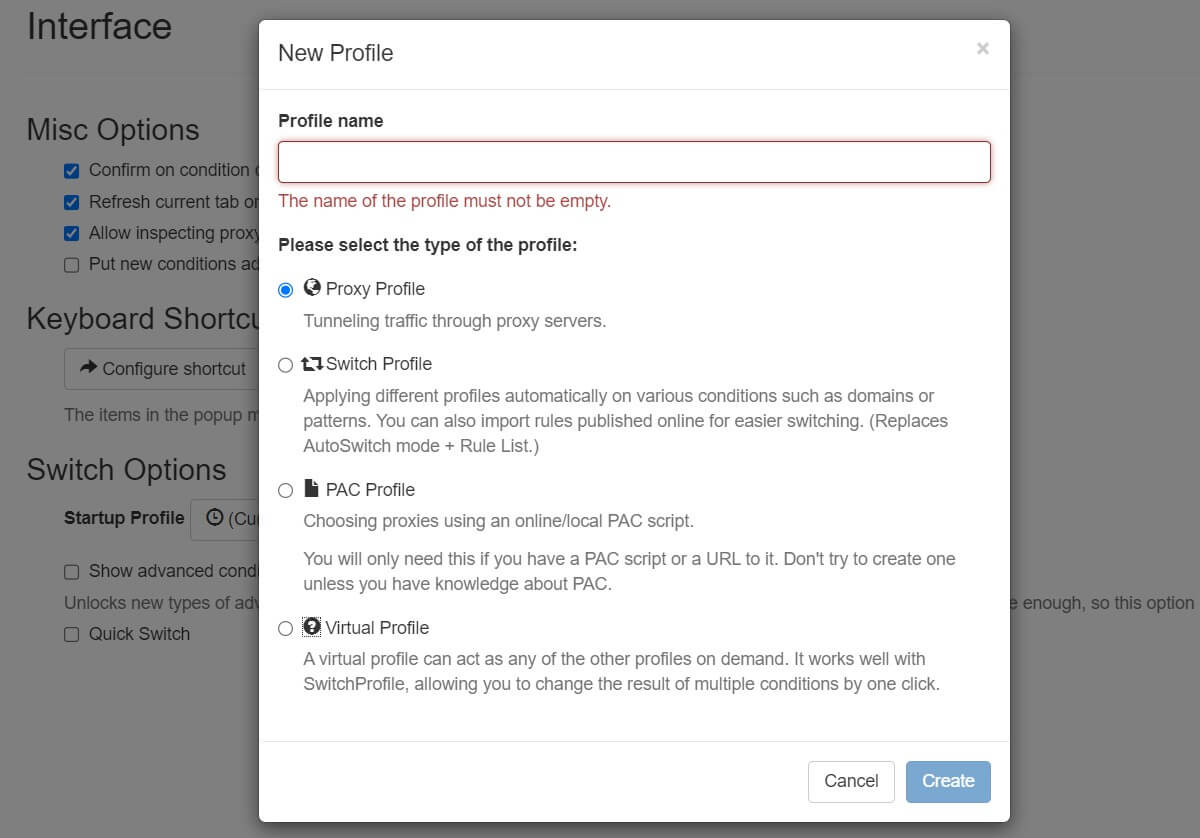
Step 1: Create a Profile
- Click the SwitchyOmega icon → Options.
- Choose New Profile → “Proxy Profile.”
- Name it descriptively (e.g., US Residential or Scrapeless Rotating).
Step 2: Enter Proxy Details
You’ll see input fields for:
- Protocol: HTTP / HTTPS / SOCKS5
- Server: IP or hostname
- Port: Provided by your proxy provider
- Username & Password: For authenticated proxies
Scrapeless allows country targeting (US, UK, DE, etc.) and timed IP rotation, making it a strong fit for automation tools and privacy browsing.
Step 3: Test Your Setup
Switch to your new profile and visit https://whatismyipaddress.com to verify your IP has changed.
4. How to Optimize Proxy Settings
Optimization ensures smoother proxy transitions and better performance.
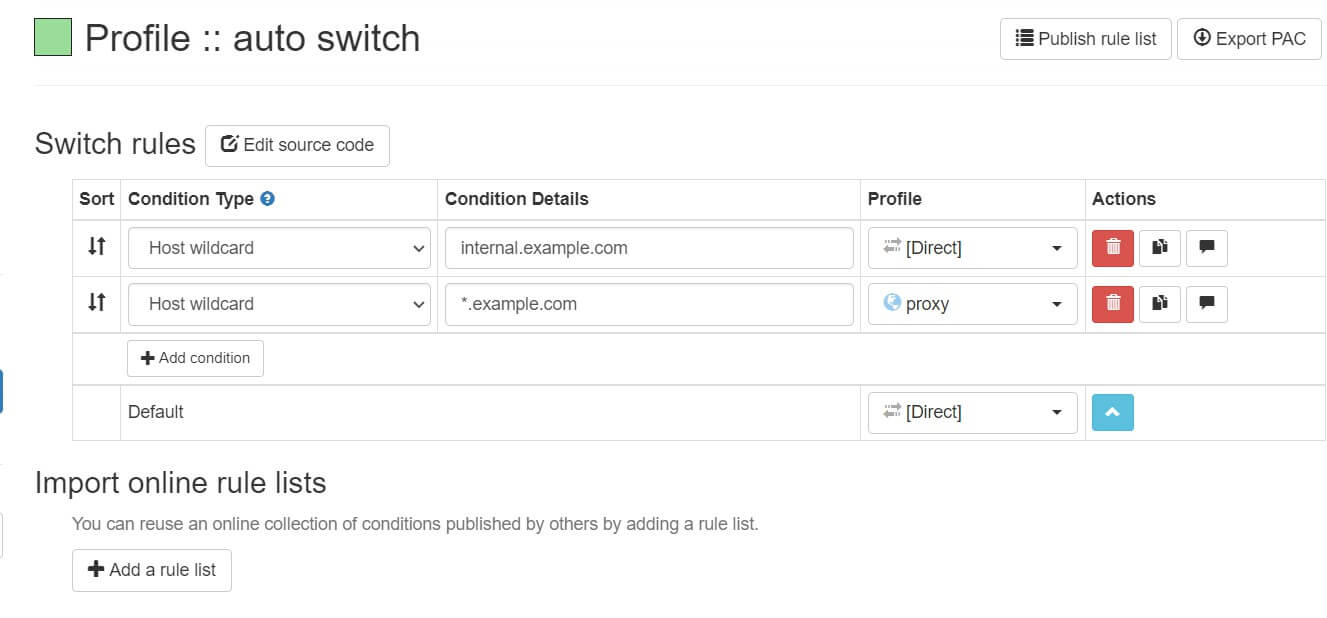
Use Auto-Switch Mode
- Go to Dashboard → Auto Switch.
- Add rules: e.g.,
*.google.com → WorkProxy,*.amazon.com → ScrapelessRotating. - Save and test.
Implement PAC Scripts
For complex routing (e.g., route only specific paths via proxy):
js
function FindProxyForURL(url, host) {
  if (dnsDomainIs(host, "youtube.com"))
    return "PROXY proxy.scrapeless.io:1080";
  return "DIRECT";
}
Paste this in a PAC Profile to automate routing logic.
5. Why Pair SwitchyOmega with Scrapeless Proxies?
Using Scrapeless Proxies with SwitchyOmega gives you enterprise-grade control without extra configuration complexity.
| Feature | SwitchyOmega | Scrapeless Proxies |
|---|---|---|
| Proxy Management | ✅ | ✅ |
| Rotating IPs | ❌ | ✅ (auto-rotation & session control) |
| Country Targeting | ✅ (per profile) | ✅ |
| API Integration | ❌ | ✅ |
| Browser Automation | ✅ | ✅ (Playwright, Puppeteer compatible) |
Scrapeless Proxies are purpose-built for:
- 🌍 SEO Monitoring: Rotate across regions for unbiased SERP checks.
- 🧾 Web Scraping: Avoid bans and blocks using dynamic IP pools.
- 📈 Ad Verification & QA: Simulate real user conditions globally.
- 🧑💻 Automation Tools: Pair with Puppeteer, Selenium, or SwitchyOmega.
👉 Try Scrapeless Proxies: Scrapeless Proxies
6. How to Use Scrapeless Proxies
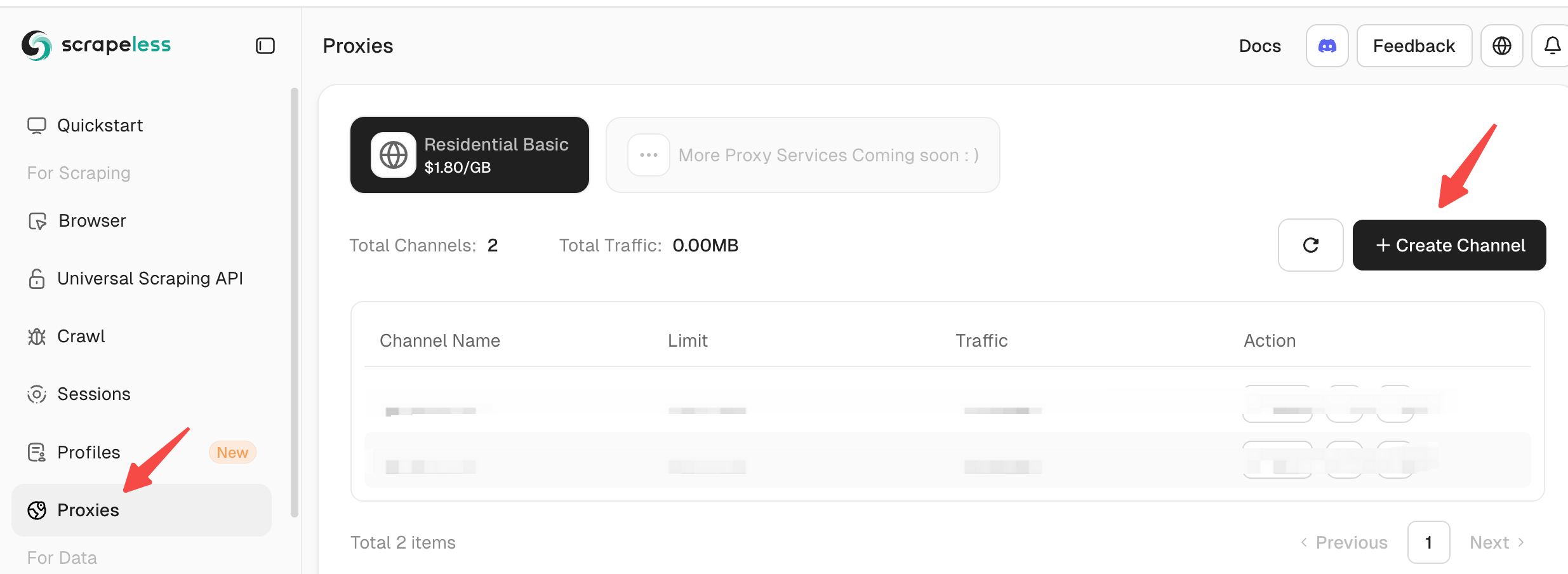
Step 1: Log in to Scrapeless, select "Proxy" in the left panel, and then click "Create Channel" in the right panel.
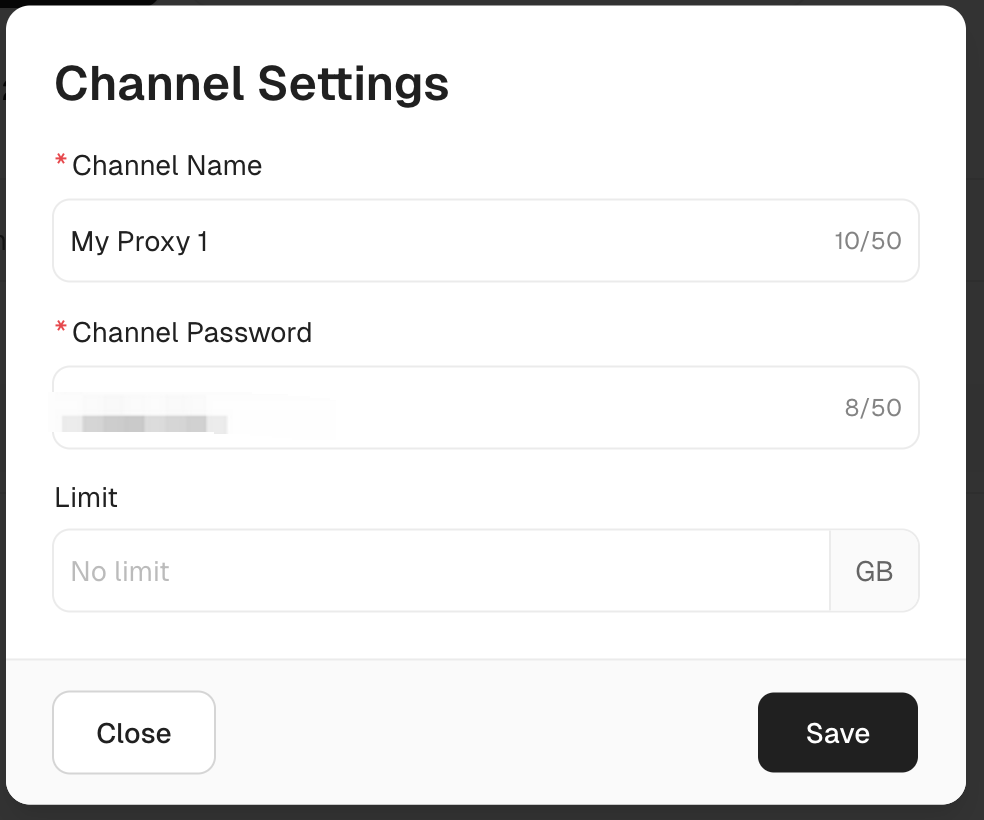
Step 2: Complete the corresponding "Channel Settings". You only need to fill in according to your needs.
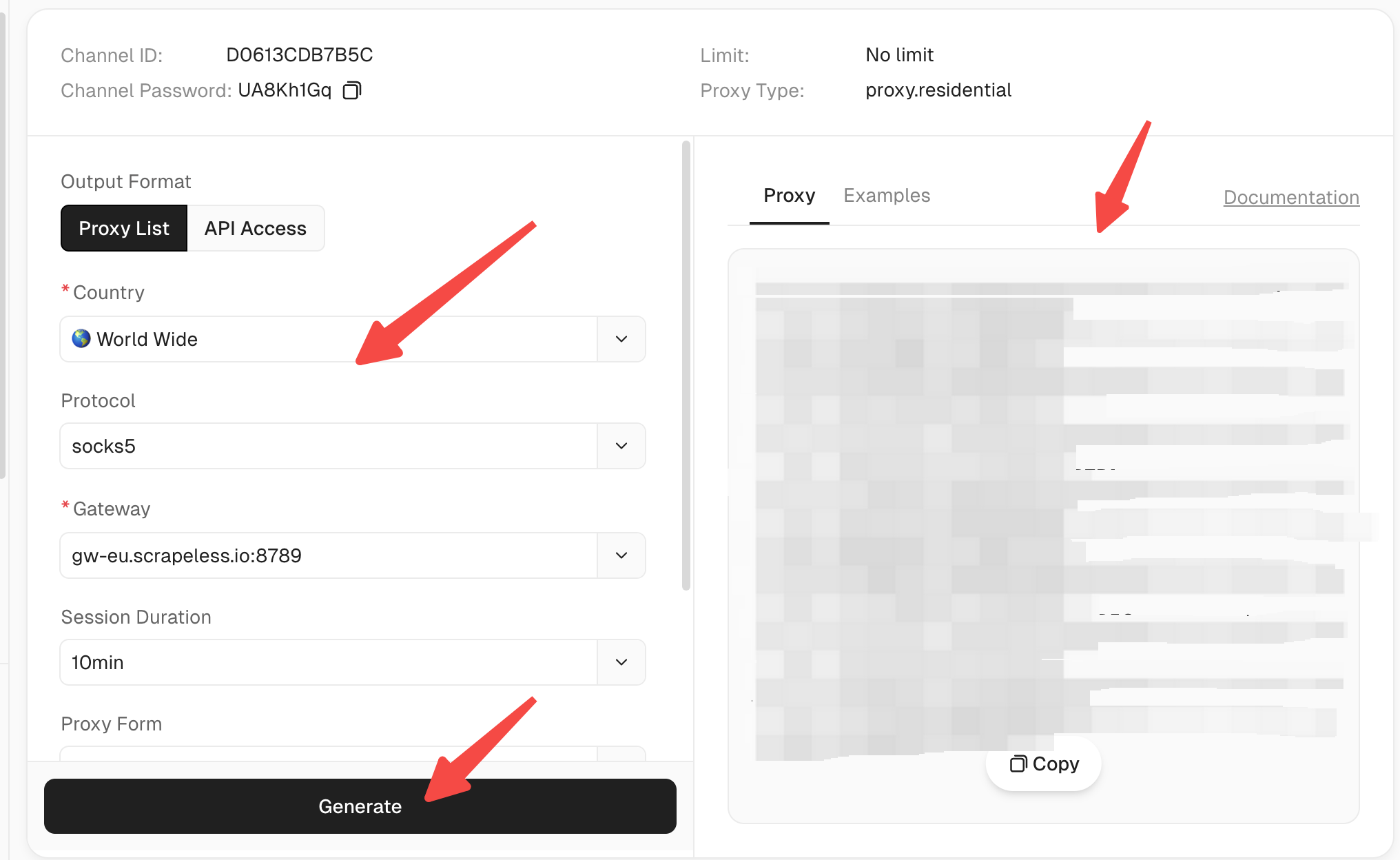
Step 3: Click "Start" to enter the proxy configuration panel.

Step 4: Configure the corresponding proxy settings and click "Generate". You can copy the generated proxy on the right.
7. Troubleshooting Common Issues
| Issue | Possible Fix |
|---|---|
| Proxy not switching | Restart browser; verify selected profile |
| Slow connection | Try another proxy location |
| “Proxy Connection Failed” | Recheck IP/port and credentials |
| Auto-Switch not working | Review rule syntax in dashboard |
| PAC errors | Validate your JavaScript syntax |
8. Tips and Tricks for Power Users
- Keyboard Shortcuts: Assign profile hotkeys for instant toggling.
- Temporary Profiles: For quick testing (e.g., rotating IP pools).
- Bypass List: Add local or trusted domains like
intranet.local. - Profile Sync: Export/import JSON configs across browsers.
- Combine with Scrapeless Rotation API: Schedule IP swaps every few minutes.
9. How Proxy SwitchyOmega Enhances Privacy and Security
Using SwitchyOmega properly strengthens both anonymity and control:
- 🔒 Encrypted Connections: Route traffic through SOCKS5 or HTTPS proxies.
- 🕵️ IP Masking: Hide your identity across regions.
- 🌐 Geo-Spoofing: Access restricted content easily.
- 🧠 Layered Privacy: Combine with rotating proxies for near-VPN-level protection.
10. Final Thoughts
Proxy SwitchyOmega remains one of the most flexible and intuitive proxy management extensions for everyday users and professionals alike. But when paired with a next-gen provider like Scrapeless Proxies, it becomes a complete automation-ready privacy toolkit.
Whether you’re testing websites globally, managing multiple social media accounts, or conducting ethical data extraction, the combination of SwitchyOmega + Scrapeless ensures stable, anonymous, and efficient workflows — without the manual hassle.
🔗 Explore More: Get started with Scrapeless Proxies →
At Scrapeless, we only access publicly available data while strictly complying with applicable laws, regulations, and website privacy policies. The content in this blog is for demonstration purposes only and does not involve any illegal or infringing activities. We make no guarantees and disclaim all liability for the use of information from this blog or third-party links. Before engaging in any scraping activities, consult your legal advisor and review the target website's terms of service or obtain the necessary permissions.





