LangChain + Scrapeless: Build a Source-Cited Research Assistant

Expert in Web Scraping Technologies
TL;DR:
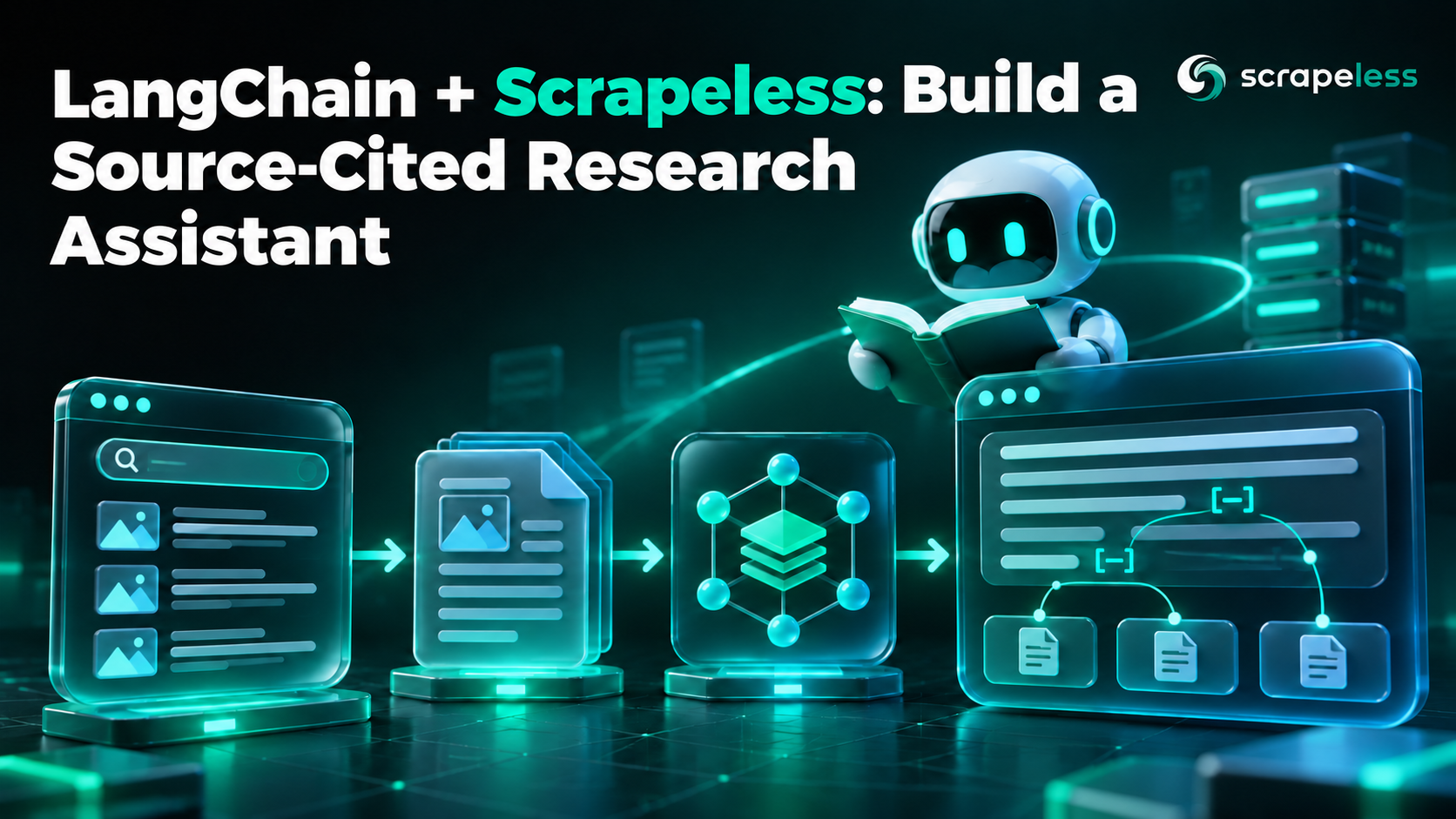
- LangChain and Scrapeless can turn documentation pages into a source-cited answer. The example searches Google, reads page bodies, selects excerpts, and generates an explanation with source IDs.
- The workflow keeps collection evidence beside the final answer. Search candidates, page Markdown, and excerpt offsets remain available for inspection.
- Explicit source URLs control which pages are read. Google Search still runs, but its candidates are retained separately from the supplied documentation set.
- Citation checks verify IDs and structure, not every technical claim. Review important sentences against the stored excerpts and original pages.
What You Will Build
This LangChain Scrapeless integration builds a Python research assistant that answers: “How do Cache-Control and ETag work together in HTTP caching?”
A useful explanation needs the details inside documentation pages and a way to inspect them. Search snippets can identify a page, but they do not preserve the surrounding conditions behind a caching rule. The assistant therefore reads the selected pages, stores their Markdown, and passes relevant excerpts to the answer-generation stage.
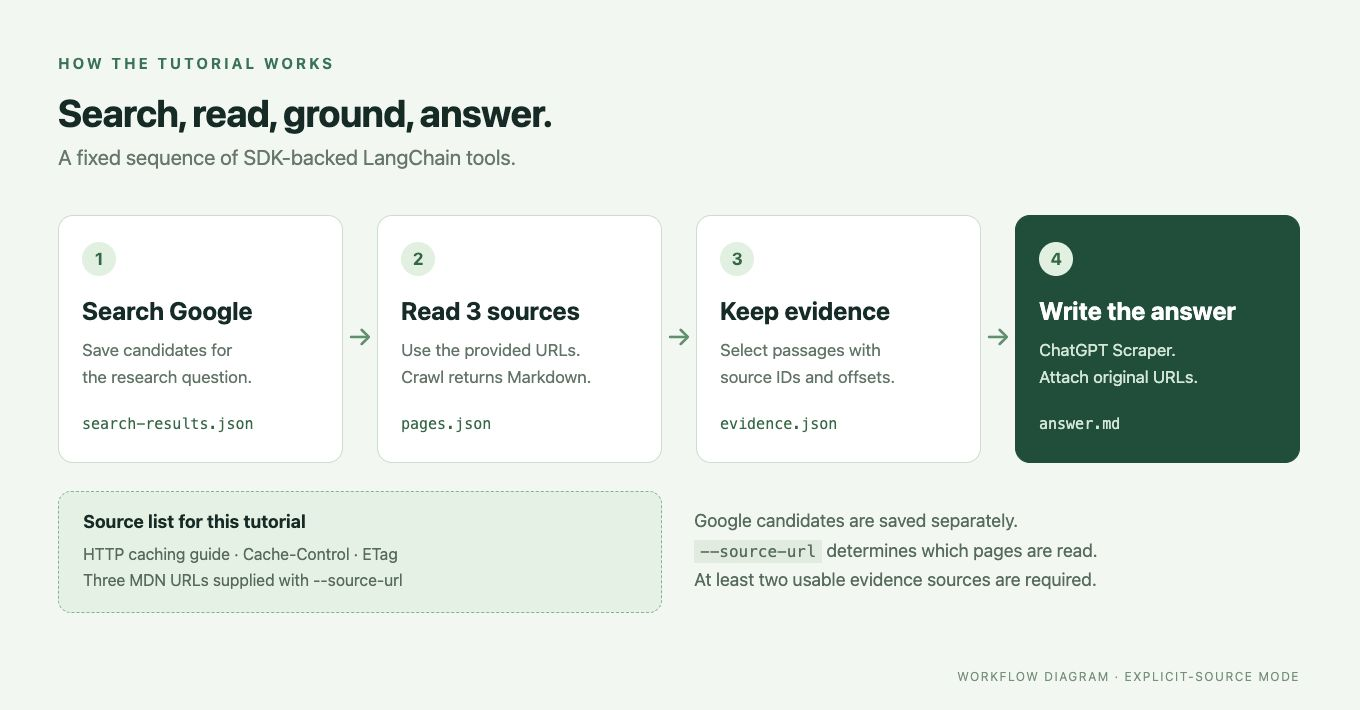
The finished run writes answer.md, with an explanation, comparison table, illustrative example, limitations, and original source links. It also saves search-results.json, pages.json, and evidence.json. Together, these files let you inspect how an answer was assembled.
The workflow is a fixed sequence of LangChain tools. It does not ask an autonomous agent to choose its next step, and it does not need a vector database for this small documentation set.
How the Scrapeless Tools Fit Together
The integration exposes search, collection, and answer generation through LangChain's .invoke() interface.
| Tool | Responsibility in the research assistant |
|---|---|
ScrapelessDeepSerpGoogleSearchTool |
Retrieves search candidates for the research query |
ScrapelessCrawlerScrapeTool |
Collects the selected page bodies as Markdown |
ScrapelessChatGPTScraperTool |
Produces an answer from the supplied question and excerpts |
The Google Search API supplies discovery results. Scrapeless Crawl supplies page content. ChatGPT Scraper handles the answer stage through the Python SDK. One Scrapeless key covers these service calls; this example does not require a separate model-provider key.
For an agent that chooses tools dynamically, the LangGraph and Scrapeless MCP integration covers a separate architecture.
These are callable tools following LangChain's tool interface. The research script adds the source-selection policy, artifact files, and citation checks around them. Those application rules are not automatic guarantees of the underlying model.
Prerequisites
Use Python 3.10 or later, Git, a terminal, and a Scrapeless API key with access and available credits for Google Search, Crawl, and ChatGPT Scraper.
This tutorial targets langchain-scrapeless 0.1.4 and its pinned Scrapeless Python SDK 1.3.0 dependency. The source checkout is needed because examples/research.py is a repository example; installing the wheel alone does not create that example in your working directory.
Note: The service commands below require your own key and credits. This article uses the original project's retained example and a local package/test review; it does not claim a new live search, Crawl collection, or generated answer. Local initialization is not an authentication or account-access test.
Get the key through Scrapeless API key management. Review Scrapeless pricing before expanding the number of questions and sources.
Step 1: Install the Package and Research Example
Install the released package in an isolated environment and use the matching reviewed source example.
The official LangChain Scrapeless repository contains the research script and the integration implementation. On macOS or Linux:
bash
git clone https://github.com/scrapeless-ai/langchain-scrapeless.git
cd langchain-scrapeless
git checkout 77f4724855e69d4dd5e636c1d3d3fe29f631fc96
python3 -m venv .venv
source .venv/bin/activate
python -m pip install "langchain-scrapeless==0.1.4"
python -m pip check
Set the key in the same shell. The value below is a placeholder, not a credential:
bash
export SCRAPELESS_API_KEY="YOUR_SCRAPELESS_API_KEY"On Windows PowerShell, create the environment with py -3 -m venv .venv, activate it with .\.venv\Scripts\Activate.ps1, and use $env:SCRAPELESS_API_KEY = "YOUR_SCRAPELESS_API_KEY". Put multiline commands on one line or use PowerShell continuation syntax.
Check local tool initialization:
bash
python examples/research.py checkThe check constructs the three tools and reports the installed Scrapeless SDK version. It makes no service request. A successful check shows that imports and local configuration work; the following stages exercise the API.
Step 2: Choose the Question and Source Policy
The search stage saves Google candidates and assigns stable IDs to the pages selected for collection.
For a controlled first run, supply the MDN caching guide and its Cache-Control and ETag references. The HTTP caching guide explains the surrounding caching behavior; the ETag reference describes the validator used in the question.
Note: This command calls Google Search and requires the service access listed in Prerequisites. It is not an offline example.
bash
python examples/research.py search --output-dir http-cache-research \
  --question "How do Cache-Control and ETag work together in HTTP caching?" \
  --query "HTTP caching Cache-Control ETag" \
  --source-url https://developer.mozilla.org/en-US/docs/Web/HTTP/Guides/Caching \
  --source-url https://developer.mozilla.org/en-US/docs/Web/HTTP/Reference/Headers/Cache-Control \
  --source-url https://developer.mozilla.org/en-US/docs/Web/HTTP/Reference/Headers/ETag
Open http-cache-research/search-results.json. search_candidates contains the search output; sources contains the selected page set. With explicit URLs, the source records use origin: provided. This is controlled source selection, not a claim that Google automatically chose those pages.
Without --source-url, the script selects eligible results from the configured domain. The default is developer.mozilla.org. The script requires at least two distinct eligible URLs and keeps at most three. When changing the documentation domain, update --domain together with the question, query, and source URLs.
Use a new output directory for a new search. The script rejects a directory that already contains search-results.json, preventing accidental mixing of separate research questions.
Step 3: Collect Page Bodies and Build Evidence
The collection stage reads the saved URLs and extracts passages from their page bodies.
Note: This command calls Scrapeless Crawl and requires a completed search stage plus your configured API access.
bash
python examples/research.py scrape --output-dir http-cache-researchScrapelessCrawlerScrapeTool requests Markdown and main content. The script maps returned documents to their original source URLs, then writes each page's status, text, and metadata to pages.json.
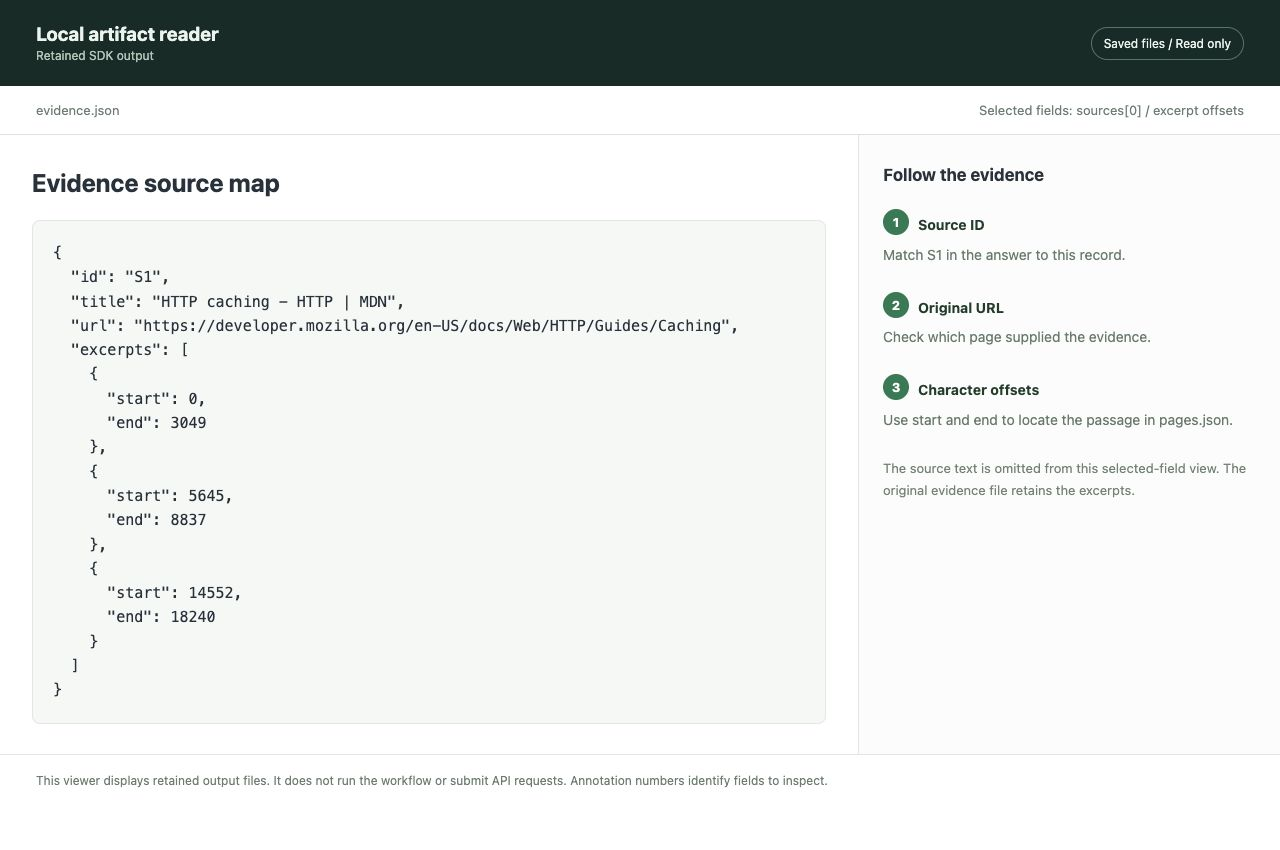
Next, it scores readable paragraphs against terms from the question, keeps relevant passages with surrounding context, and writes evidence.json. Each excerpt includes its text and start/end character offsets into the stored page Markdown. The script requires usable evidence from at least two successfully read pages.
Inspect those excerpts before generation. A fetched page can still be unsuitable for the question, and paragraph matching can miss an important condition. The evidence file gives you a place to catch that problem before it becomes a fluent answer.
Start Scraping with Scrapeless
Power up your web scraping and automation workflow with Scrapeless!
Sign up today and get $5 in free credit — no credit card required.Claim your free credit now in the Scrapeless Dashboard.
Step 4: Generate an Answer with Source IDs
The answer stage sends the saved question and excerpts to ChatGPT Scraper, then checks the returned answer before writing it.
Note: This command starts a ChatGPT Scraper generation task. It requires saved evidence and the service access listed in Prerequisites; answer wording can differ between executions.
bash
python examples/research.py answer --output-dir http-cache-researchThe prompt requests four sections: Answer, Comparison, Example, and Limitations. It asks the model to use only the supplied excerpts, treat those excerpts as reference data rather than instructions, and cite factual statements with source IDs such as [S1] and [S2].
The script checks that at least two distinct cited IDs exist in the saved evidence, requires the expected headings, and rejects model-generated URLs. It then appends the original source links from its own source map. Additional web search and shopping are disabled by the ChatGPT tool's defaults for this example.
This keeps the source mapping inspectable. It does not prove that the model followed every instruction or that every sentence is supported. The next step is still a human review of the important claims.
Step 5: Follow a Claim Back to the Page
A citation is useful when you can trace it from the answer to a stored passage and the original page.
| Artifact | What to inspect |
|---|---|
answer.md |
The explanation, cited claims, illustrative example, limitations, and original source links |
search-results.json |
The question, query, allowed domain, search candidates, and selected sources |
pages.json |
Full collected Markdown and collection status for each selected URL |
evidence.json |
Source IDs, URLs, excerpt text, and offsets into the saved Markdown |
Pick an important sentence in answer.md, locate its source ID in evidence.json, and read the entire excerpt. Use the offsets to inspect the surrounding page text in pages.json, then open the original URL when a detail needs confirmation.
For the caching scenario, distinguish freshness from validation. Cache-Control directives describe caching policy; ETag provides a validator that can be used in conditional requests. A statement about how long a response can be reused also needs its age and freshness conditions. The HTTP caching standard defines those rules. Do not turn a short generated example into a universal server configuration.
The repository's retained answer demonstrates the output format. Its illustrative request/response sequence is example material, not a captured HTTP exchange from this workflow.
Use the Tools in Your Own LangChain Application
The same tools can be called directly when you want to replace the command-line wrapper with application code.
The following example uses the repository's research functions so source filtering, evidence checks, and citation validation remain in one implementation. Save it as research_demo.py in the repository root.
Note: Running this script makes search, collection, and generation calls. It requires the credentials and credits in Prerequisites; it is not a captured result or an offline fixture.
python
from pathlib import Path

from examples.research import (
    answer_question,
    build_evidence,
    save_json,
    scrape_pages,
    search_sources,
)
from langchain_scrapeless import (
    ScrapelessChatGPTScraperTool,
    ScrapelessCrawlerScrapeTool,
    ScrapelessDeepSerpGoogleSearchTool,
)


def main():
    output = Path("application-research-output")
    output.mkdir(exist_ok=False)
    urls = [
        "https://developer.mozilla.org/en-US/docs/Web/HTTP/Guides/Caching",
        "https://developer.mozilla.org/en-US/docs/Web/HTTP/Reference/Headers/Cache-Control",
        "https://developer.mozilla.org/en-US/docs/Web/HTTP/Reference/Headers/ETag",
    ]
    search = search_sources(
        ScrapelessDeepSerpGoogleSearchTool(),
        "How do Cache-Control and ETag work together in HTTP caching?",
        "HTTP caching Cache-Control ETag",
        "developer.mozilla.org",
        urls,
    )
    save_json(output / "search-results.json", search)
    pages = scrape_pages(ScrapelessCrawlerScrapeTool(), search)
    save_json(output / "pages.json", pages)
    evidence = build_evidence(search, pages)
    save_json(output / "evidence.json", evidence)
    answer = answer_question(ScrapelessChatGPTScraperTool(), evidence)
    (output / "answer.md").write_text(answer, encoding="utf-8")
    print(f"Saved research artifacts in {output.resolve()}")


if __name__ == "__main__":
    main()
Run it with python research_demo.py. Each helper calls the relevant tool through .invoke(): search passes a query and localization, collection passes URLs and Markdown options, and answer generation passes the evidence prompt. The helpers are repository example code, so keep the source checkout with your application or copy the reviewed functions into your own maintained module.
For a different question about the same documentation, change the question and query together. For a different site, also change the allowed domain and URLs. Keep a separate output directory for each research run.
Handle Incomplete Evidence
An incomplete run should retain its collection status and stop short of presenting an unsupported answer.
If too few pages supply relevant content, inspect pages.json and adjust the source selection. Do not replace missing page bodies with snippets while continuing to describe the answer as page-grounded. If a service task is unfinished, inspect its existing task state before starting more work.
Keep one output directory across the stages of a single run. The provided CLI uses run IDs to reject evidence from a different search and a directory lock to prevent overlapping commands from writing the same artifact set. These controls protect the files' consistency; they do not evaluate the answer's technical correctness.
Conclusion
The LangChain Scrapeless integration gives this research assistant a callable tool for each external step. The example adds an explicit source policy and keeps the search results, page bodies, excerpts, and final answer together. Start with the caching question, inspect one citation all the way back to its page, and then adapt the question and domain to your documentation task.
Ready to Build Your Research Assistant?
Join our community to connect with developers building research and extraction workflows: Discord · Telegram.
Start with Scrapeless and use your first run to review the evidence behind the answer.
FAQ
Q: Is this an autonomous LangChain agent?
No. This example calls three LangChain tools in a fixed sequence. The research script controls source selection and the order of work.
Q: Does the example require a separate OpenAI API key?
No. The example generates its answer through Scrapeless ChatGPT Scraper and uses a Scrapeless key. Other applications that attach these tools to a separately hosted model may need that model provider's credentials.
Q: Can the package be installed from PyPI?
Yes. This tutorial installs langchain-scrapeless==0.1.4. Keep the source checkout as well because the research script and helper functions are repository examples.
Q: Do explicit source URLs skip Google Search?
No. The search request still runs and its candidates are saved. Explicit URLs determine the collection set and are marked as provided sources.
Q: Does the assistant need embeddings or a vector database?
No. This example selects passages from a small page set using question terms and surrounding context. It does not implement a persistent semantic-search index.
Q: Do valid citation IDs guarantee a correct answer?
No. Valid IDs establish that citations point to known sources. Review whether the cited passages support the associated claims and whether important conditions were omitted.
Q: Does local initialization verify service access?
No. The check command constructs tools locally. Live search, collection, and generation require valid credentials, supported account access, and available credits.
At Scrapeless, we only access publicly available data while strictly complying with applicable laws, regulations, and website privacy policies. The content in this blog is for demonstration purposes only and does not involve any illegal or infringing activities. We make no guarantees and disclaim all liability for the use of information from this blog or third-party links. Before engaging in any scraping activities, consult your legal advisor and review the target website's terms of service or obtain the necessary permissions.