
Hermes Agent + Scrapeless MCP: Build a Web-Aware AI Assistant

Scraping and Proxy Management Expert
TL;DR:
- Hermes Agent can load Scrapeless as a local stdio MCP server and discover its web tools at startup.
- A verified setup exposed eight selected tools to Hermes while the connection test discovered twenty-four tools on the server.
- Tool allowlists keep the agent’s visible surface focused on search, extraction, and a bounded browser workflow.
- A successful MCP handshake proves connectivity and schema discovery; a valid Scrapeless key is still required for live web calls.
Hermes Agent already knows how to reason over tools. The useful integration question is narrower: how can it gain current web evidence without burying browser automation, search, and extraction logic inside the agent itself?
MCP provides the boundary. Hermes acts as the client. Scrapeless runs as the tool server. The model sees a filtered set of typed operations, and the credentials stay in the server environment rather than inside the prompt.
What you can do with Hermes Agent and Scrapeless MCP
The connection supports a practical set of web-aware agent jobs:
- search Google and pass structured results back to the agent;
- extract page content as Markdown for research or summarization;
- create a cloud browser session for JavaScript-heavy pages;
- navigate, inspect interactive elements, click, type, and read visible text;
- keep the web operation trace separate from the model’s interpretation.
Hermes registers MCP tools alongside its native tools. Its MCP guide documents local stdio and remote HTTP servers, automatic discovery, and per-server filtering. That means no custom Hermes plugin is required for a server that already speaks MCP.
Why use the Scrapeless MCP Server?
A normal HTTP fetch works for static pages. An agent that researches the live web soon meets pages that depend on JavaScript, interactive controls, location, or a maintained session. The Scrapeless server groups search, extraction, crawling, and browser actions behind one MCP connection.
The official Scrapeless MCP Server repository documents both stdio and Streamable HTTP transports. This guide uses stdio because it gives Hermes a local child process with a clear lifecycle and a small configuration footprint.
For a direct browser connection over CDP instead of MCP, use the separate Hermes Agent and Scraping Browser guide. The two approaches solve different integration problems: CDP exposes a browser connection; MCP exposes typed tools that Hermes can discover and filter.
Prerequisites
Prepare these before editing the Hermes configuration:
- Git, Node.js, and
npxon the machine running Hermes; - Python in the version range supported by the current Hermes release;
- a Scrapeless account and API key;
- a terminal where
hermesresolves to the intended installation.
Keep the API key out of Markdown, shell history, and agent prompts. The Scrapeless documentation explains where to create and manage credentials.
Connect Hermes Agent to Scrapeless MCP
Install Hermes with MCP support
The standard Hermes installer already includes MCP support. For an isolated source installation, the following sequence is useful because it pins the checkout and virtual environment to one directory.
bash
git clone https://github.com/NousResearch/hermes-agent
cd hermes-agent
python3.12 -m venv .venv
./.venv/bin/pip install -e '.[mcp]'
./.venv/bin/hermes --version
This sequence was run against Hermes Agent v0.20.5 with Python 3.12.13. The official installation guide remains the preferred path for a normal end-user install because it manages the launcher and supporting dependencies.
Configure the stdio server
Add a scrapeless entry under mcp_servers in the active Hermes config.yaml. Replace the prerequisite value with a real key in the environment before starting Hermes.
yaml
mcp_servers:
  scrapeless:
    command: npx
    args: ["-y", "scrapeless-mcp-server"]
    env:
      SCRAPELESS_KEY: "${SCRAPELESS_KEY}"
    enabled: true
    tools:
      include:
        - google_search
        - scrape_markdown
        - browser_create
        - browser_goto
        - browser_snapshot
        - browser_click
        - browser_get_text
        - browser_close
      resources: false
      prompts: false
The command, args, env, and tools keys follow the Hermes MCP configuration reference. The allowlist is deliberate. It gives a research assistant search, readable extraction, and a bounded browser loop without exposing every available operation.
Start Scraping with Scrapeless
Power up your web scraping and automation workflow with Scrapeless!
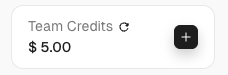
Sign up today and get $5 in free credit — no credit card required.Claim your free credit now in the Scrapeless Dashboard.
Verify the connection and tool discovery
Hermes includes a connection test that starts the configured server, performs the MCP handshake, and lists the discovered tools.
bash
hermes mcp list
hermes mcp test scrapeless
The verified run reported this summary:
text
scrapeless   node ...   8 selected   enabled
Connected
Tools discovered: 24
The two counts describe different surfaces. “Eight selected” is the allowlist stored in the Hermes configuration. “Twenty-four discovered” is the full tool catalogue returned during the connection test. At runtime, the allowlist is the surface intended for the model.
Tool names appear in Hermes with an MCP namespace that identifies the server and native tool. The exact formatting is handled by Hermes; the server-native names in tools.include remain google_search, scrape_markdown, and the browser operation names. The underlying protocol exchange follows the Model Context Protocol specification.
If the configuration changes while Hermes is running, use /reload-mcp inside the session. Connection testing and credential testing are separate. The handshake can succeed with valid schemas even when a later web call cannot authenticate, so make one read-only search after loading the real key.
How you actually use this: prompt your agent
The best prompts describe the evidence standard and the allowed tool path, not a brittle sequence of clicks.
Prompt you can paste
Search the web for the current installation requirements of the named project. Open the official documentation result, extract the relevant section as Markdown, and return a short checklist. Cite the source URL and distinguish documented facts from your inference. Do not use write-capable tools.
This prompt gives Hermes room to select tools while preserving a checkable outcome. Search discovers the official page. Markdown extraction supplies readable evidence. The answer carries the URL and labels any inference.
A browser-backed prompt
Open the public product page, inspect the interactive page structure, and report the visible plan names and their displayed units. Do not sign in, submit forms, or click purchase controls. Include the final page URL and quote only the minimum text needed to support the table.
This version establishes negative constraints around consequential actions. The allowlist also helps: no form submission tool is visible unless the chosen browser operations can express it, and the prompt forbids the action.
The Scrapeless MCP tool surface
The verified server build returned twenty-four tools grouped into four useful families:
| Family | Examples | Use in Hermes |
|---|---|---|
| Search | google_search, google_trends |
Discover current sources and trend data |
| Extraction | scrape_markdown, scrape_html, scrape_screenshot |
Turn a public URL into model-readable evidence |
| Crawl | crawl_start, crawl_result, crawl_cancel |
Traverse a defined public site scope |
| Browser | session, navigation, snapshot, input, reading, and close tools | Operate pages that require rendering or interaction |
Do not expose the full catalogue by habit. A report-writing agent may need search and Markdown extraction only. A browser task needs a session lifecycle and page actions. Keep separate Hermes profiles or separate server entries when those permission sets differ materially.
The Scrapeless AI Agent surface provides the product context, and pricing helps map expected web operations to an account plan.
What you get back
MCP tool results remain structured messages rather than hidden browser state. A search can return result records; extraction can return Markdown; browser snapshots can return element descriptions suitable for the next model decision. Hermes then places the selected result into its task context.
That separation improves diagnosis. “Server failed to start,” “tool discovery failed,” “credential rejected,” and “page returned no useful content” are different events. The harness can report the right one instead of turning every failure into a vague model apology.
Conclusion
Hermes Agent and Scrapeless MCP fit together at a clean boundary: Hermes owns reasoning and orchestration; the MCP server owns typed web operations. The verified path is install, configure one stdio server, apply a narrow allowlist, test discovery, and make a read-only credential-gated call.
Ready to Build a Web-Aware Hermes Agent?
Join our community to claim a free plan and connect with developers building agent research workflows: Discord · Telegram.
Sign up at app.scrapeless.com and connect Hermes to the smallest useful web tool surface.
FAQ
Q: Does Hermes Agent support MCP servers?
Yes. Hermes Agent supports local stdio and remote HTTP MCP servers, discovers their tools at startup, and can filter the visible tools per server.
Q: Which environment variable does the Scrapeless stdio server use?
The documented stdio configuration uses SCRAPELESS_KEY. Put it in the server environment and keep the value out of prompts and committed configuration files.
Q: Why does the connection test show more tools than the allowlist?
The connection test reports the server’s discovered catalogue, while the allowlist defines the subset intended for the model. In the verified setup, the server returned twenty-four tool schemas and the configuration selected eight.
Q: Does a successful MCP connection prove the API key works?
No. A successful handshake proves that Hermes started the server and discovered its schemas. Run a read-only web operation after loading the real key to verify service authentication.
Q: Should every Scrapeless MCP tool be enabled?
No. Enable only the operations required by the agent’s job. Smaller tool sets reduce selection ambiguity and limit the effect of a mistaken action.
Q: Can Hermes use Scrapeless without an AI agent framework?
Hermes is itself the agent runtime in this setup. It connects directly to the Scrapeless MCP server, so no additional agent framework is required.
Q: Can the setup use HTTP instead of stdio?
Yes. Both products document HTTP-capable MCP connections. Stdio is convenient for a local child process; remote HTTP is useful when the server lifecycle and credentials are managed centrally.
Q: Does MCP override website access rules?
No. MCP defines how the client and tool server communicate. The agent still needs permission to access the target, must use public or authorized data, and should follow applicable terms and laws.
At Scrapeless, we only access publicly available data while strictly complying with applicable laws, regulations, and website privacy policies. The content in this blog is for demonstration purposes only and does not involve any illegal or infringing activities. We make no guarantees and disclaim all liability for the use of information from this blog or third-party links. Before engaging in any scraping activities, consult your legal advisor and review the target website's terms of service or obtain the necessary permissions.





