
How To Use Proxy With Craigslist?

Expert Network Defense Engineer
Key Takeaways
- A Craigslist Proxy lets you route your traffic to Craigslist through a different IP or region, which can help you browse, post or manage listings without being blocked.
- Using a high-quality Craigslist Proxy (especially residential or ISP-based) reduces the risk of bans and improves reliability compared to cheap datacenter or free proxies.
- Setup on Windows and Android is straightforward once you have the proxy credentials and correct protocol (HTTP/HTTPS/SOCKS5).
- Testing and turning off your Craigslist Proxy are important so you know when you're connected through it and when your real IP is used.
- The best Craigslist Proxy providers offer large IP pools, geographic targeting, protocol support, high success rates and strong support — we recommend starting with Scrapeless (Residential Proxies, IPv6 Proxies, Datacenter Proxies, Static ISP Proxies) as the first choice.
Before Starting
Using a Craigslist Proxy has many legitimate use cases — e.g., posting in multiple cities, managing multiple seller/buyer accounts, bypassing region locking or network blocks. But you should always comply with Craigslist’s terms of service and with local laws.
Why is this important? Craigslist actively blocks suspicious IPs and accounts tied to them. For example, one study notes that IP reuse and high-volume automation lead to rapid bans. ([anonymous-proxies.net][1])
In addition, some legal cases hold that circumventing IP-blocks can invoke liability under the U.S. Computer Fraud and Abuse Act (CFAA). ([WIRED][2])
So before you adopt a Craigslist Proxy, you should:
- Choose a provider with genuine residential or ISP-based IPs (not easily detected as data-centre).
- Configure appropriate rotation or session timing to avoid appearing as a bot.
- Maintain reasonable posting and browsing behavior (avoiding mass duplicates or extremely fast posting loops).
- Keep track of which IPs/accounts you use to avoid cross-linking or bans.
Easiest Method: Craigslist- Proxy from Scrapeless
For a robust, reliable Craigslist Proxy, start with Scrapeless Proxy.
Here’s why Scrapeless stands out:
-
Residential Proxies: Over 90 million real residential IPs in 195+ countries, priced competitively at approx. $1.80/GB.
-
Automatic proxy rotation, an average 99.98% success rate, geo-location targeting, supports Http/HTTPS and Socks5 protocols, response time under 0.5 s, excellent download speed and durability.
-
Additional types of proxies to cover broader needs for Craigslist usage:
- IPv6 Proxies: verified individual IPv6 proxies, HTTP(S)/Socks5 support, large 50 M+ premium IP pool, CCPA & GDPR compliant, pay-per-GB model.
- Datacenter Proxies: high performance, 99.99% uptime, unlimited session duration, high bandwidth, HTTP(S)/Socks5.
- Static ISP Proxies: dedicated residential IPs, 99.99% uptime, low latency, geo-location targeting (ideal for managing specific Craigslist market regions).
-
Because Craigslist may flag repeated activity from the same IP or data-centre IPs, using real residential or ISP addresses via Scrapeless makes your activity appear much closer to genuine user behavior.
Step-by-Step Integration with Scrapeless
The following section is for your configuration. It details the exact steps to integrate a Scrapeless Telegram Proxy into your workflow.
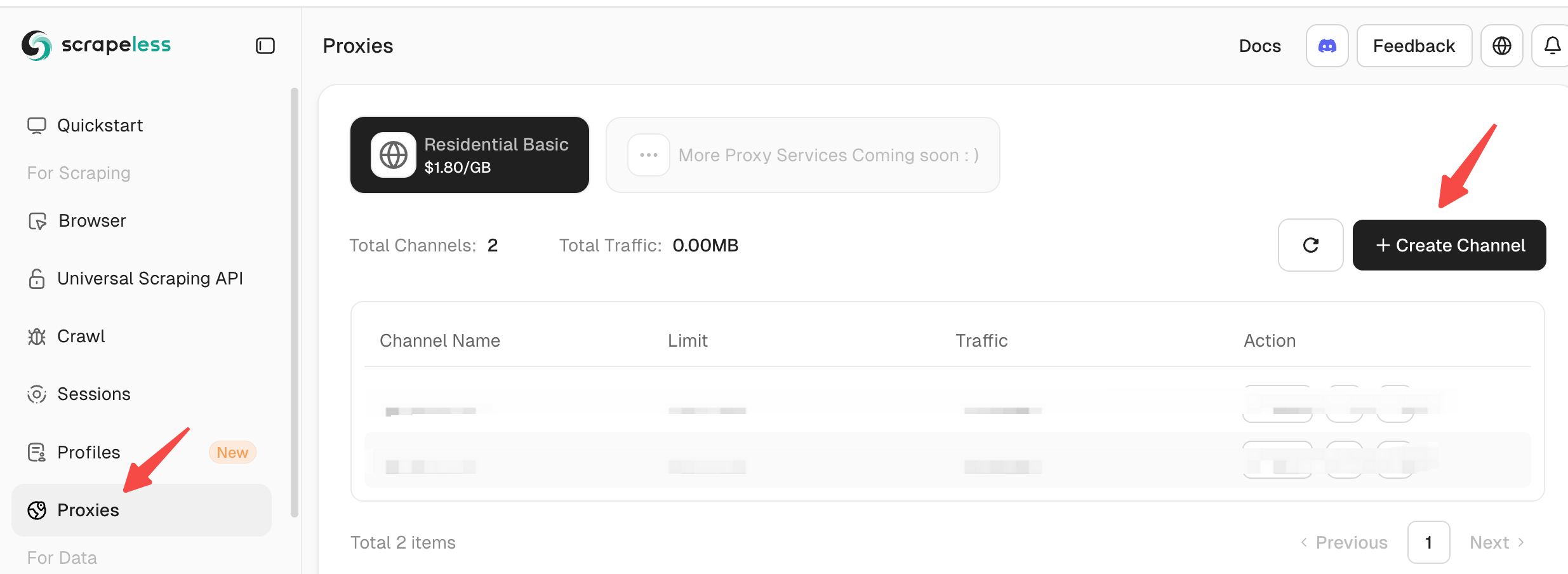
Step 1: Log in to Scrapeless, select "Proxy" in the left panel, and then click "Create Channel" in the right panel.
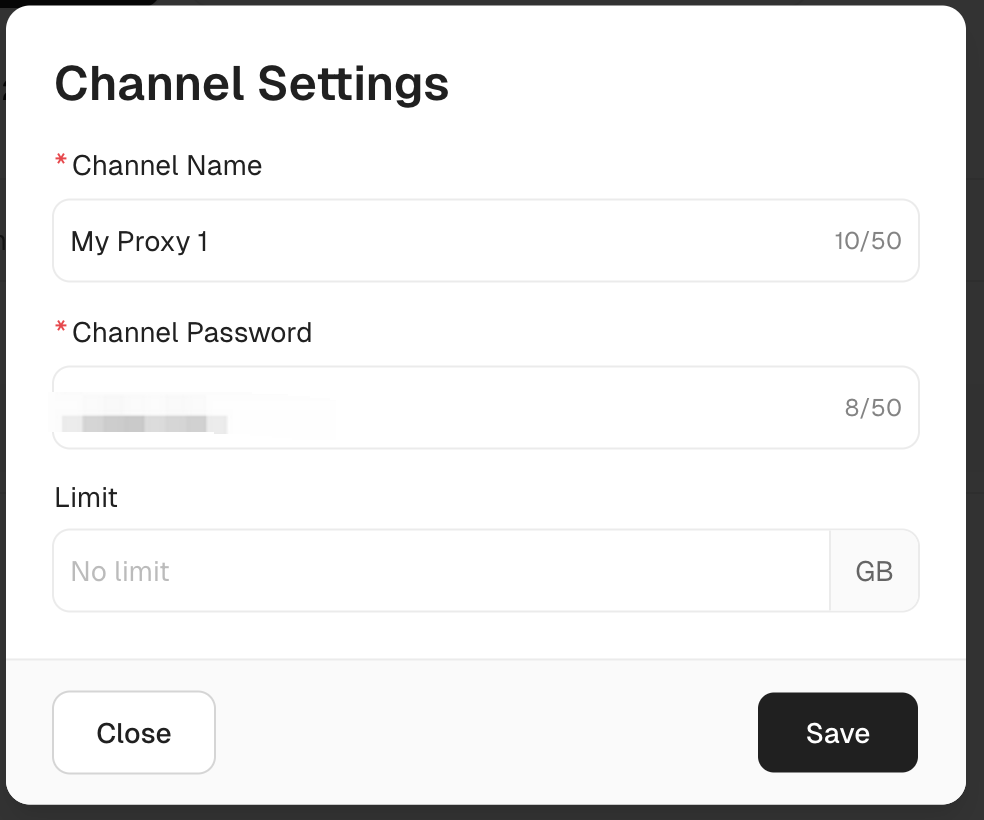
Step 2: Complete the corresponding "Channel Settings". You only need to fill in according to your needs.
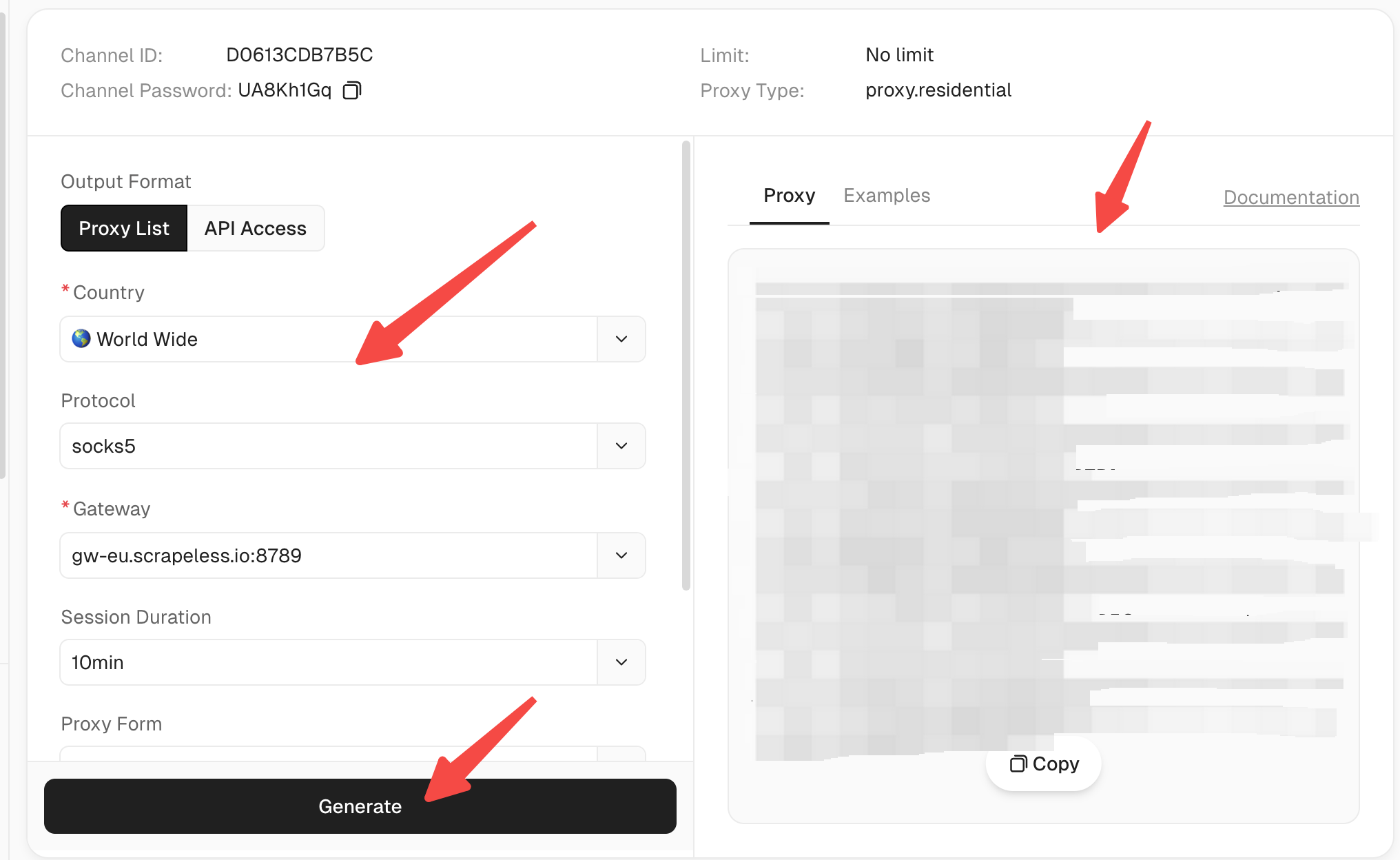
Step 3: Click "Start" to enter the proxy configuration panel.

Step 4: Configure the corresponding proxy settings and click "Generate". You can copy the generated proxy on the right.
Using Scrapeless as your Craigslist Proxy provider gives you a strong foundation: large IP pool → residential reputation → geographic flexibility → protocol support → strong success.
Craigslist proxy for Windows instructions
If you want to browse Craigslist with a proxy on your Windows computer, you’ll need to set it up in your system settings. Windows gives you two ways to do this.
- Automatic Setup - Windows detects and configures the proxy for you.
- Manual Setup - You enter the proxy details yourself (this is the preferred option).
Step 1: Open Windows proxy settings
Click on the Start Menu and type Proxy Settings in the search bar.
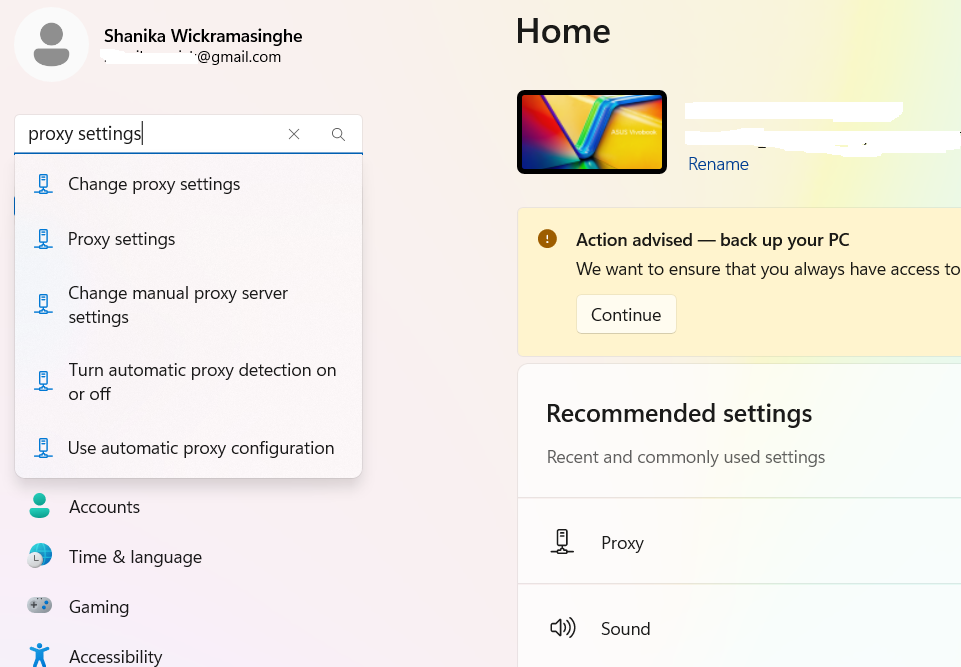
Click on the Proxy Settings option from the search results.
You’ll see two options for setting up a proxy. Out of them you can pick the one you prefer.
- Automatic Proxy Setup - Windows will handle it for you.
- Manual Proxy Setup - You manually enter the proxy details - this is the preferred option.
Step 2: Use Manual Proxy Setup
Turn on "Use a proxy server.
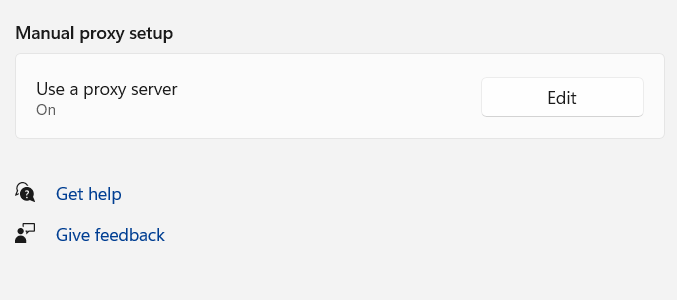
Step 3: Enter proxy details
Type in the proxy server address and port number given by your proxy provider.
If there are websites you want to access without the proxy, add them to the exception list in the designated field.
To allow local network access without using the proxy, check the box for "Don’t use the proxy server for local addresses."
Step 4: Click "Save" to apply the settings.
Click "Save" to confirm your settings.
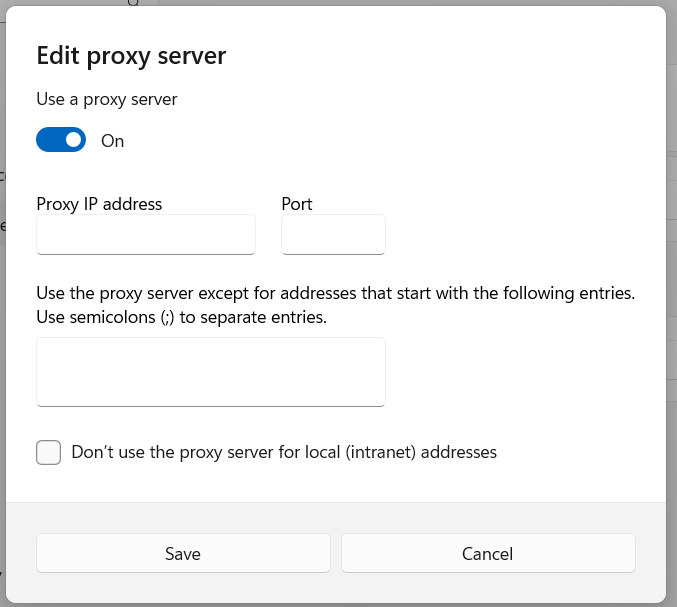
Now, all your internet traffic, such as Craigslist browsing, will go through the proxy.
Tips for using Windows-proxy with Craigslist:
- Use different proxies (ideally distinct residential IPs) for each Craigslist account if you manage multiple. This reduces cross-account linking risk.
- Avoid making many posts from the same proxy in very short time – rotate IPs or add delay in your workflow.
- Clear cookies/cache when switching proxies/accounts if multiple regions are involved.
- Monitor response time and success rate: if the proxy is slow or fails, both browsing and posting may lag or get blocked.
Craigslist proxy for Android instructions
Setting up a proxy on your Android device depends on whether you're using Wi-Fi or mobile data.
Step 1: Wi-Fi Network proxy
If you’re connected to a Wi-Fi network please check the below steps.
Open the Settings app on your Android device. Then, tap Connections to see available Wi-Fi networks.
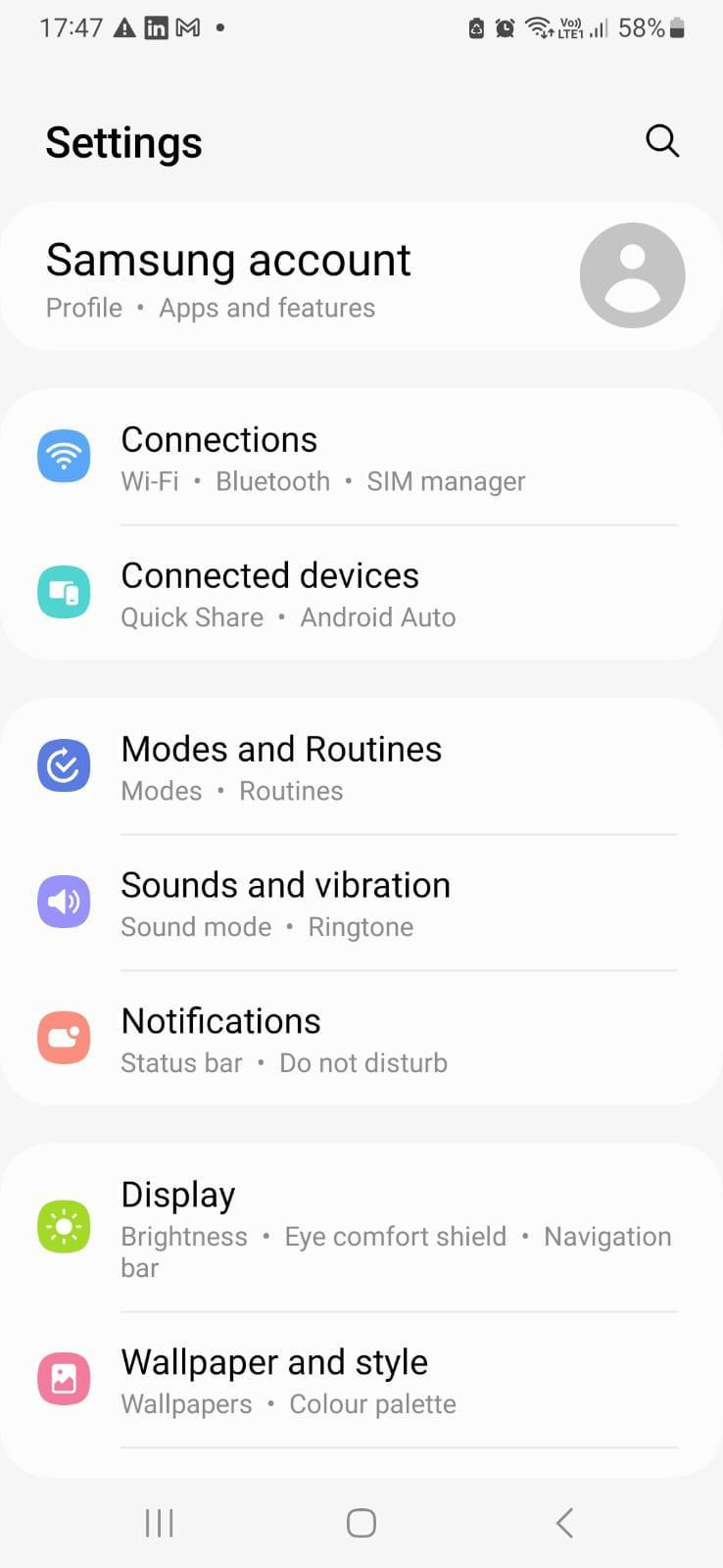
Step 2: Open Wi-Fi Settings
Tap and press the Wi-Fi network you want to configure.
Select the Settings icon.
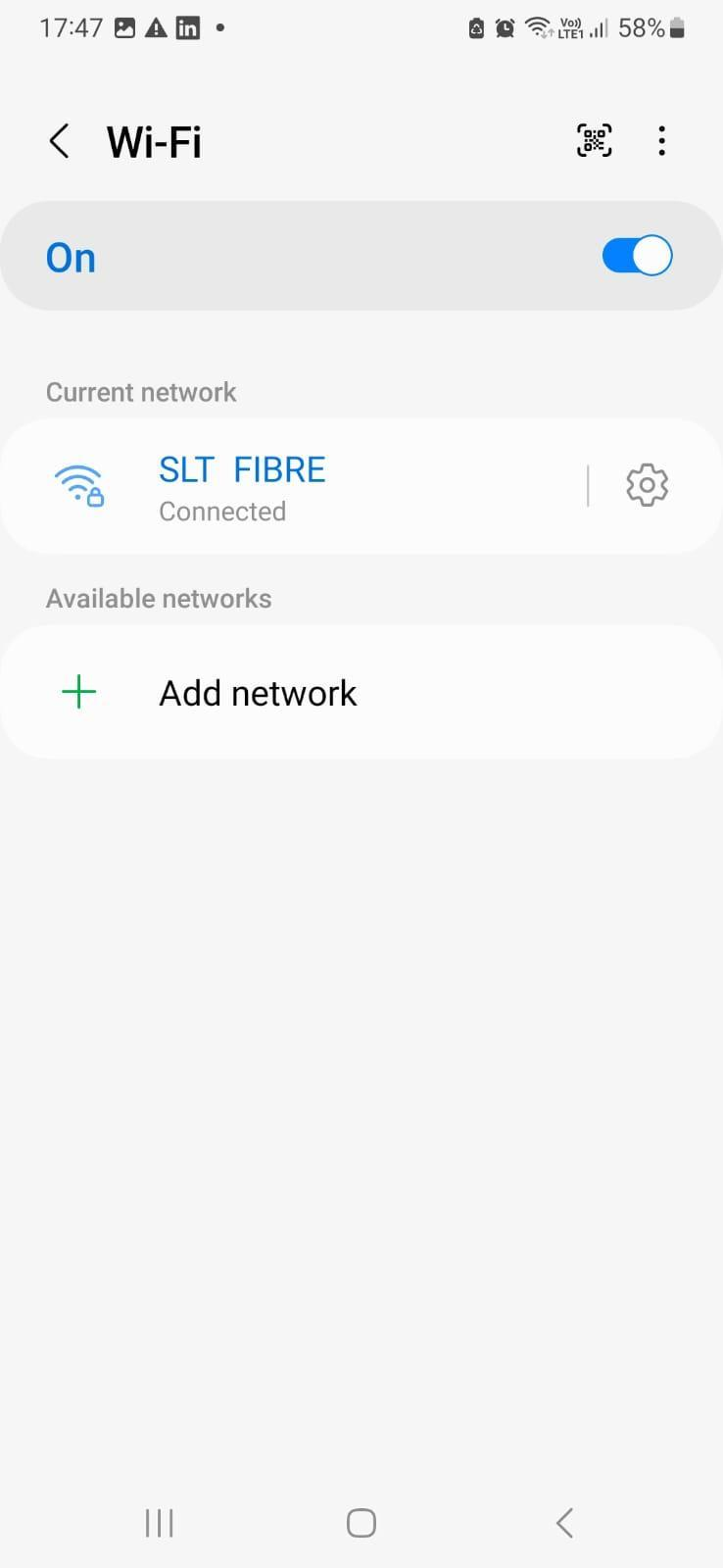
Tap View more to expand the down arrow.
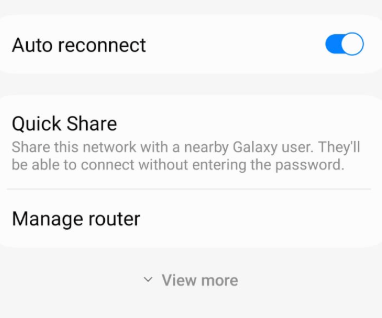
Step 3: Configure proxy details
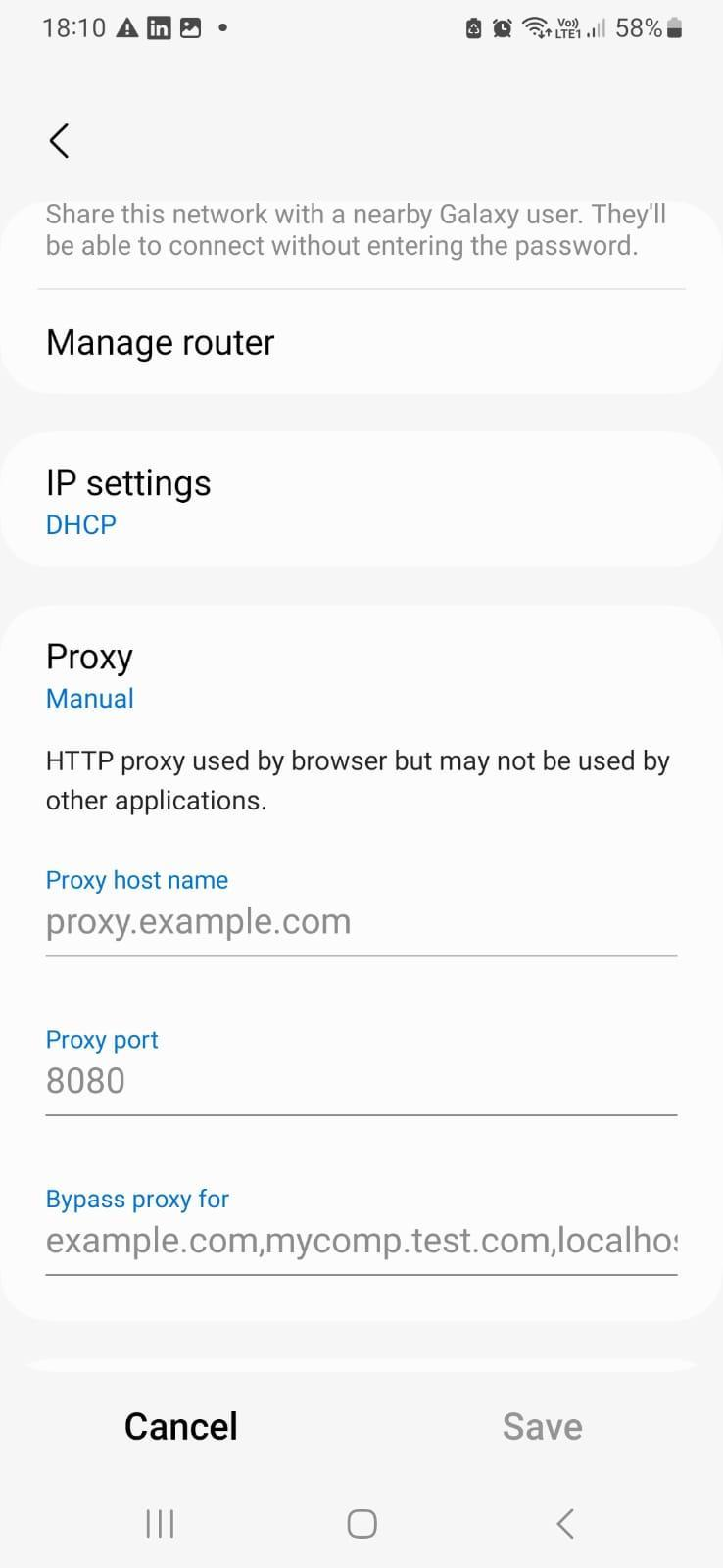
Select Proxy, where you'll see three options.
- None - No proxy is used.
- Manual - Enter proxy details manually.
- Proxy Auto-Config - The system detects settings automatically.
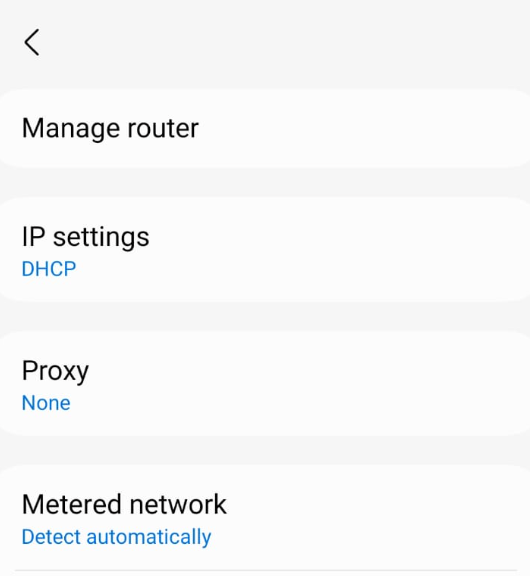
Choose Manual if you have a specific proxy server. This is the most common and easiest setup.
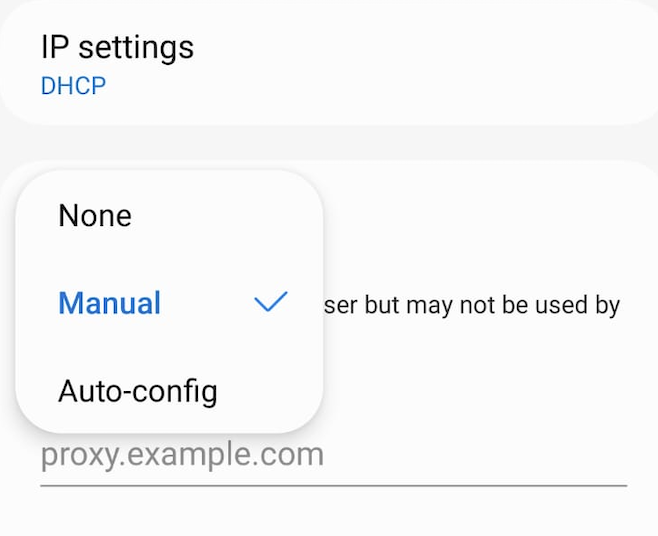
Enter the proxy server address and port number given by your proxy provider.
If you want to bypass the proxy for certain websites, enter them in the Bypass proxy for the field.
Step 4: Save proxy settings
Double-check your details and tap Save to apply the settings.
Now, your Android device will route all traffic through the selected Craigslist proxy whenever you're connected to this Wi-Fi network.
How to Test Craigslist Proxy?
It’s essential to test that your Craigslist Proxy is functioning correctly before heavy use. Here are methods:
Method A: IP Check
- Visit a site like “whatismyipaddress.com” or similar via your browser/app while the proxy is active.
- Confirm that the shown IP address and location correspond to your proxy server’s region (not your local ISP).
- If it shows your real IP, the proxy isn’t active and your Craigslist traffic may be exposed.
Method B: Craigslist Behaviour Check
- Log into Craigslist with a test account while using the proxy. Try browsing a location you were previously unable to access (due to region or block).
- Try posting a low-impact ad. If it goes through and remains active without immediate removal or error, the proxy is likely functioning.
- If you receive rapid “You’re blocked” messages, a captcha, or your account is flagged quickly, the proxy may be detected or unsuitable.
Method C: Performance Metrics
- Measure page load times of Craigslist listings. A quality Craigslist Proxy should keep latency low and listing images should not lag excessively.
- Track posting success rate: how often posts are accepted vs rejected. If you notice high failure across multiple IPs, revisit your provider or rotate strategy.
Recording key metrics (IP visibility, latency, posting success) helps you evaluate whether your proxy setup is viable for sustained Craigslist use.
How to Turn Off Craigslist Proxy?
When you’ve finished the specific browsing or posting session, or if you want to revert to normal network connection, here’s how to disable your Craigslist Proxy:
On Windows:
- Return to Internet Options → Connections → LAN settings.
- Uncheck “Use a proxy server for your LAN” or clear the advanced entries.
- Save settings and refresh your browser. Browse to “what is my IP” to confirm your real IP is back in use.
- Avoid leaving proxy settings enabled if you don’t need them — normal network performance may degrade.
On Android:
- Go to Settings → WiFi, long-press the network name → Modify network → Advanced options → Proxy.
- Change the proxy setting to “None” or “Auto”.
- Save and reconnect. Check via an IP-check tool to confirm your device is no longer using the proxy.
- If you switch between proxy and non-proxy frequently, consider using separate network profiles or apps that toggle proxies for you.
Turning off the proxy when you don’t need it ensures you don’t accidentally post or browse via an unintended IP, and prevents confusion when troubleshooting.
What is the Best Proxy to Use with Craigslist?
When selecting the best Craigslist Proxy, you should consider proxy type, IP reputation, geographic coverage, rotation strategy, and protocol support. Based on those criteria:
Recommended Proxy Type for Craigslist:
- Residential proxies (IP addresses assigned to real home ISPs) are typically best for Craigslist, because they mimic genuine user behavior and are less likely to be flagged than datacenter IPs. ([anonymous-proxies.net][1])
- Static ISP residential proxies (dedicated residential IPs, low latency) are especially suitable if you’re managing a stable Craigslist account in a specific region.
- Avoid free public proxies or basic datacenter proxies if you’re serious about reliability; research shows free proxies often suffer from instability and security risks. ([arXiv][3])
Why Scrapeless Proxy is a Top Choice:
As detailed earlier, Scrapeless offers a large pool (90M+ residential IPs), rotation, geo-targeting, protocols (Http/HTTPS/Socks5) and strong performance. That aligns closely with what you want for a Craigslist Proxy.
If you pair high-quality residential/ISP proxies with sensible usage (moderation of posting frequency, geo-varying IPs, account hygiene), you will have much better success on Craigslist than using generic or cheap proxy services.
Additional Considerations:
- Make sure your provider offers IPs in the regions you intend to post/browse Craigslist. For example if you target multiple U.S. cities, you’ll want coverage across those cities.
- Ensure you can rotate or assign dedicated IPs per account to avoid account linking through shared IPs.
- Choose protocols your device supports (HTTP/HTTPS often standard, SOCKS5 may offer flexibility especially if using scripts or automation).
- Monitor IP performance and ban history; good providers will share stats or let you test.
- Stay compliant: avoid posting duplicate ads, spamming many cities instantly, or using automation in ways that trigger Craigslist’s bot detection.
Conclusion
Using a Craigslist Proxy is a smart move when you need to access Craigslist from restricted networks, manage multiple accounts, test listings across geographies, or avoid IP blocks while posting. To summarise:
- A Craigslist Proxy routes your Craigslist traffic through a different IP, helping you appear as a different user or region.
- Residential or ISP-based proxies provide the best results for Craigslist, thanks to higher authenticity and lower block risk.
- Setup is straightforward on Windows and Android if you have the credentials; you also need to test and know how to disable the proxy when done.
- Avoid free proxies—the risk and instability are significant. Choose a trusted provider.
- Among providers, Scrapeless Proxy stands out as a first-choice for Craigslist Proxy use, thanks to its large IP pool, residential & ISP options, geo-targeting and strong performance.
If you’re ready, try using Scrapeless as your Craigslist Proxy provider and configure your plan here: Scrapeless Login
FAQ
Q1: Will using a Craigslist Proxy get me banned?
A1: Not necessarily — using a high-quality proxy reduces risk. But if you post very frequently, reuse the same IP for many accounts, or behave like a bot, Craigslist may still block you. Moderation is key.
Q2: Can I use a free Craigslist Proxy?
A2: Technically yes, but research shows free proxies are highly unreliable, slow and may expose you to risk. ([arXiv][3]) For serious Craigslist work, a paid residential/ISP proxy is much safer.
Q3: How many IPs do I need for Craigslist postings?
A3: It depends on volume and diversity of cities/accounts. For moderate use, a small pool of dedicated residential IPs may suffice. For high-scale multi-city posting, larger pools and rotation help. ([substack.thewebscraping.club][4])
Q4: What type of proxy is best for Craigslist browsing vs posting?
A4: For posting (especially multiple accounts or cities) you want residential or static ISP proxies (dedicated, low latency). For general browsing or occasional use, rotating residential proxies may suffice.
Q5: Can I switch between proxy and normal connection easily?
A5: Yes. On Windows or Android you just disable the proxy setting when you’re done. Make sure to verify your real IP is back and no proxy remains active accidentally.
At Scrapeless, we only access publicly available data while strictly complying with applicable laws, regulations, and website privacy policies. The content in this blog is for demonstration purposes only and does not involve any illegal or infringing activities. We make no guarantees and disclaim all liability for the use of information from this blog or third-party links. Before engaging in any scraping activities, consult your legal advisor and review the target website's terms of service or obtain the necessary permissions.





