FREE TOOL · CHROME EXTENSION

Anti-bot Detector

See what protects a website.

Identify anti-bot systems, CAPTCHA providers, and browser fingerprinting signals with a free Chrome extension. Inspect the evidence before you build your scraper or automation workflow.

Free Chrome extension · No account required

Identify anti-bot systems, CAPTCHA providers, and browser fingerprinting signals with a free Chrome extension. Inspect the evidence before you build your scraper or automation workflow.

8

CAPTCHA detectors

15

Anti-bot / WAF detectors

21

Fingerprinting detectors

Free

No account required

What is an anti-bot detector?

Scrapeless Anti-bot Detector is a free Chrome extension that identifies anti-bot / WAF systems, CAPTCHA providers, and browser fingerprinting activity from signals on the pages you visit. It shows matched technologies and supporting evidence so you can investigate website protection before choosing a scraping or automation approach. The extension detects protection; it does not bypass it or solve CAPTCHAs.

44 Built-in detectors

What can Anti-bot Detector identify?

Explore three categories of page protection. Each result reflects a match to a detector rule, rather than a guarantee about a website’s entire security setup.

0115 / 44

Anti-bot and WAF detection

Recognize systems such as Cloudflare Bot Management, Akamai, and DataDome from their observable signals. Use the result to narrow down which protection technology to investigate when requests are blocked or challenged.

  • Cloudflare Bot Management
  • Akamai
  • DataDome
  • PerimeterX
  • Kasada
  • Shape Security
  • AWS WAF
  • Imperva
  • F5 BIG-IP ASM
  • Reblaze
  • Sucuri
  • ThreatMetrix
  • Cheq
  • Ocule
  • Meetrics
028 / 44

CAPTCHA type identification

Find supported CAPTCHA providers even when a page exposes a script or widget before showing a visible challenge. Provider detection helps you understand what your users or browser workflow may encounter.

  • Google reCAPTCHA
  • hCaptcha
  • FunCaptcha (Arkose)
  • GeeTest
  • Friendly Captcha
  • Captcha.eu
  • QCloud Captcha
  • AliExpress CAPTCHA

Provider identification does not guarantee reCAPTCHA version classification or that a challenge is currently active.

0321 / 44

Browser fingerprinting detection

Observe when a page accesses supported browser APIs, including Canvas, WebGL, Audio, and WebRTC. This adds context to an automation investigation; API activity alone does not prove malicious tracking or explain why a request was blocked.

  • Canvas
  • WebGL
  • Audio
  • Font
  • WebRTC
  • Navigator
  • Screen
  • Hardware

Canvas, WebGL, Audio, Font, WebRTC, Navigator, Screen, Hardware, Timezone, Battery, Gamepad, USB, Clipboard, Geolocation, Media, Crypto, CSS, IndexedDB, Web Storage, Performance, and Device Orientation.

Coverage based on the bundled detector rules, reviewed September 23, 2026. No match does not guarantee that a site has no protection.

Inspect, compare, and customize your detection workflow.

Move from an initial signal to evidence you can review, keep, and use in your own investigation.

01 / DETECTION DETAILS

See why a technology was detected

Open a detection card to inspect the matched provider, category, confidence score, and contributing methods. Follow the evidence instead of relying on a vendor name alone.

  • Review the signals behind each match.
  • Separate CAPTCHA, anti-bot, and fingerprinting findings.
  • Treat confidence as a rule score, not a measured accuracy rate.
02 / RUNTIME SIGNALS

Observe fingerprinting API calls

JavaScript hooks watch supported APIs as the page uses them. This helps distinguish observed API activity from a library name that merely appears in page markup.

  • Hooks start early in the page lifecycle.
  • Observe supported Canvas, WebGL, and other API surfaces.
  • Reload a page after installation to capture its loading activity.
03 / LOCAL HISTORY

Revisit previous detections

Use local scan history to review what you encountered across pages. Copy detection data for debugging notes and compare findings during an investigation.

  • Adjust cache duration and history limits.
  • Exclude selected domains from detection.
  • Keep the context of earlier scans close at hand.
04 / DETECTOR RULES

Adapt detection to your workflow

Read, edit, disable, or add detector definitions in the extension. Configure matching conditions and confidence values when your investigation needs a different rule.

  • Work with JSON detector definitions.
  • Configure matching options and detection methods.
  • Import and export detector rules as JSON.
05 / HISTORY ANALYTICS

Understand what you encounter

The analytics board summarizes your own stored scan history, including detection trends, vendor rankings, category distribution, and vendors that appear together.

  • Review patterns across your local history.
  • Inspect confidence and signal distributions.
  • Export analytics as JSON or PDF.
06 / DEVELOPER INTEGRATION

Use detection from your code

Repository SDKs cover browser JavaScript, Node.js, Python, Go, Java, C#, Ruby, PHP, and Rust. They expose detection results for extension-backed workflows.

  • Check whether the extension is available before using a result.
  • Enable Page signals for browser integration.
  • Non-browser SDKs drive Chrome with the extension loaded.
Read the SDK reference ↗

Found protection on a page you need to access?

Choose the next tool based on whether you need page content or an interactive browser session.

FROM SIGNALS TO FINDINGS

How does anti-bot detection work?

The extension compares observable page and browser signals with its detector definitions. Different rules use different combinations of evidence.

01

Visit a page

Install the extension, open or reload the target page, and let its normal page-load detection run.

02

Match the evidence

Supported signals are evaluated against enabled detector rules for providers and fingerprinting activity.

03

Inspect the result

Open the extension to review matches, then decide what to investigate or test next.

Eight signal types supported by the detector catalogue

Signal
What it observes
Example evidence
Page content
Markup, inline scripts, and embedded references.
A provider name or initialization code.
Window properties
Provider objects exposed on the page’s global scope.
A CAPTCHA integration object.
JavaScript hooks
Supported browser APIs as they are called.
A Canvas or WebGL API invocation.
Request URLs
Resource and request URLs associated with known systems.
A CAPTCHA script or vendor endpoint.
Cookies
Cookie signals associated with a protection system.
A known session or challenge cookie.
DOM
Matching elements, selectors, and iframe references.
A CAPTCHA widget container.
Response headers
Headers referenced by supported detector rules.
An identifiable protection-related response header.
Request payloads
Headers referenced by supported detector rules.
An identifiable protection-related response header.

These are catalogue capabilities, not eight mandatory checks for every vendor. The extension does not inspect TLS/JA3/JA4 fingerprints or offer a standalone hosted classification API.

PRACTICAL USE CASES

Start with a clearer diagnosis

Use the free detector to gather context before spending time changing clients, proxies, or browser workflows.

Investigate blocked requests

A scraper returns a challenge instead of page content. Visit the page in Chrome and inspect the detected anti-bot provider and matched evidence. Use that context when testing access through Web Unlocker.

Explore Web Unlocker

Plan browser automation

A workflow must click, scroll, or preserve state across multiple steps. Check the page’s CAPTCHA and fingerprinting signals, then evaluate an Agent Browser session for the interactive workflow.

Explore Agent Browser

Review your own integrations

Check whether a CAPTCHA integration exposes recognizable signals on your site. Compare pages and keep findings for your team. Detection is a diagnostic aid, not a security certification.

Set up the free detector

A clearer view of page protection

Explore detection results, scan history, custom rules, and settings in one extension.

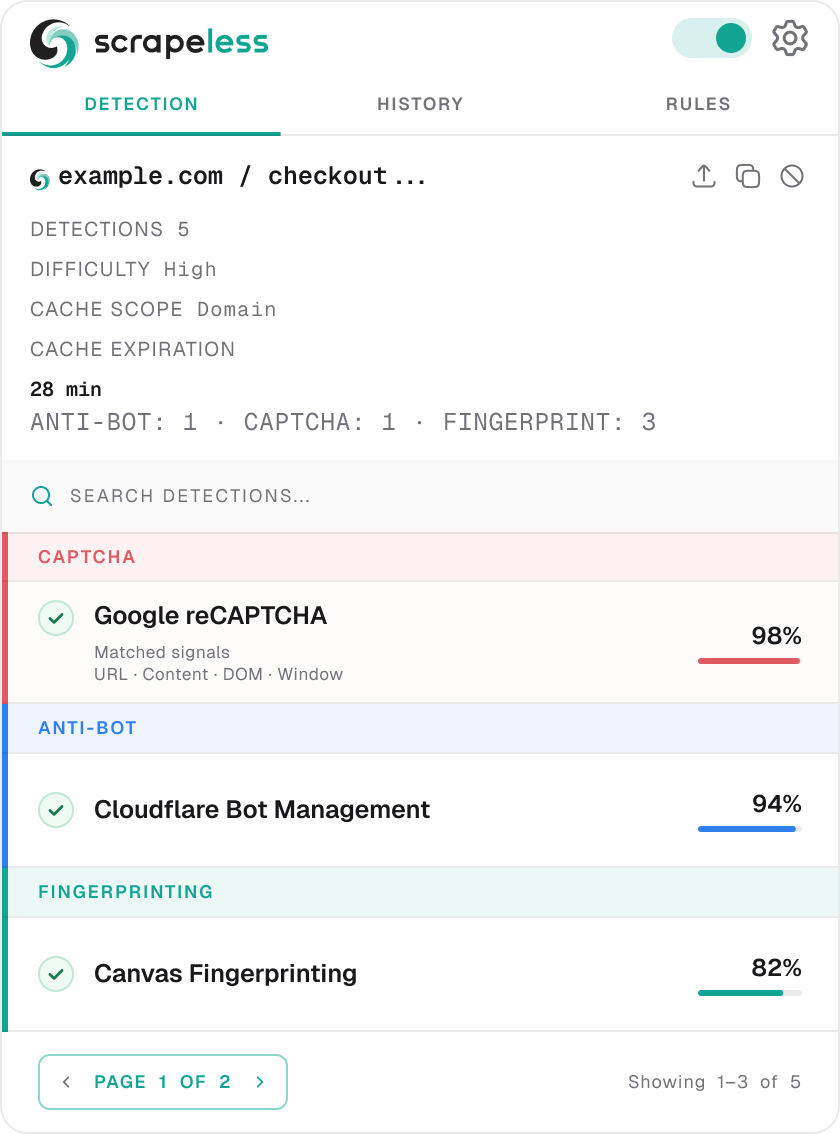
SCRAPELESS ANTI-BOT DETECTOR01 / 04

Spot anti-bot protection

Identify anti-bot, CAPTCHA, fingerprinting, and other signals with confidence scores and matched methods.

Select a feature to zoom into the extension

example.com
DETECTIONS5
DIFFICULTYHigh
CACHE SCOPEDomain
CACHE EXPIRATION28 min
ANTI-BOT:1·CAPTCHA:1·FINGERPRINTING:3
CAPTCHA
Google reCAPTCHA
SignalsURL·Content·DOM·Window
98%
ANTI-BOT
Cloudflare Bot Management
SignalsHeader (3)·Cookie
94%
FINGERPRINTING
Canvas Fingerprinting
SignalsWindow·JS Hooks
82%
PAGE 1 OF 2
Showing 1–3 of 5

Illustrative previews from the project repository. Example results are not a live scan of this page.

PRACTICAL USE CASES

You know what is there Choose how to work with the page

Choose by the job you need to complete, not just the vendor name detected. A detection match does not guarantee that another product will handle every target; test your own page and workflow.

I NEED PAGE CONTENT

Web Unlocker

Send a target URL and retrieve rendered content through an API, with managed access handling.

  • Built-in CAPTCHA handling, IP rotation, and retries.
  • JavaScript rendering for dynamic pages.
  • HTML, JSON, Markdown, or screenshot output.
Explore Web Unlocker
I NEED TO INTERACT WITH A PAGE

Agent Browser

Run browser automation in a cloud browser with the tools and session control your workflow needs.

  • Connect Puppeteer or Playwright through CDP.
  • Navigate, click, scroll, and maintain session state.
  • Use Live View and Session Replay for debugging.
Explore Agent Browser
The detector stays free. When your goal extends to collecting content or running browser workflows, explore a separate Scrapeless product.

Which Scrapeless tool fits your task?

Your taskStart withWhat you get
Identify page protection
Anti-bot Detector · Free
Matched technologies and detection evidence.
Retrieve public page content
Web Unlocker · Paid product
Content returned through a managed API request.
Run interactive automation
Agent Browser · Paid product
A cloud browser session controlled by your framework.

The free extension does not include paid API usage. Review current Scrapeless pricing for product plans and billing.

GET STARTED

Install once Explore as you browse

Prefer a manual setup? Load the extension directly from the official GitHub repository. Use desktop Chrome to install. Extension name: Scrapeless Anti-bot Detector

Open GitHub repository
  1. Download the source

    On GitHub, choose Code → Download ZIP, then unzip it.

  2. Load the extension in Chrome

    Open chrome://extensions/, enable Developer mode, and select Load unpacked.

  3. Select the extension folder

    Choose scrapeless-extension/ inside the extracted repository.

  4. Open a website and inspect the results

    Visit or reload the page, then click the extension icon to view detected providers and matched signals.

Frequently asked questions

What is Scrapeless Anti-bot Detector?

Scrapeless Anti-bot Detector is a free Chrome extension for identifying anti-bot / WAF systems, CAPTCHA providers, and browser fingerprinting activity. It reports matched technologies and evidence from the pages you visit. A rule match does not prove that a visible challenge is currently active.

Does it solve CAPTCHAs?

No. This extension identifies technologies and their signals. It does not solve CAPTCHA challenges.

Is it free, and do I need an account?

The detector is free to use and does not require an account. Source code is available on GitHub under the NPOSL-3.0 license; review the repository license before redistribution or reuse.

Does detection run locally?

Detection runs in your browser, with no telemetry according to the project documentation. User-triggered actions such as sharing a result, configured webhooks, resource fetching, or catalogue sync can make outbound requests. Automatic catalogue sync is off by default.

What if no CAPTCHA is detected?

The page may not expose a supported signal, or the challenge may load only after an interaction. Reload the relevant page after installing the extension and check again. No match does not guarantee that the site is unprotected.

Can I use it from code?

The repository includes SDKs for browser JavaScript and eight other languages. They rely on the installed extension; non-browser SDKs drive a real Chrome instance. Browser integration requires enabling Page signals. Check availability before interpreting results. Explore the SDKs ↗

How can I check if a website uses Cloudflare, Akamai, or DataDome?

Install Anti-bot Detector, visit or reload the website, and open the extension. Check the Anti-bot findings and matched signals for the provider. A missing match is not conclusive: a protection system may only expose signals on particular paths or during a challenge.

Can it identify reCAPTCHA and hCaptcha?

Yes. Google reCAPTCHA and hCaptcha are included among the eight bundled CAPTCHA detector rules. Detection identifies matching provider signals; it does not guarantee a specific reCAPTCHA version or solve the challenge.

What does a detection confidence score mean?

It reflects the score produced by matched detector rules. It is useful for reviewing evidence, but it is not a measured probability of correctness, a site security score, or a guarantee that a bypass will succeed.

Can I scan a website by entering a URL on this page?

No. This page introduces the Chrome extension. Install it and visit the target in your browser to inspect its signals. The repository SDKs also depend on the extension; they are not a standalone hosted detection API.

What is the difference between Anti-bot Detector and Web Unlocker?

Anti-bot Detector identifies protection signals in your browser for free. Web Unlocker is a separate paid API product for retrieving page content with managed access handling. Detection does not automatically send your target to Web Unlocker or start a paid request.

When should I choose Agent Browser instead?

Choose Agent Browser when the task needs browser interaction, such as navigation, clicking, scrolling, or maintaining a multi-step session. Consider Web Unlocker when the main goal is to retrieve content from a URL.

BUILD WITH SCRAPELESS

Make your next web workflow work

Start with free detection. Move to managed web access or browser automation when your project needs it.